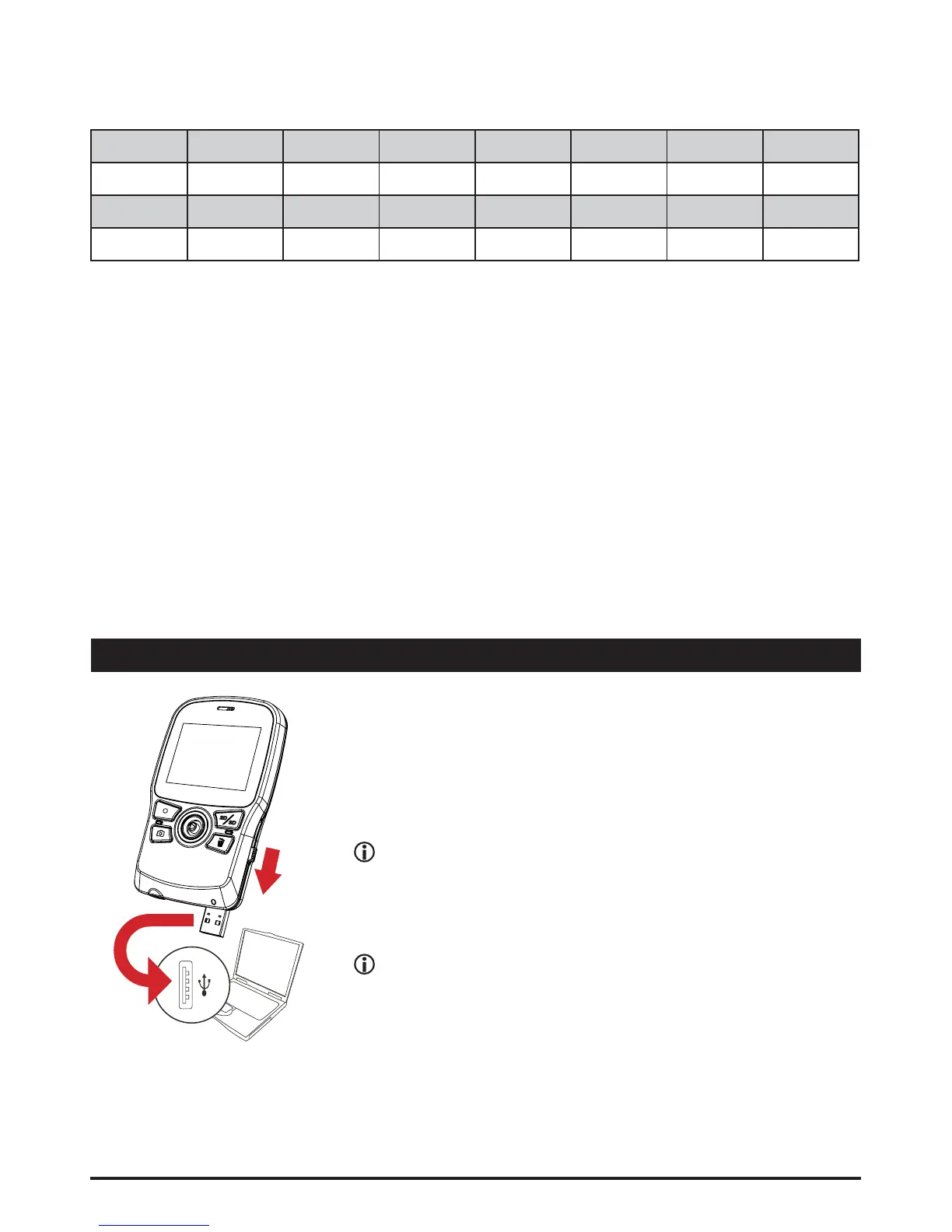
File management on PC
Connect the USB connector of the camcorder to your
PC. Power on the camcorder and the LED will turn
green. The camcorder is then treated as a removable
GLVNRQWKH3&DOORZLQJ\RXWRKDYHDFFHVVWRDOO¿OHV
stored in the camcorder.
When you connect the camcorder to your PC for the
¿UVWWLPHWKHLQVWDOODWLRQRIWKHEXQGOHGVRIWZDUH
will automatically start. Please follow the on-screen
instructions to complete the software installation.
&RS\\RXUQRUPDO'¿OHVLQWRWKH''&,0?',5'
IROGHULQ\RXUPHPRU\FDUG'RQRWVWRUH'¿OHVLQWKH
''&,0?',5'IROGHURWKHUZLVHWKH\ZLOOQRWEH
detected and displayed.
* Flicker table:
5HJLRQ England Germany France Italy Spain
Netherlands
Russia
Setting +] +] +] +] +] +] +]
5HJLRQ Portugal America Taiwan China Japan Korea Thailand
Setting +] +] +] +] +] +] +]
1RWH7KHÀLFNHUVHWWLQJLVEDVHGRQWKHIUHTXHQF\VWDQGDUGRI\RXUORFDOSRZHUVXSSO\










 To Next Page