Page
15Air Techniques, Inc. Air Techniques, Inc.
Page
14
OPERATING INFORMATION
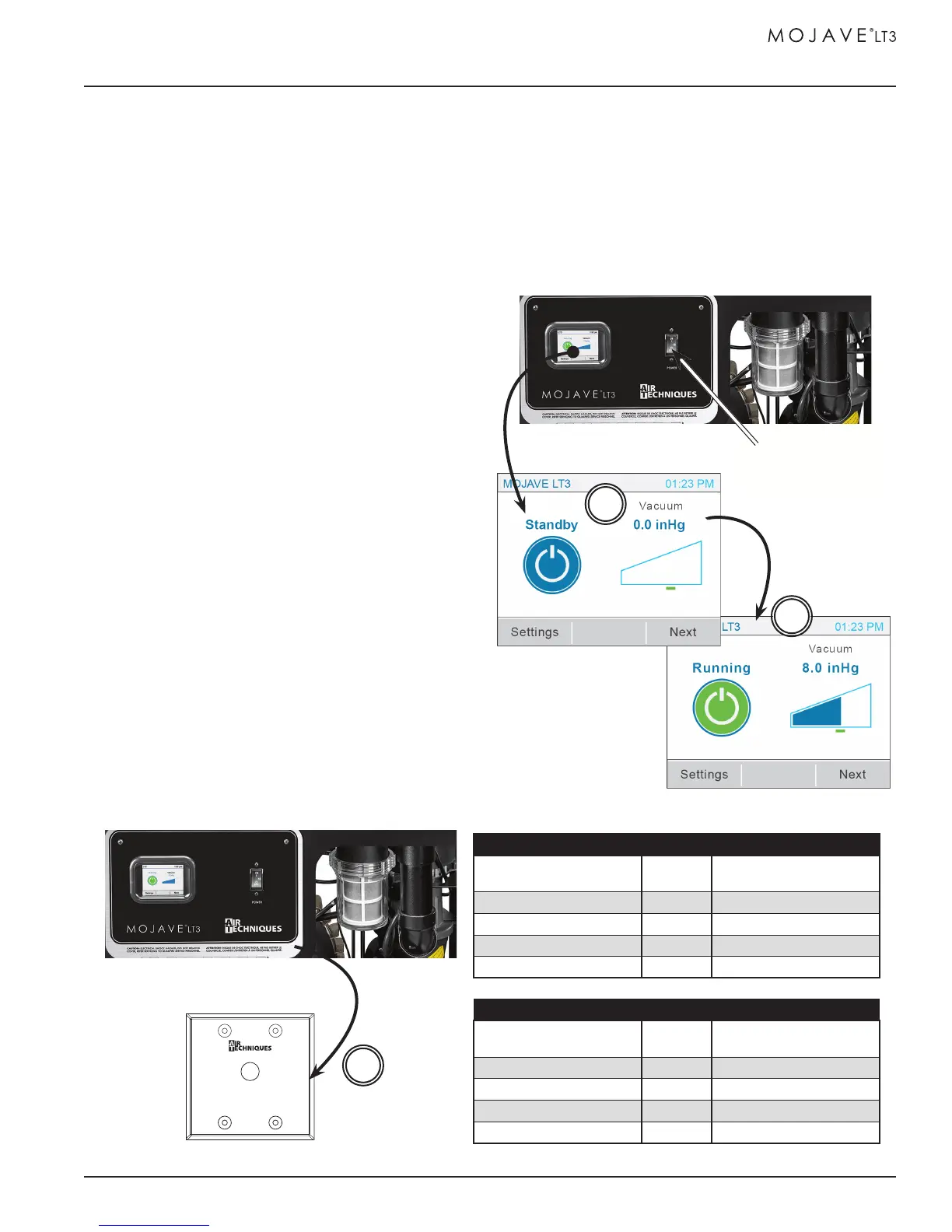
All MOJAVE LT3 units can be operated from either the LCD touch screen or an optional remote
switch. The motor Power circuit breaker on the face of the compressor control box must be set in
the ON position whether using the touch screen or the optional remote switch. The MOJAVE LT3
is designed for continuous operation. Operate the MOJAVE LT3 by performing either the touch
screen or remote switch procedure below.
START UP BY TOUCH SCREEN
1. Set the motor Power circuit breaker in the
ON position.
2. Observe that the color touch screen illuminates
and depress the blue Standby button.
3. Observe that the Standby button changes to a
green Running button, that the unit is running and
the Vacuum widget shows increasing pressure.
START UP BY OPTIONAL REMOTE SWITCH
1. Set the motor Power circuit breaker to the ON
position.
2. Observe that the when in Standby with no errors
the push button indicator is extinguished.
Note a: Depending on the site installation, the
remote switch can be either a Bi-Color LED
6VDC switch (included) or a single LED 24
VDC switch.
Refer to the tables below for the LED
conditions for each switch during operation.
3. Depress the push button switch and observe that
the associated indicator illuminates as listed
for the corresponding switch.
6V DC Bi-Color Green / Yellow Indicators (See Note a.)
Bi-Color LED Condition
Switch
Position
Condition Description
None Out Standby, No errors
Solid Green In Running, No errors
Flashing Yellow Out Standby, Error present
Alternating Green / Yellow In Running, Error present
24V DC Green Indicator Only (See Note a.)
Green LED Condition
Switch
Position
Condition Description
None Out Standby, No errors
Solid Green In Running, No errors
Flashing Green – Slow Out Standby, Error present
Green – Fast In Running, Error present
Optional Remote Control Panel
Control Panel
2
Color LCD Touch Screen Display
Control Panel
3
2
Pump Power
On/Off Switch and
Circuit Breaker


 To Next Page