Page
17Air Techniques, Inc. Air Techniques, Inc.
Page
16
Note: The motor power circuit breaker must be kept in the ON position to operate the color
LCD touch screen display. See Operating Information on page 15.
All MOJAVE LT3 units have a color LCD touch screen display located on the front control box panel.
This display is used to start the unit and show system operating status. It also serves as an input for
controlling operation and adjusting system parameters.
The display shows two screens during normal operation; a Home Screen and a Settings Screen. The
Home Screen is used to start and monitor operation of the MOJAVE LT3, while the Settings Screen
allows changes to operating parameters.
The screens are comprised of operation Buttons, Navigation Buttons and Widgets as described below.
TOUCH SCREEN CONTROLS
Operation Buttons
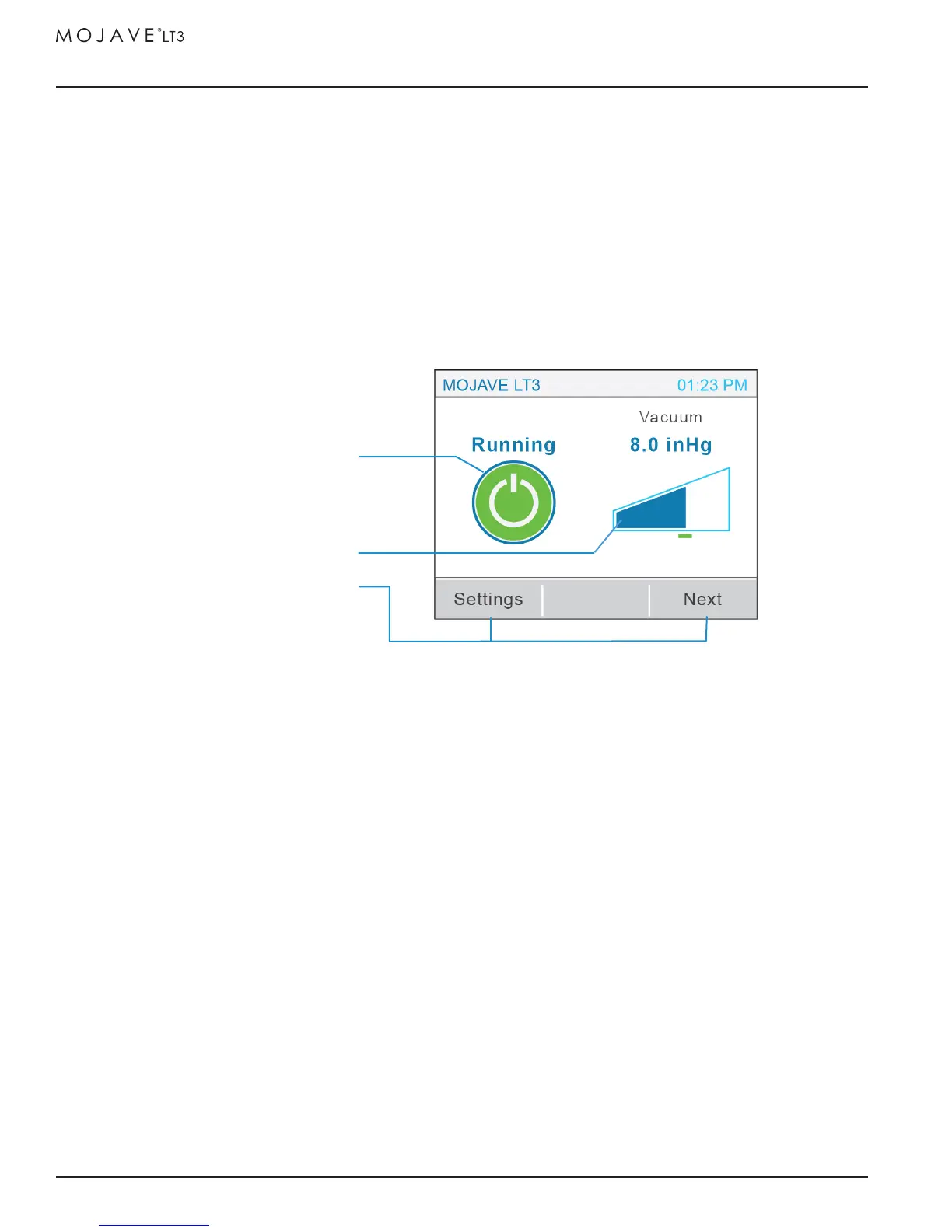
Standby Button - Home Screen Standby Button that when blue, indicates the system is in
the "Standby" mode. When pressed, this switch starts the compressor operation.
Running Button - Home Screen Standby Button that turns green to indicate the system
is in the "Running" mode. When pressed, this switch stops MOJAVE LT3 operation and
returns to the "Standby" (blue button) mode.
Error Button - Home Screen Standby Button that turns red to indicate an error is present
causing the MOJAVE LT3 to shut down operation.
Navigation Buttons - located on the bottom of the screen these buttons allow the user to migrate
within a screen by going to the next screen level or to transfer between the Home Screen and a
Settings Screen.
Widget - an element of a graphical user interface (gui) that is used to display information during
vacuum operation. The Home Screen normally shows the Vacuum Widget while the Motor Frequen-
cy, Separator RPMs, Voltage and Temperature widgets are accessed by pressing the Next Navigation
Button.
Vacuum Widget
Standby Button
Navigation Buttons


 To Next Page