Page
17Air Techniques, Inc. Air Techniques, Inc.
Page
16
TOUCH SCREEN CONTROLS
1. HOME SCREEN
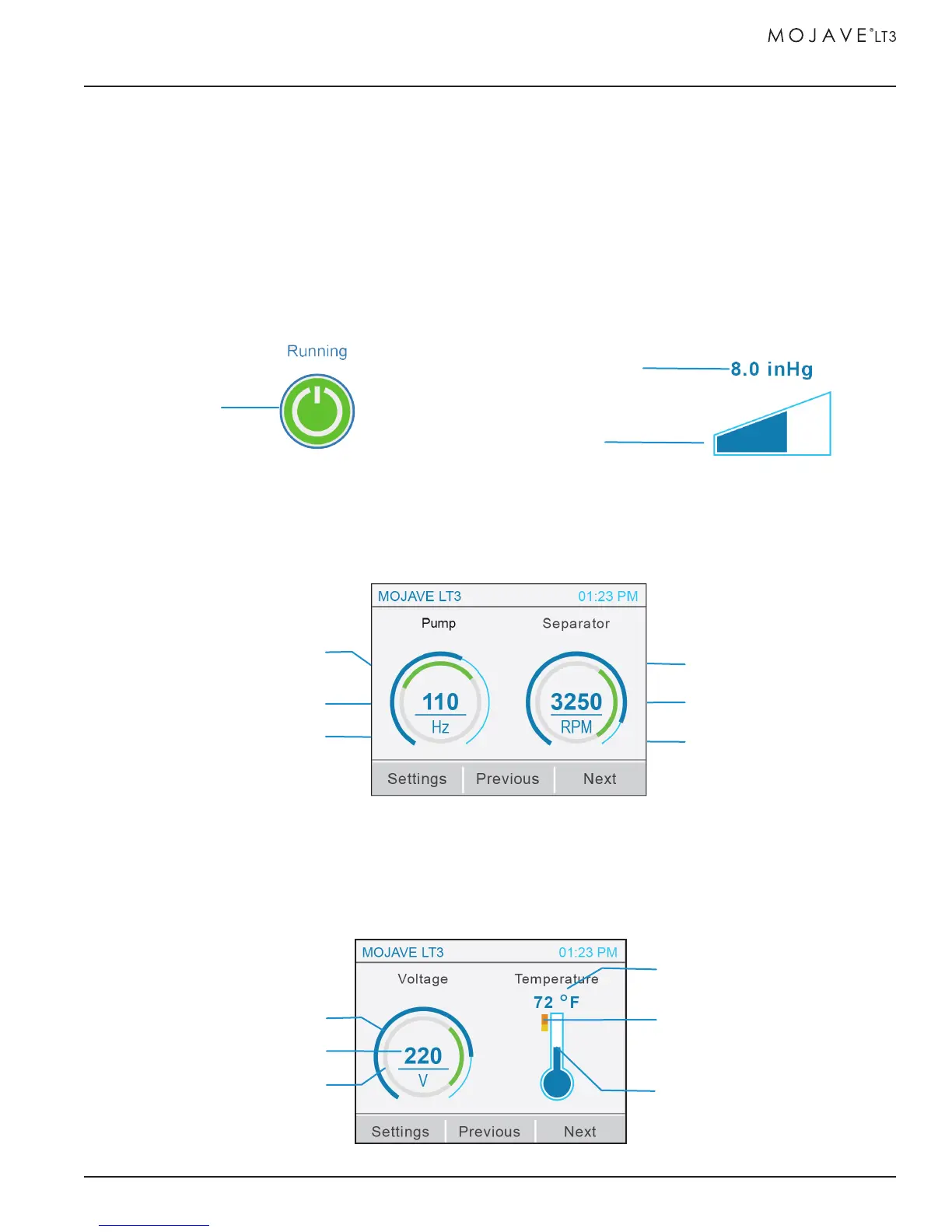
a. STANDBY BUTTON / VACUUM SCREEN
i. Standby Button
- Running: Motor and separator run to maintain the set vacuum level of 8.0 to 10.0 inHg.
- Standby: Motor and separator are not running.
- Error: Motor and separator do not run.
ii. Vacuum Widget - Displays current vacuum level.
b. PUMP / SEPARATOR SCREEN
i. Pump Frequency Widget - Displays current frequency level with min/max range indicator.
ii. Separator RPM Widget - Displays current RPM value with min/max range indicator.
c. VOLTAGE / TEMPERATURE SCREEN
i. Voltage (V) Widget - Current line voltage with min/max range indicator.
iI. Temperature (
ο
F) Widget - Current ambient temperature of room with max temperature limit
indicator.
Vacuum Indicator
Vacuum Digital Readout
Standby
Button
Frequency Digital Readout
Frequency Indicator
Note: Indicator will turn red when
room temperature exceeds 105
ο
F
Temperature
Digital Readout
Max Temperature
Range Indicator
Temperature Indicator
Voltage Min/Max
Range Indicator
Voltage Digital Readout
Voltage Indicator
Frequency Min/Max
Range Indicator
RPM Digital Readout
RPM Indicator
RPM Min/Max
Range Indicator


 To Next Page