Page
19Air Techniques, Inc. Air Techniques, Inc.
Page
18
TOUCH SCREEN CONTROLS
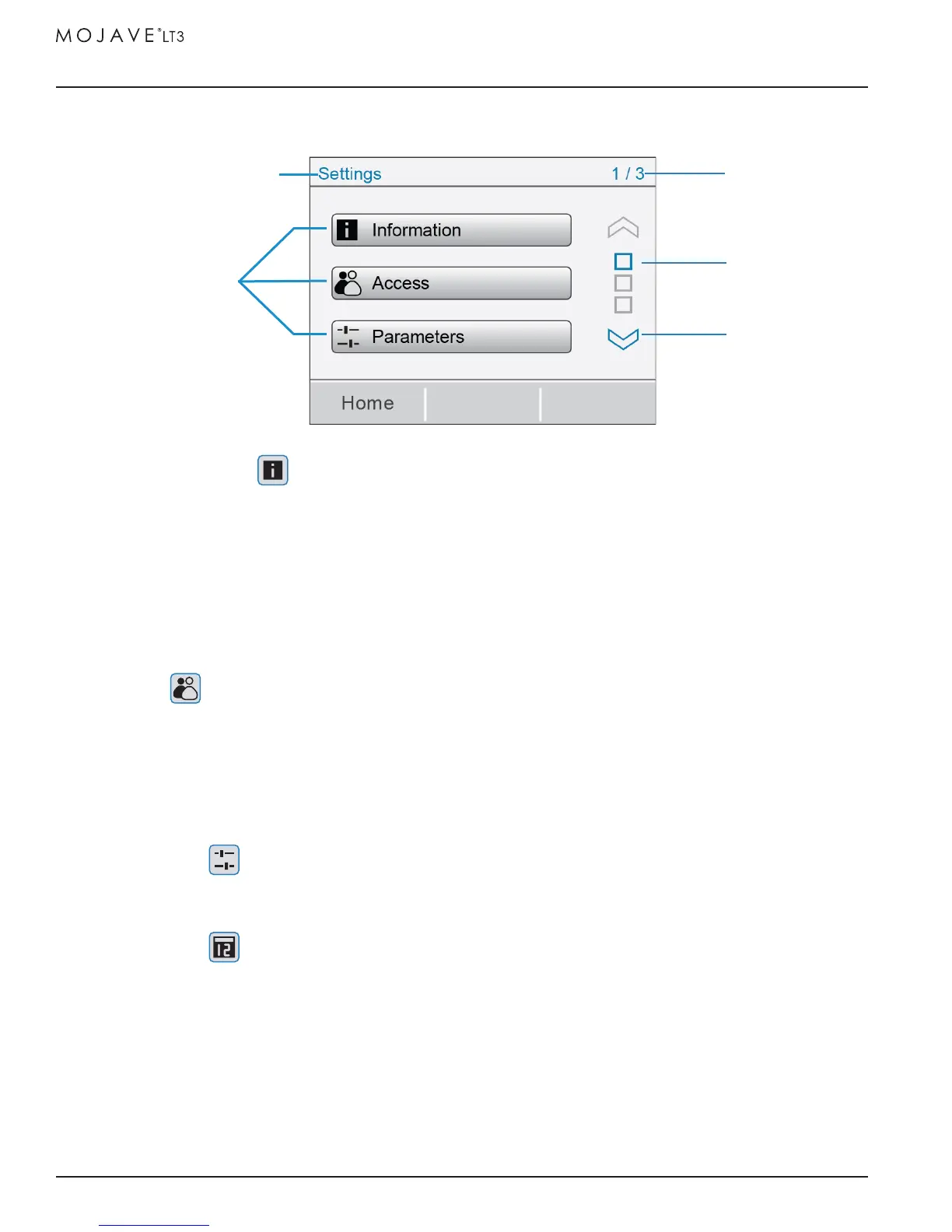
2. SETTINGS SCREEN
a. INFORMATION
i. Model - Air Techniques model number.
ii. SN - Unit serial number.
iii. PCB - Indicates control board serial number.
iv. Firmware - Indicates latest installed firmware and revision.
v. VFD Code - Indicates VFD Code number.
b. ACCESS
i. User - Default setting on startup, this access level should be used when unit is not being
serviced by a technician. Set level by pressing the radio button.
ii. Technician - This access level is used when unit is being serviced by a technician to access all
option choices. Set level by pressing the radio button.
Note: Access will save on exit by either HOME or BACK buttons
c. PARAMETERS
i. Set Point - Sets vacuum level between 8-10 inHg in 0.5 inHg increments by pressing up or
down arrows. Press the SAVE button to accept setting.
d. DATE / TIME
i. Date - Sets to current date. Set date by pressing up or down arrows above or below each
digit, then press the SAVE button.
Note: When the time zone (UTC) is reset, the time setting may need to be set to match location.
ii. Time - Sets current time for selected time zone. Set time by pressing up or down arrows above
or below each digit, then press the SAVE button.
iii. Time Zone - Sets time zone. Set appropriate UTC (see table) by pressing up or down arrows
above or below each digit. Press the SAVE button and then power cycle (power off then on)
device to save setting. After completing power cycle, verify the time matches location.
SETTINGS SCREEN
P
age Number
Scroll Button
Option Choice
Page Indicator
Sub-Folder Address


 To Next Page