63
Wiring Diagrams contd.
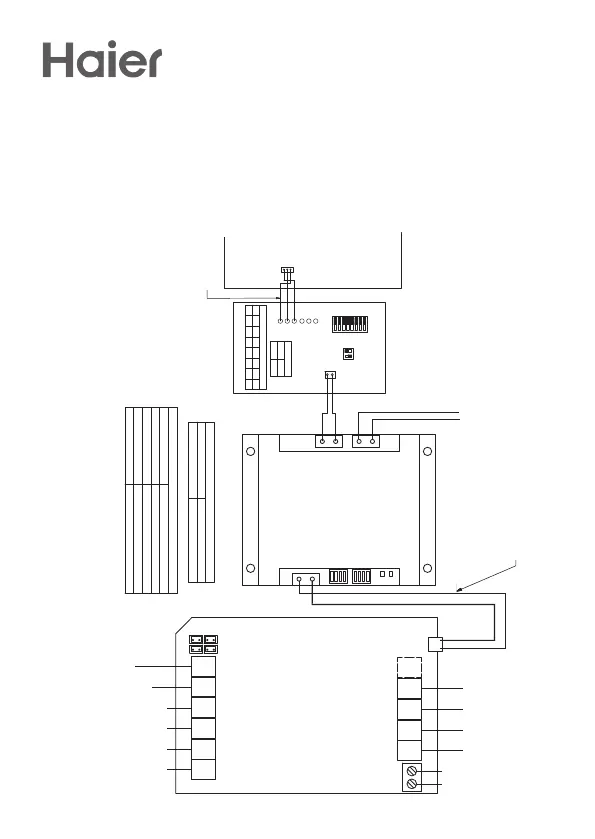
1. Wire AirTouch, gateway, YCJ-A002 (supplied by Haier) and AC indoor as per
diagram. Make sure all wires are connected properly
2. Set the dipswitch settings on the YCJ-A002 and the gateway as shown on the
drawing as required
3. In default, AC will use its own return air sensor as control sensor. Installers can
set the AC control thermistor to an AirTouch 2+ sensor by going to AC detail
setting in Installer’s Settings of AirTouch 2+.
1 3
2 4
E/M T Z1 Z2 Z3 Z4
Z8 Z7 Z6 Z5
RS485
Gateway
N L
24 VAC
B A
E/M: To Extension Module
T: To Touchscreen (Console)
Z1-Z8: To Zone Ports
1-4: Supply Air Sensors
RS 485: To AC Gateways
24 VAC: To Power Supply
To Damper Motors
To Damper Motors
AirTouch 2+
To Transformer
To Extension Module
To Touch Screen
(Optional)
R
S
4
8
5
A
+
B
-
H
o
m
e
K
i
t
S/A2
E/M T Z1 Z2 Z3 Z4
Z8 Z7 Z6 Z5 B2 B1
N L
584SR
-B +A
1S
2S
S/A1-2: Supply Air Sensors
E/M: Extension Module
T: Touchscreen
Z1...Z8: Zone Dampers
L and N: 24V AC Power Supply
HomeKit: HomeKit Module
RS485: AC Gateway
AC Gateway
42NC
AirTouch 2 Plus
S/A1
2V 1V
24 VAC
B A
YCJ-A002 Adaptor
21
G 1MOC
CN1
B
A
SW1
1MB
ON
ON
1 2
Gateway ID Setting
S2
ID
0001 Haier
Three wire cable
with plugs
(Provided with YCJ-A002)
(From Haier)
AC Indoor PCB
Gateway Address Setting
S1
Gateway Address
1000 1
0100 2
1100 3
0010 4
657222
Note: 0-Off, 1-On
BM1
1
2
0 1
SW1
1 2 3 4 5 6 7 8
00000000
Note: 0-Off, 1-On
R
S
4
8
5
A
+
B
-
H
o
m
e
K
it
S/A2
E/M T Z1 Z2 Z3 Z4
Z8 Z7 Z6 Z5 B2 B1
L N
RS485
A+ B-
S3
S4
S1
S/A1-2: Supply Air Sensors
E/M: Extension Module
T: Touchscreen
Z1...Z8: Zone Dampers
L and N: 24V AC Power Supply
RS485: AC Gateway
AC Gateway
P1 P2
P1 P2
AirTouch 2 Plus
S/A1
657211 (RS485 Cable) from Polyaire
(Provided with the gateway)
Master/Slave Setting
S1 S4
Gateway As
0111 0000
Slave
1111 0000 Master
Two Core cable, stripped wires
field prepared
AC Indoor PCB
Gateway Address Setting
S3
Gateway Address
10000001 1
01000001
2
11000001 3
00100001 4
657212
Note:
0-Off, 1-On
R
S
4
8
5
A
+
B
-
H
o
m
e
K
i
t
S/A2
E/M T Z1 Z2 Z3 Z4
Z8 Z7 Z6 Z5 B2 B1
N L
584SR
-B +A
1S
2S
S/A1-2: Supply Air Sensors
E/M: Extension Module
T: Touchscreen
Z1...Z8: Zone Dampers
L and N: 24V AC Power Supply
HomeKit: HomeKit Module
RS485: AC Gateway
AC Gateway
42NC
AirTouch 2 Plus
S/A1
2V 1V
24 VAC
B A
YCJ-A002 Adaptor
21
G 1MOC
CN1
B
A
SW1
1MB
ON
ON
1 2
Gateway ID Setting
S2
ID
0001 Haier
Three wire cable
with plugs
(Provided with YCJ-A002)
(From Haier)
AC Indoor PCB
Gateway Address Setting
S1
Gateway Address
1000 1
0100 2
1100 3
0010 4
657222
Note: 0-Off, 1-On
BM1
1
2
0 1
SW1
1 2 3 4 5 6 7 8
00000000
Note: 0-Off, 1-On
To Transformer


 To Next Page