OPERATING INSTRUCTIONS
12
Preset function – quick selection
Five presets with temperature, air volume, running speed and Blowing time are possible
for a quick selection. Programming can be done at programming level.
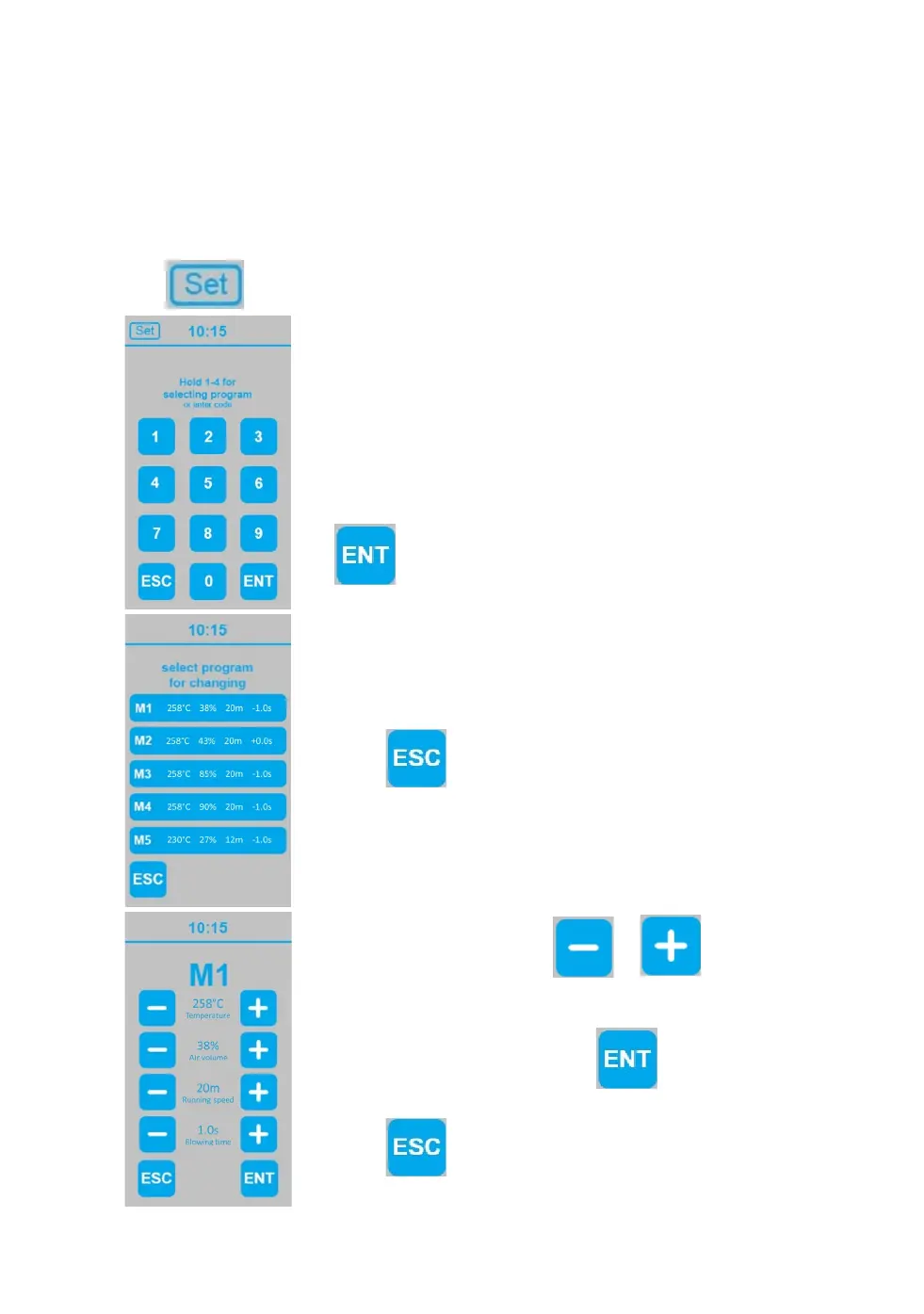
Touch at start screen to get to the screen for selecting program
For quick selection of a preset touch assigned number (1, 2,
3, 4, or 5) and keep in touch until return to start screen.
Settings will automatically be transferred in start screen
Factory-adjusted: M1 for type 7.1 PE-Film 20µm; M2 for
type 8.3 PE-Film 20µm
To program or change a preset enter “4-5-6” and touch
Select one program by touching M1, M2, M3, M4 or M5 to
get to the corresponding programming level.
Touch to return to start screen with without any
changes.
To change displayed unit, please see “advanced settings”.
At programming level touch or to adjust
temperature, air volum, running speed or blowing time.
When all settings are done, touch to continue
changes and get back to program quick selection page.
Touch to return to program quick selection page
without any changes.


 To Next Page