32
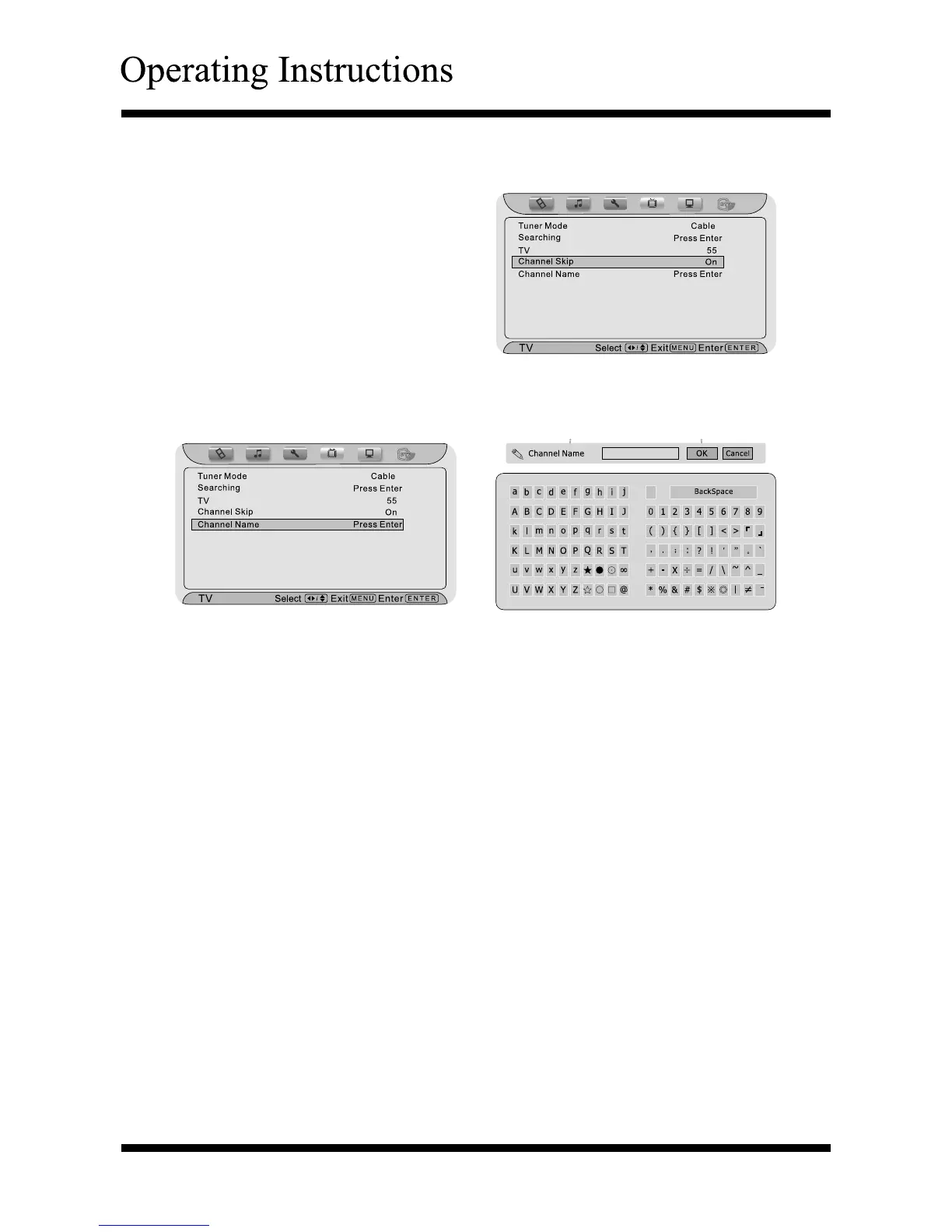
Using the “Channel Skip”
Press the Menu button, and then
press < or > button until the
“TV” menu appears.
Press ∧ or ∨ button to highlight
your selection.
Press < or > button to select
“On” or “Off”.
Press the Menu or Exit button to
return or exit.
Using the “Channel Name”
Press the Menu button, and then press < or > button until the “TV” menu
appears.
Press ∧ or ∨ button to highlight the item.
Press the Enter button to confirm, it will display “Channel Name” list.
Use∧, ∨, < or > button to select, and move cursor to “OK”, then press
the Enter button for confirm you selection. If you want to cancel this
operation, move cursor to “Cancel” and press the Enter button for close this
setting.
Press the Menu or Exit button to return or exit.
Selecting Channel
Press CH+/- button to search the channels, the channel number will increase
or decrease excluding skipped channels.
Press number buttons 0~9 to select the channel you want. If the channel
number is bigger than 9, press the two number buttons successively. If the
channel number is bigger than 100, press the three number buttons
successively. You have two seconds to select your channel, after this the TV
will go back to your last channel displayed.
If you select a channel higher than those already in memory, the TV will
display the last channel selected.
Channel Preview
Press the Recall button to switch between the current channel and the last channel
you watched.



 To Next Page