39
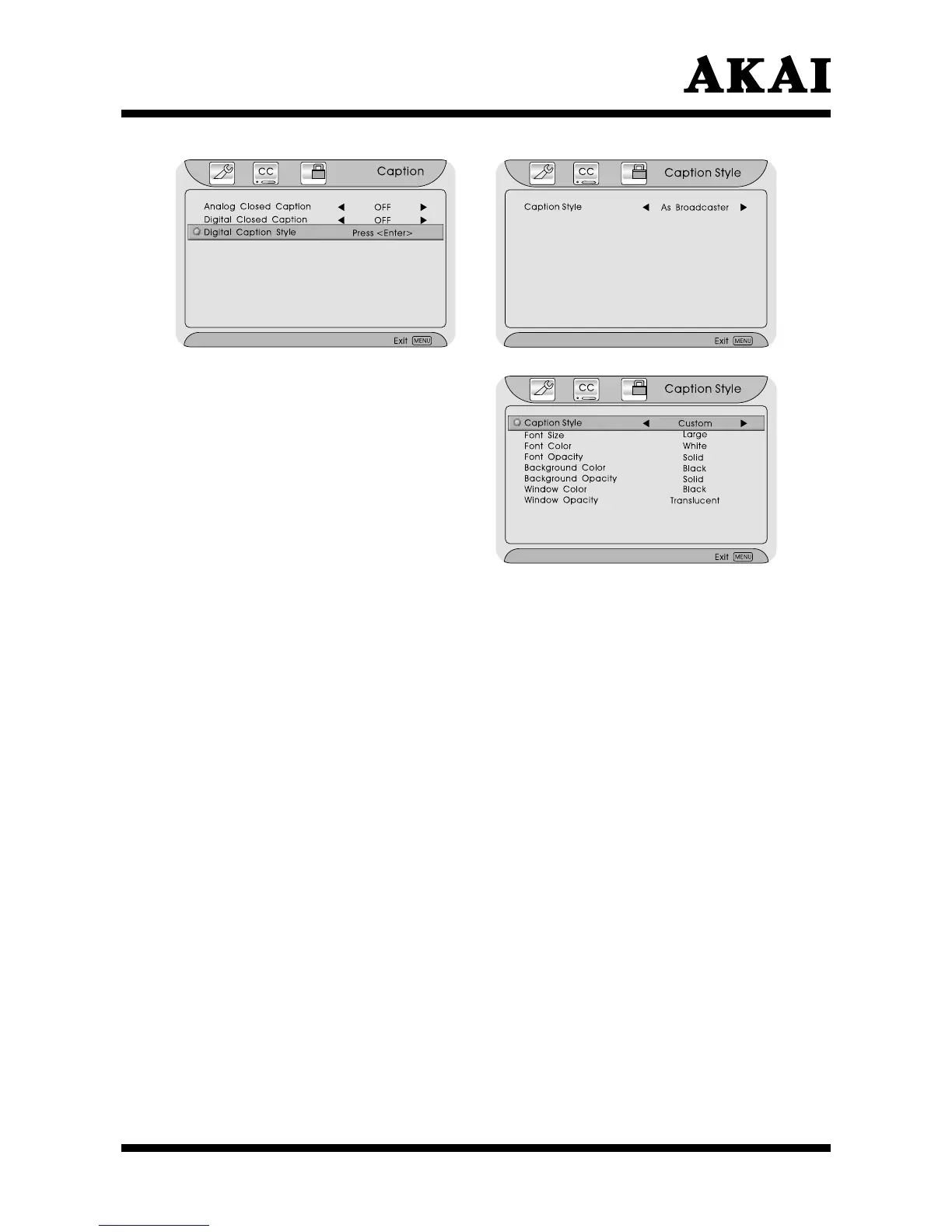
If you select “Custom”, you can operate
as below:
Press ∧ or ∨ button to highlight
the item.
Press < or > button to select.
Press the Menu or Exit button to
return or exit.
Font Size : To set the Font Size value from Large, Small and Medium.
Font Color : To set the Font Color value from White, Green, Blue, Red,
Cyan, Yellow, Magenta and Black.
Font Opacity : To set the Font Opacity value from Solid, Translucent and
Transparent.
Background Color : To set the Background Color value from White, Green, Blue,
Red, Cyan, Yellow, Magenta and Black.
Background Opacity : To set the Background Opacity value from Solid, Translucent
and Transparent.
Window Color : To set the Window Color value from White, Green, Blue,
Red, Cyan, Yellow, Magenta and Black.
Window Opacity : To set the Window Opacity value from Solid, Translucent
and Transparent.
Parental Setting
After entering the “Parental” menu, press ∨ button to highlight
and use 0~9
buttons input the correct password.
Press the Enter button to enter
and it will display the Parental sub page menu
.
Press the Menu or Exit button to return or exit.



 To Next Page