30 APS4
Troubleshooting
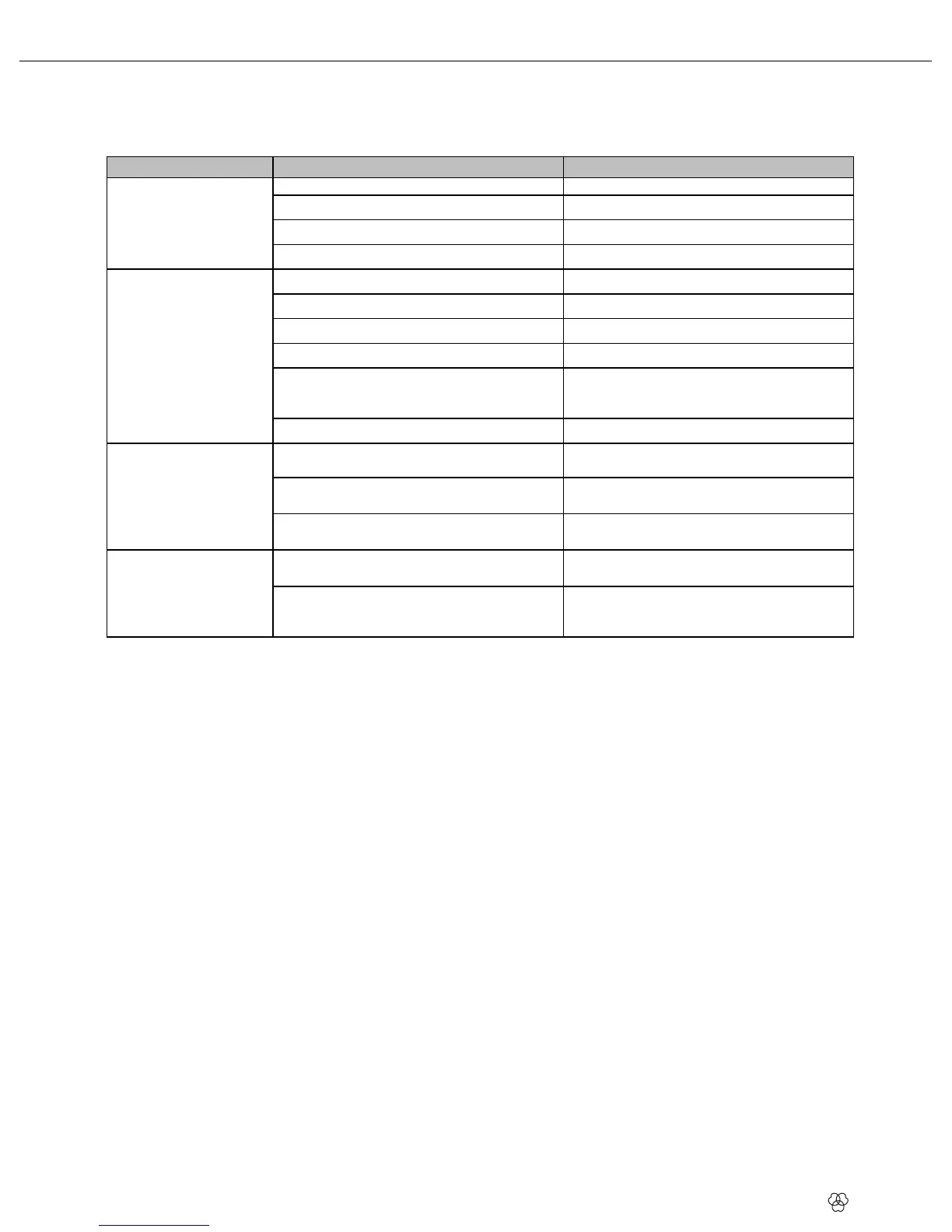
Problem Possible Cause Remedy
No sound.
Power supplies not connected to power outlet(s).
Connect power supplies to power outlet(s).
DC cables not connected or defective.
Connect or replace DC cables.
Connect antennas.
Power supplies defective.
Contact your nearest AKG Service Center.
No or poor reception on
some channels.
Transmitter and/or receiver switched OFF.
Switch transmitter and/or receiver ON.
Transmitter batteries down.
Replace transmitter batteries.
Power supply of receiver makes poor contact.
Check power supply connector for secure fit.
Power supply of receiver is defective.
Replace power supply.
Transmitter and receiver of dead channel are tuned to
different frequencies.
Tune transmitter and receiver to the same frequency.
Refer to the transmitter and receiver Instruction
Manuals.
Transmitter or receiver defective.
Contact your nearest AKG Service Center.
Green LED on an active
antenna component is
dark.
ntenna cable not connected or makes poor contact.
Connect antenna cable or check connectors for
secure fit.
ctive antenna component defective.
Contact your nearest AKG Service Center.
One of the ERROR LEDs on
the antenna splitter is lit.
Supply voltage for active antenna components shorted
out.
Check all cables and active antenna components
connected to antenna splitter.
Supply voltage for active antenna components too low
because cable run is too long.
Refer to Table 1 to check cable lengths and use
shorter cables or break down cable run and insert
ASU4000(s) (see also Wiring Diagrams).
6 Troubleshooting


 To Next Page