Charging mode
General informa-
tion
Charging mode is used for:
- Charging or conservation charging with the battery either fitted or removed
- Charging while vehicle consumers are switched on
Charging the bat-
tery
Plug in charger mains plug
Charging mode is automatically started af-
ter the charger is connected to the mains.
Connect battery - the de-energised charger leads mean there are no sparks when
connecting to the battery, even if the charger is already connected to the mains supply.
- Connect the red charger lead to the positive pole (+) on the battery
- Connect the black charger lead to the negative pole (-) on the battery
The charger automatically identifies the
battery, e.g. 12 V, and starts the charging
process after 5 seconds.
If the battery voltage is not correctly identi-
fied (e.g. in the event of a deep-discharge
battery), you have 5 seconds to enter the
correct battery voltage as follows:
CAUTION! Risk of damage when attempting to charge a faulty battery. Before
charging, ensure that the battery to be charged is fully functional.
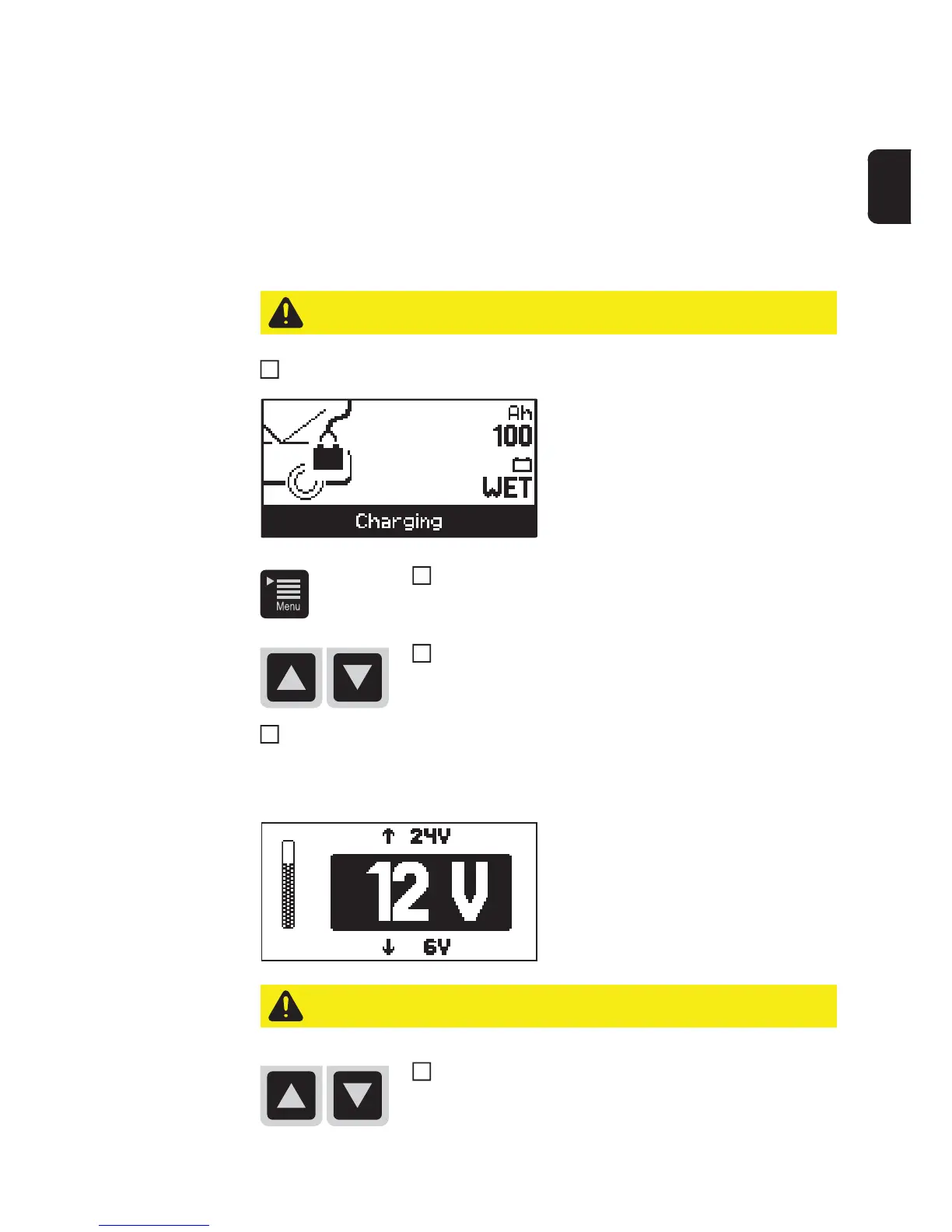
Use the Menu key to select the 'Ah' or 'Battery type' setting.
Use the up/down keys to enter the required value (e.g. 100
Ah or 'Wet' battery type).
4
CAUTION! Risk of damage if the wrong voltage is set. Always ensure that the cor-
rect battery voltage is set.
Set the correct battery voltage using the up/down keys (6 V /
12 V / 24 V).


 To Next Page