II Aladin
®
Pro – Survey
14
1. Aladin
®
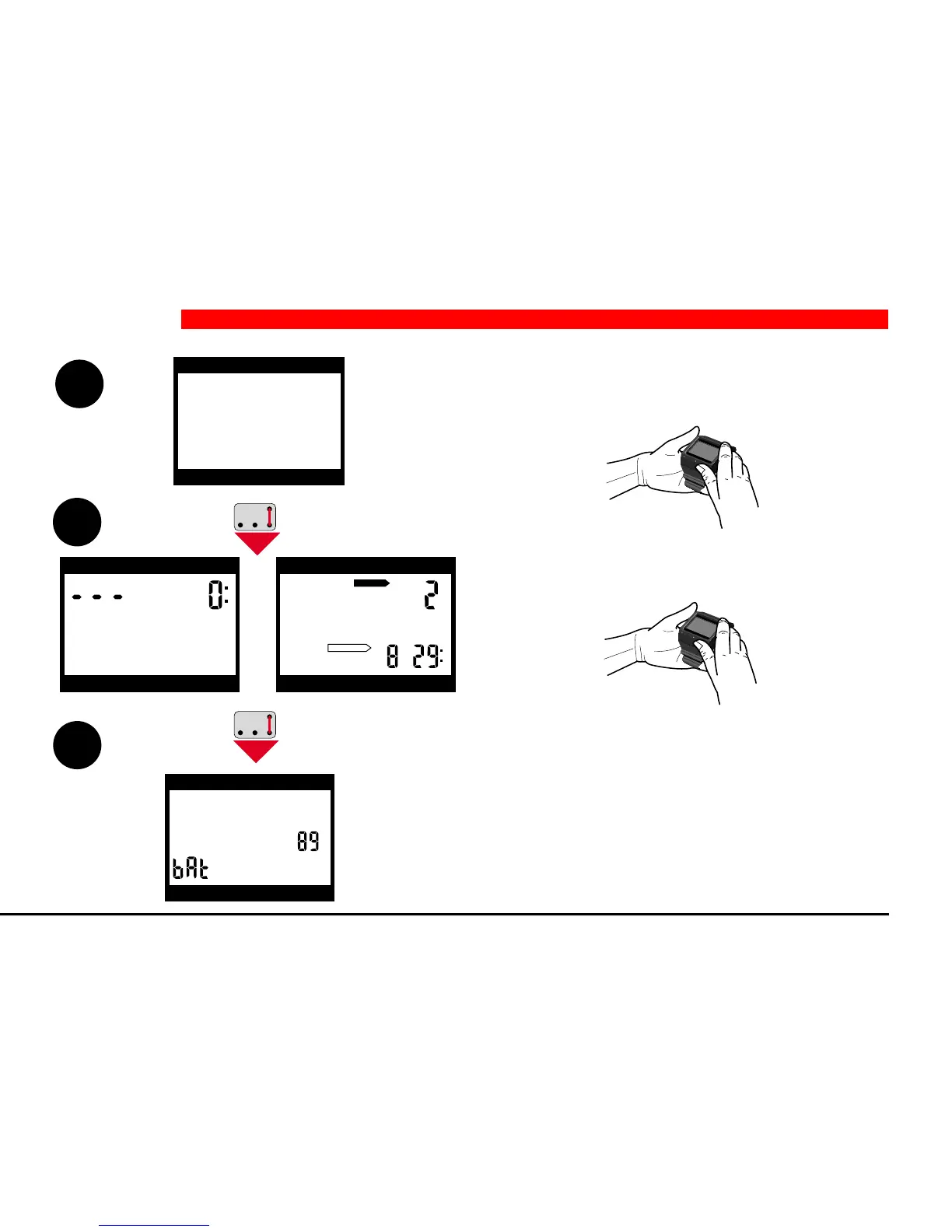
Pro is in a state of rest; no information is
displayed (-> sleep-mode or -> surface-sleep-
mode).
2. Bridging B and E activates the computer -> ready-
mode or -> surface-mode.
3. A second bridging of contacts B and E activates
the display of the remaining battery capacity for
approximately 5 seconds.
As soon as the battery capacity is 0%, a battery
alarm is sent (see page 29). There is still a small
reserve left at bAt 0%.
2 Operation
Ready-mode Surface-mode
depth dive time
max. depth deco info
1
2
3
depth dive time
max. depth deco info
d
e
p
th
d
iv
e
tim
e
deco info
m
a
x
. d
e
p
th
depth dive time
max. depth deco info
h
h
DO NOT FLY
DESATURATION
depth dive time
max. depth deco info
d
e
p
th
d
iv
e
tim
e
deco info
m
a
x
. d
e
p
th


 To Next Page