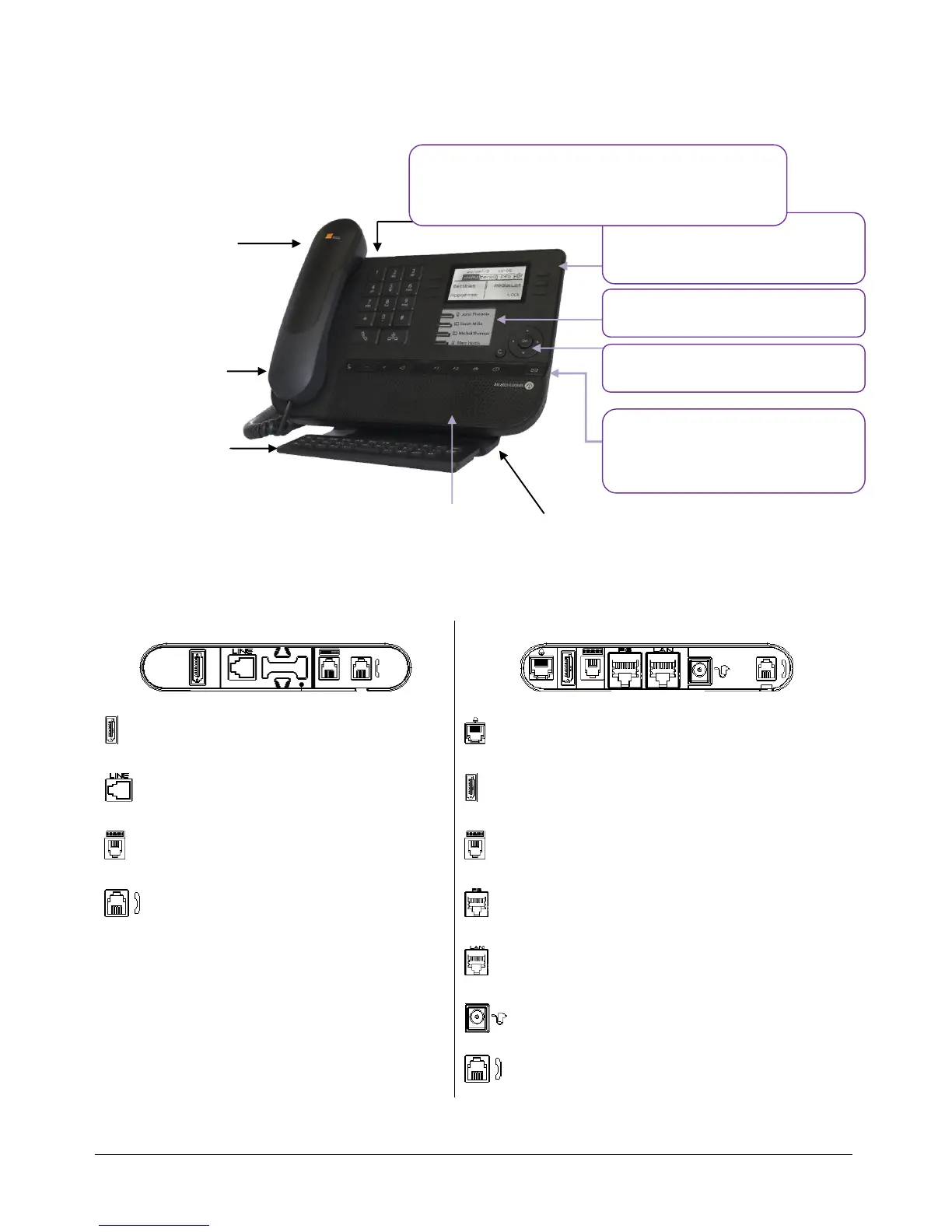
1.3 8028/8029
1.4 Connectivities
Description of the connectors
Add-on module connector (SATA type).
1 RJ 11 connector for external ringer and
audio active envelop indicator
1 RJ 11 connector for external ringer
and audio active envelop indicator
Add-on module connector (SATA type).
1 RJ 9 connector for alphanumerical
keyboard
1 RJ 9 connector for alphanumerical
keyboard
1 RJ9 connector for a corded handset
One 10/100/1000 Gigabit Ethernet
connector (PC)
One 10/100/1000 Gigabit Ethernet
connector (LAN)
One DC power jack for an external power
adaptor
1 RJ9 connector for a corded handset
Cable path for line connection (8029/8039)
Make sure you position the cable correctly in the compartment intended for that purpose:
Monochrome screen
6 dedicated functions keys
functions keys
LED
Flashing blue: incoming call Arrival of a new call
Flashing orange: alarm
4 programmable keys with Led and
paper label
Permanent feature keys: quick
access to the phone’s main features
An adjustable and stable foot










 To Next Page