57 58
7
Multimedia applications ........
7.1 Camera ......................................................
Your mobile tablet is fitted with a camera for taking
photos and videos.
Before using the camera, make sure that you remove
the protective lens cover to avoid it affecting your
picture quality.
To take a photo or video, touch Camera from the Home
screen.
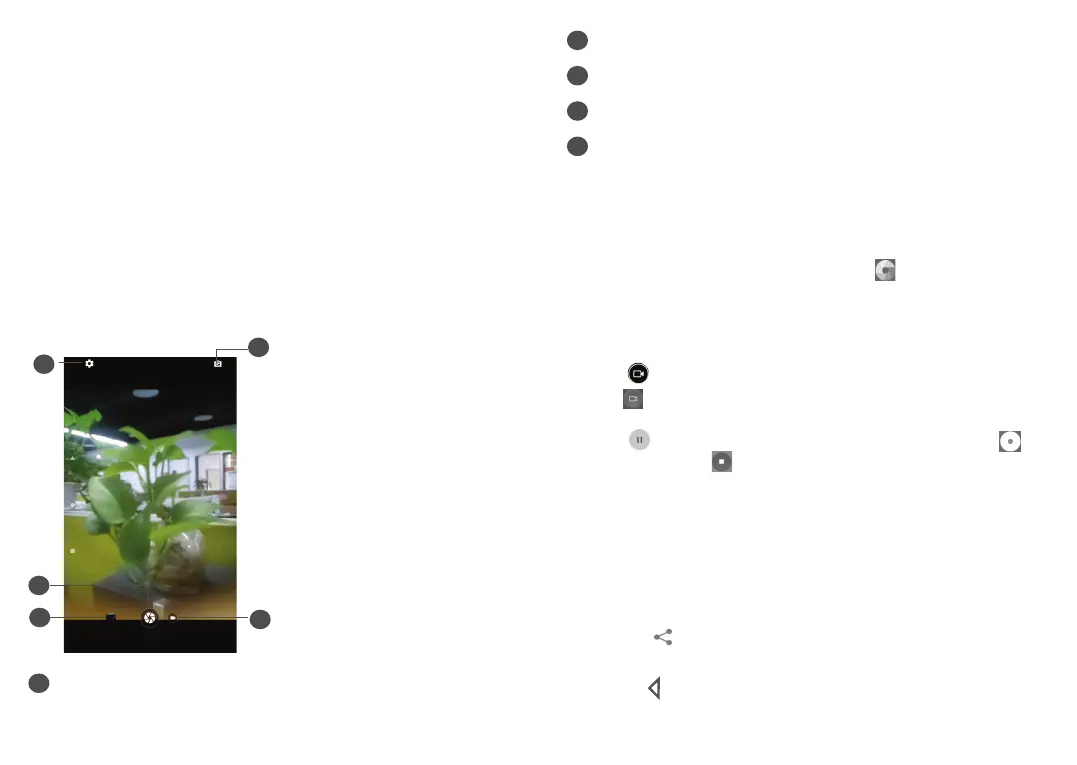
4
1
2
3
5
1
Switch between front/back camera
2
Touch to take a video
3
Open settings
4
Take a photo
5
View the photos or videos you have taken
To take a photo
The screen acts as the viewfinder. First, position the
object or landscape in the viewfinder, touch the screen
to focus if necessary and touch
to capture. The
photo will be automatically saved.
To take a video
Touch
to change the camera mode to video, then
touch to start video recording.
Touch
to pause video recording and touch to
continue. Touch
to stop recording. The video will be
automatically saved.
Further operations when viewing a picture/video you
have taken
• Slide left or right to view the photos or videos you
have taken.
• Touch
, then Gmail/Bluetooth/etc. to share the
photo or video.
• Touch
to return to Camera.













 To Next Page