115
1 kW
+22°C
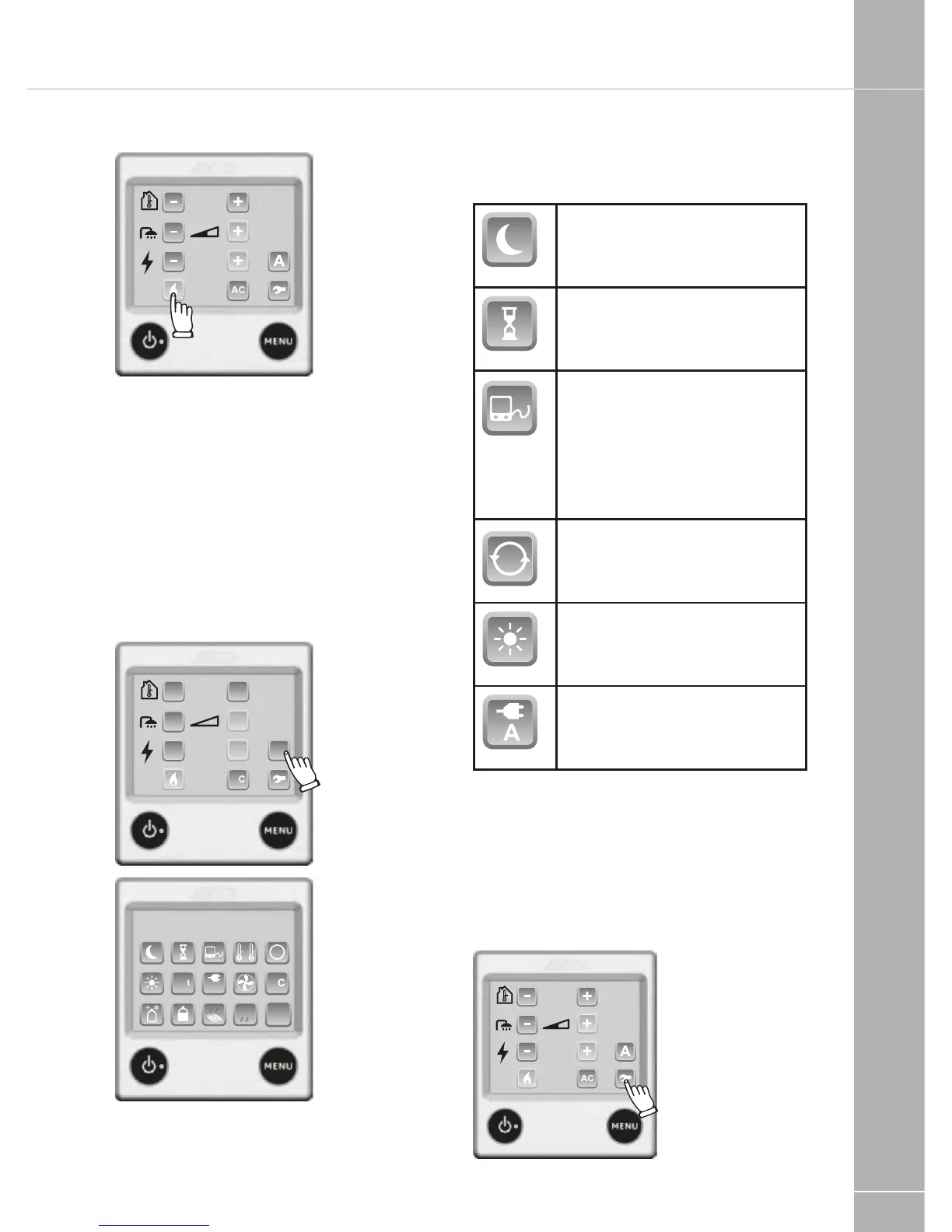
1. Press the Flame button to select gas
heating. Green is on, blue is off.
Use both gas and electric heating for best
performance.
What’s Activated Menu
Press the A button to access the What’s
Activated Menu. This screen shows any
functions that are activated and allows direct
access to that function by pressing its button.
NB: The A button is not displayed if no
functions are activated.
Please note: Not all functions are relevant to a
caravan installation.
Night Mode is enabled, but may
or may not be active, depending
on the time and day.
Delayed Start/Cycle is enabled,
but may or may not be active,
depending on the time and day.
Alde Smart-Control or daisy-
chained, third party control
panel is enabled. This feature
must be engaged to use the
Swift Command control panel
or app for control of the heating
system.
Circulation Pump is set to
Continuous. NB: This will reduce
the hot water supply.
Day Mode is enabled, but may
or may not be active, depending
on the time and day.
Load Monitor is enabled and an
amp limit is set.
Settings Menu
Press the Tool Button to access the Settings
Menu from the Main Menu. Lower level
functions can be accessed by from these
screens by pressing the buttons. NB: If a
function is not available its button is greyed
out.
!"#$
%&&'(



 To Next Page