12
(2.2) Rear Panel
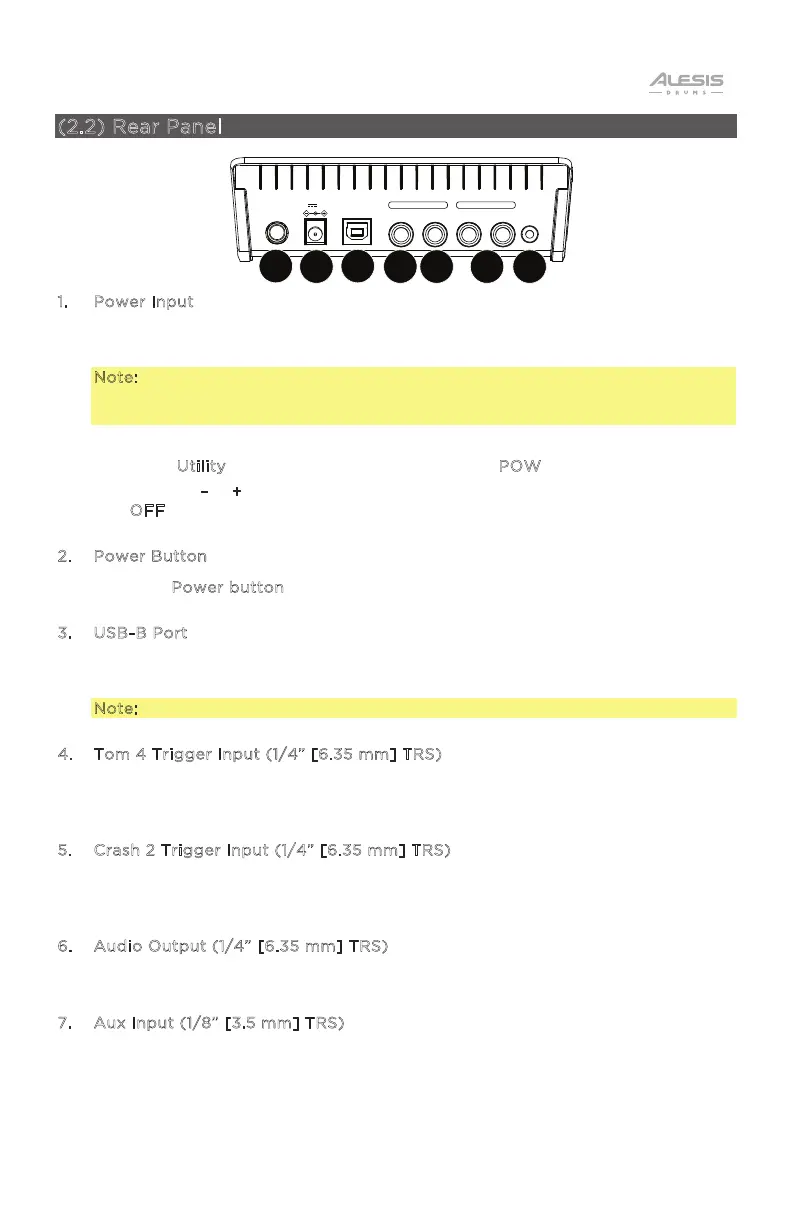
1
. Power Input
Connect the included power adapter (9V DC, 500mA, center pin-positive) here,
then connect the adapter to wall power.
Note: To save energy, the drum module will shut down automatically after 30
minutes of no activity. If you do not need this feature or want to adjust the
shutdown time, do the following:
I. Power on the drum module.
II. Press U
tility repeatedly until the Power page (POW) is selected.
III. Use the –
/ + buttons to adjust the shutdown time (30 – 60 minutes, or
O
FF).
2. Power Button
Press the P
ower button to turn the module on or o.
3. USB-B Port
Use a USB cable (sold separately) to connect the module to your computer to
send MIDI information.
Note: Only MIDI information is sent over the USB connection, not audio.
4. Tom 4 Trigger Input (1/4” [6.35 mm] TRS)
Use a standard 1/4" TRS cable to connect this input to an optional drum pad,
which will trigger the Tom 4 sound.
5. Crash 2 Trigger Input (1/4” [6.35 mm] TRS)
Use a standard 1/4" TRS cable to connect this input to an optional cymbal pad,
which will trigger the Crash 2 sound.
6. Audio Output (1/4” [6.35 mm] TRS)
Connect this output to a speaker, amplifier system, or mixer.
7. Aux Input (1/8” [3.5 mm] TRS)
Connect an auxiliary device such as a phone, MP3 player, or CD player here. This
audio will be heard in the Audio Outputs and Phones output. During recording,
the audio from this input will not be recorded.
CYM 2USBPOWER TOM 4 R L/MONO AUX IN
TRIGGER INPUT AUDIO OUTPUT
0.5A9V
1
2 3
45 6 7


 To Next Page