19
(4.2) Adjusting the Metronome
The module's built-in metronome can be used when practicing, performing,
recording, or playback.
U
sing the metronome:
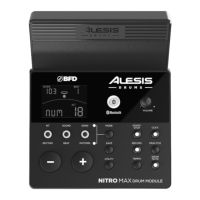
You can turn the click track (metronome) on or o by pressing the C
lick button.
Adjust its tempo by pressing T
empo and using the – and + buttons to set the new
BPM (beats per minute).
T
o adjust the metronome settings:
1. Turn on the metronome (by pressing C
lick), then, while in Normal Mode, press
the Mode button repeatedly until the desired setting appears on the display:
• S
IG (Time signature): The time signature the metronome is counting. (When
a "0" is selected as the first number, the first beat will not be indicated by a
dierent metronome sound; every beat will have the same sound.)
• I
NT (Interval): The subdivisions that the metronome will play.
• V
OL (Volume): The metronome volume.
• V
OC (Voice): The metronome sound.
2. Use the –
and + buttons to adjust the value. The settings will be automatically
saved.


 To Next Page