7
(2.0) Features
(2.1) Top Panel
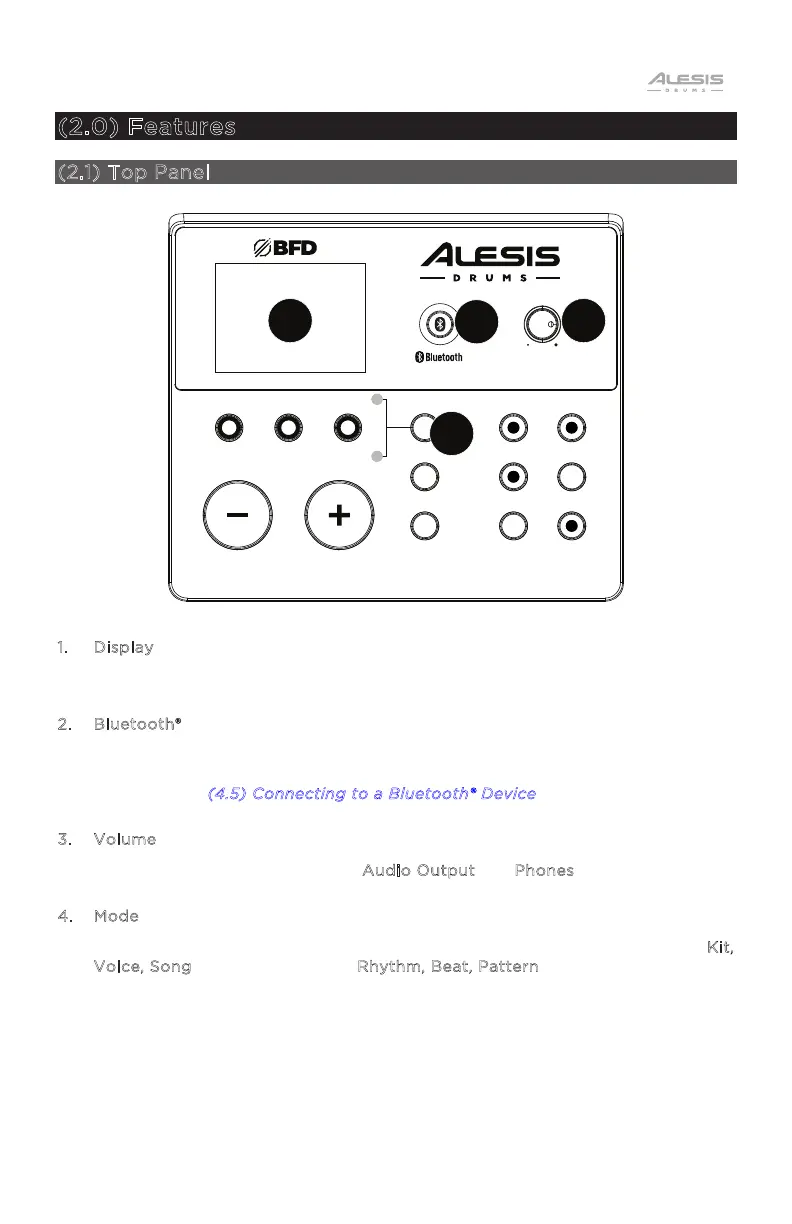
1. Display
This display shows information relevant to the current settings and functions.
2. Bluetooth®
Press this button to pair to a Bluetooth device. The backlit button will be lit solid
when a device is paired. If the button is pressed again, pairing mode will be
canceled. See (
4.5) Connecting to a Bluetooth® Device for more details.
3. Volume
Adjusts the output volume of the A
udio Output and Phones.
4. Mode
Press to set the function of the three buttons to the left to Normal mode (K
it,
V
oice, Song) or Learning mode (Rhythm, Beat, Pattern), indicated by the LEDs.
KIT
VOICE
SONG
RHYTHM BEAT PATTERN
MODE
SAVE
UTILITY
START/
STOP
RECORD
TEMPO
CLICK
PL AY/
PRACTICE
DRUM
MUTE
NITRO
MAX
DRUM MODULE
VOLUME
1
2
3
4


 To Next Page