8
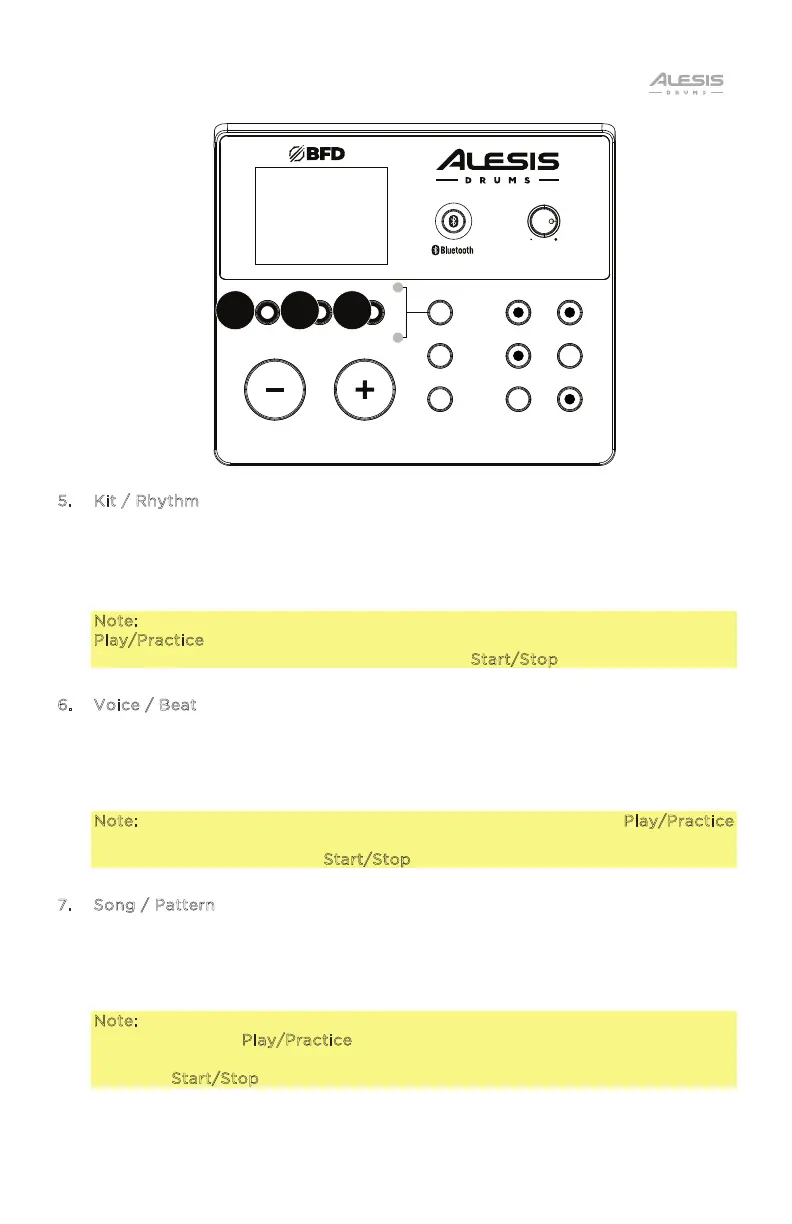
5. Kit / Rhythm
In Normal Mode, press this button to enter the Kit Menu, where you can select a
kit or adjust kit-related settings.
In Learning Mode, press this button to select a rhythm (full kit) to play along to
or adjust pattern-related settings.
Note: To play along with the pre-recorded rhythm pattern, press the
Play/Practice button. To play along without the pre-recorded rhythm pattern
and keep score of your performance, press the Start/Stop button.
6. Voice / Beat
In Normal Mode, press this button to enter the Voice Menu, where you can
select a voice (drum sound) or adjust voice-related settings. In Learning Mode,
press this button to select a beat (snare drum only) to play along to or adjust
pattern-related settings.
Note: To play along with the pre-recorded beat pattern, press the Play/Practice
button. To play along without the pre-recorded beat pattern and keep score of
your performance, press the Start/Stop button.
7. Song / Pattern
In Normal Mode, press this button to enter the Song Menu, where you can select
a song or adjust song-related settings. In Learning Mode, press this button to
enter the Pattern Menu, where you can select a pattern (full kit plus
accompaniment) to play along to or adjust pattern-related settings.
Note: To play along with the pre-recorded pattern, including backing track
drums, press the Play/Practice button. To play along with the pre-recorded
pattern and keep score of your performance without the backing track drums,
press the Start/Stop button.
KIT
VOICE SONG
RHYTHM BEAT PATTERN
MODE
SAVE
UTILITY
STA RT/
STOP
RECORD
TEMPO
CLICK
PL AY/
PRACTICE
DRUM
MUTE
NITRO
MAX
DRUM MODULE
VOLUME
6 75


 To Next Page