9
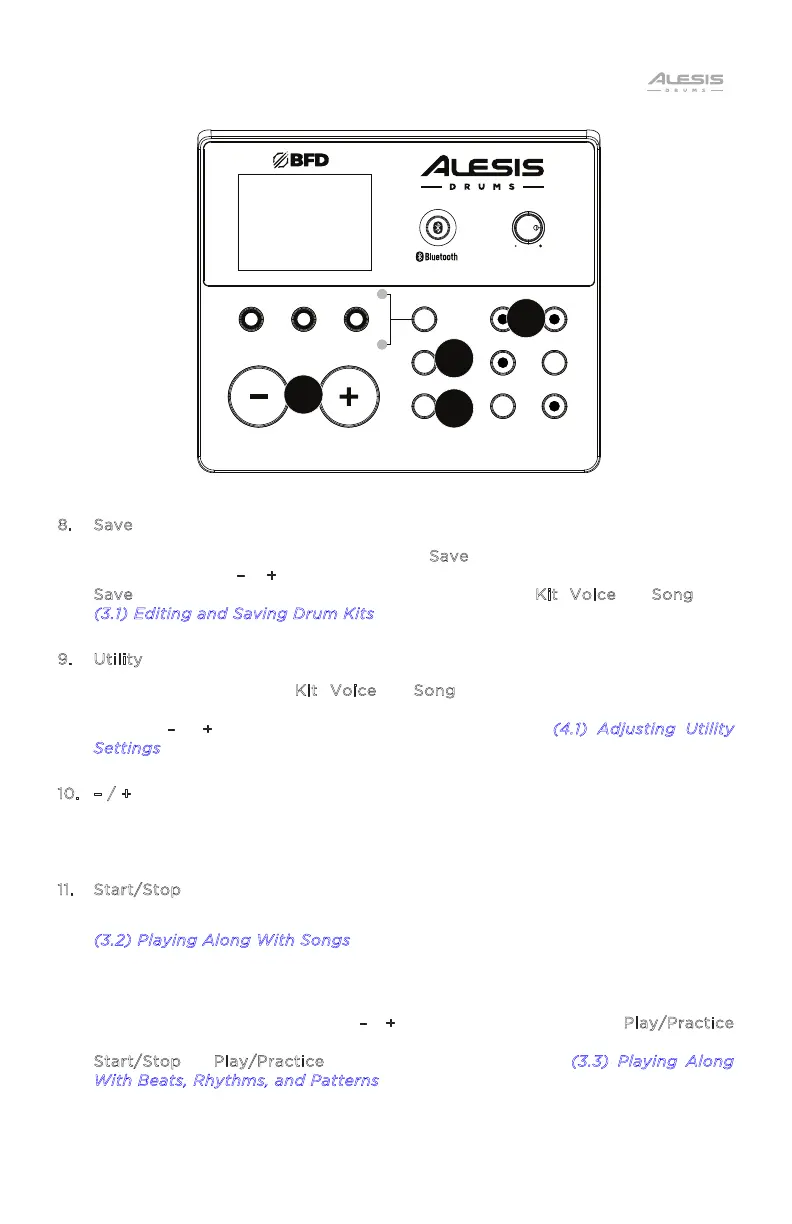
8. Save
While in Kit or Voice mode, press the S
ave button to save the current kit
settings. Use the –
/ + buttons to select an available save slot, and then press
S
ave again. To cancel a change before saving, press Kit, Voice, or Song. See
(
3.1) Editing and Saving Drum Kits for more details.
9. Utility
While in Normal Mode (K
it, Voice, or Song), press this button repeatedly to
access the advanced settings for the pads, as well as the module's MIDI settings.
Use the –
/ + buttons to adjust parameters. See the (4.1) Adjusting Utility
S
ettings section for more information.
10. – / +
Press to adjust the selected parameter. Use these buttons to change the value
of the setting shown on the display, such as kit numbers or eects levels.
11. Start/Stop
When in the Normal Mode, press this button to start or stop Song playback. See
(
3.2) Playing Along With Songs for more details.
When in the Learning Mode, press this button to start or stop the selected
Pattern, Rhythm, or Beat scored performance, once you feel you have learned
the Pattern, Rhythm, or Beat in Play/Practice. Select a Song
/Pattern/Rhythm/Beat using the –
/ + buttons. Press and hold the Play/Practice
button for 2 seconds to hear the playback of your performance. Press
S
tart/Stop or Play/Practice again to stop playback. See (3.3) Playing Along
W
ith Beats, Rhythms, and Patterns for more details.
KIT
VOICE
SONG
RHYTHM BEAT PATTERN
MODE
SAVE
UTILITY
STA RT/
STOP
RECORD
TEMPO
CLICK
PL AY/
PRACTICE
DRUM
MUTE
NITRO MAX
DRUM MODULE
VOLUME
10
11
9
8


 To Next Page