10
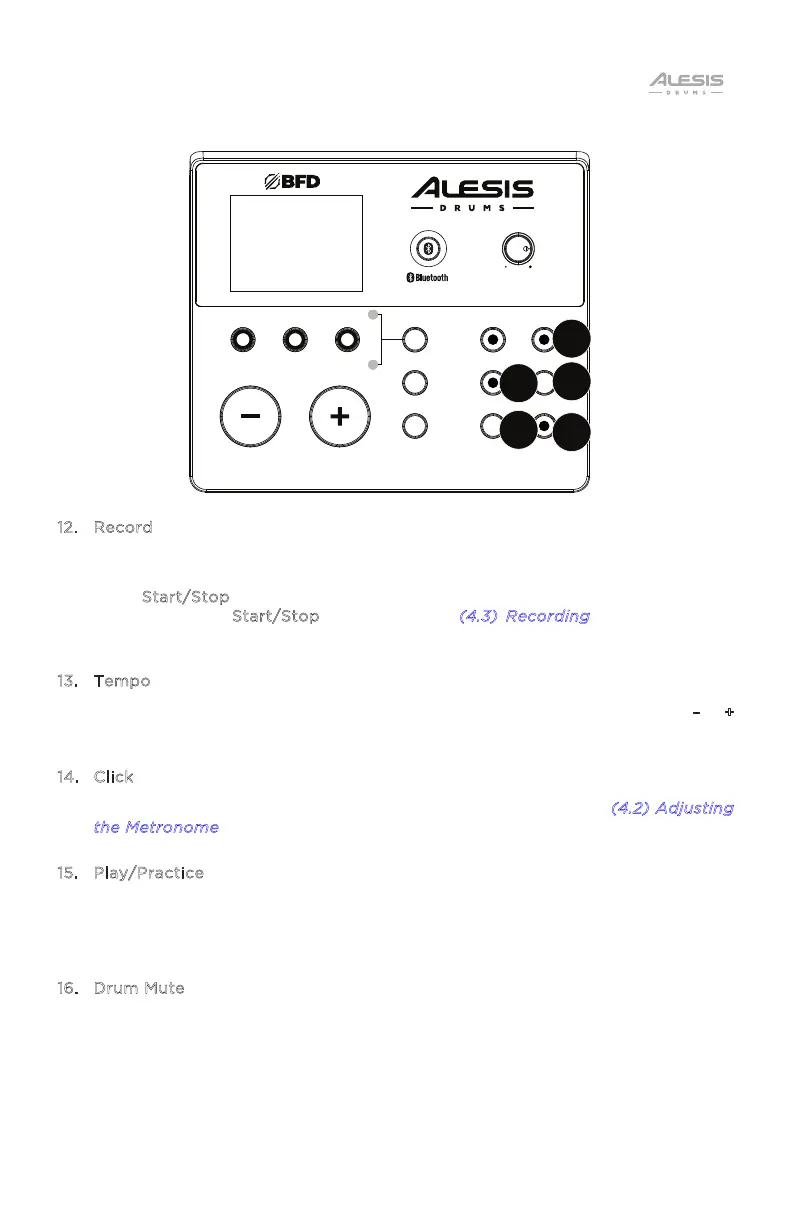
12. Record
While in Normal Mode (Kit, Voice, or Song), press this button once to record-
arm the module. When armed, the button LED wil flash. To start recording,
press S
tart/Stop or hit a pad. When recording, its LED will light solid. (To stop
recording, press S
tart/Stop again.) See the (4.3) Recording section for more
information.
13. Tempo
Press to display the current tempo in beats per minute (BPM). Use the –
/ +
buttons to change it.
14. Click
Press this to turn the click track (metronome) on or o. See the (
4.2) Adjusting
t
he Metronome section for more information.
15. Play/Practice
In Normal Mode, press this button to hear a recorded performance. In Learning
Mode, press this button to start playing the beat, rhythm, or pattern; you can
then play along to it without being scored.
16. Drum Mute
When this button is on, its LED will be lit and the pre-recorded drum part will be
muted so you can hear only your performance and any accompaniment
(backing music). While in Song mode, this button can be pressed again to hear
the pre-recorded drum part. This button will automatically be on while
recording.
KIT
VOICE SONG
RHYTHM BEAT PATTERN
MODE
SAVE
UTILITY
STA RT/
STOP
RECORD
TEMPO
CLICK
PL AY/
PRACTICE
DRUM
MUTE
NITRO MAX
DRUM MODULE
VOLUME
15
16
13
14
12


 To Next Page