18
(4.0) Advanced Functions
(4.1) Adjusting Utility Settings
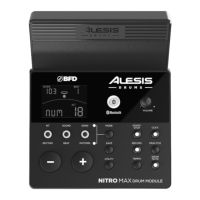
The Utility menu lets you further customize your pad settings and adjust the
module's MIDI settings.
T
o adjust the Utility settings:
1. Press the M
ode button so that Normal Mode (Kit, Voice, Song) is active.
2. Hit the pad whose settings you want to adjust.
3. Press the Utility button repeatedly until the desired setting appears on the
display:
• SEN (Pad sensitivity): Controls how responsive a pad is when you hit it. The
higher the value, the less forcefully you need to play to generate a loud hit.
• T
HR (Pad threshold): Controls how forcefully you have to hit the pad to
generate a sound. The higher the value, the harder you have to hit it.
• C
RO (Pad crosstalk): Crosstalk is the unintentional triggering of a pad when
an adjacent pad is hit. The higher the value, the less likely the pad will be
triggered by crosstalk.
• C
UR (Pad velocity curve): Controls the pad's dynamic response relative to
the force (velocity) of your hit. The curves are shown in the (
5.0) Appendix
section.
• R
-S (Pad rim sensitivity): Controls how responsive a pad's rim is when you
hit it.
• S
-S (Hi-Hat "splash" sensitivity): Controls how responsive the hi-hat "splash"
eect is when you hit the pedal. To create this sound, tap your foot on the
pedal but lift it up immediately instead of leaving your foot down.
• L
OC (Local Mode): See (4.4) MIDI Settings for more information.
• G
M (General MIDI Mode): See (4.4) MIDI Settings for more information.
4. Use the –
and + buttons to adjust the value.
T
o save the settings, press Save. Otherwise, they will return to their default settings
when you power the module o.


 To Next Page