16
(3.2) Playing Along With Songs
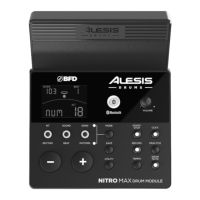
Important: To play songs, you must be in Normal Mode (Kit, Voice, Song).
T
o select and play a song:
1. Press the S
ong button until NUM appears on the display.
2. Use the –
and + buttons to select a song.
3. Press S
tart/Stop to begin playback.
A
djust the tempo by pressing Tempo and using the – and + buttons to adjust the
BPM. Press both –
and + buttons simultaneously to reset the tempo to its default
value. Press the S
ong button to cycle through additional Song settings.
A
djust the volume of the music (not the drum part) by pressing the Song button,
then press the S
ong button repeatedly until ACC appears on the display. Use the –
and +
buttons to adjust the volume. It will return to its default volume setting when
you power the module o.
A
djust the volume of the drum part by pressing the Song button, then press the
S
ong button until DRM appears on the display. Use the – and + buttons to adjust the
volume. To mute/unmute the drum part entirely, press D
rum Mute. It will return to
its default volume setting when you power the module o.


 To Next Page