Chapter 1 – Your First Session with the Wedge
10 Wedge Reference Manual
What’s in the Display?
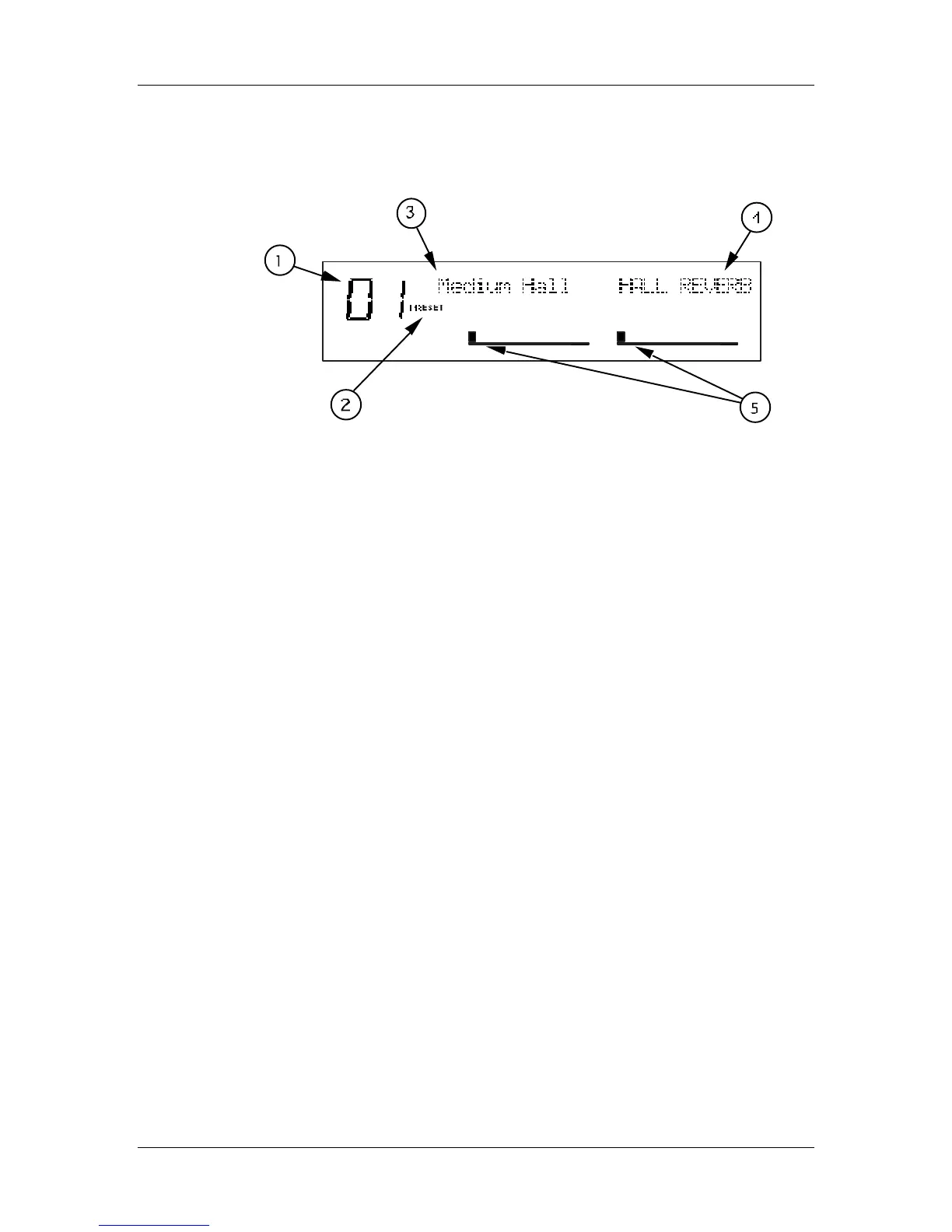
When the Wedge is first turned on, the display will look something like this:
The Wedge’s display is divided into 5 sections:
Ê Program Number
Ë Preset/User Bank
Ì Program Name
Í Configuration
Î Input Level Meters
For more about the Wedge display, see Chapter 3.
Auditioning Internal Programs
The Wedge comes with 128 Programs in a Preset bank, plus another 128 Programs in
the User bank. These Programs represent the wide range of applications for which
the Wedge is suited.
To audition the internal effect Programs:
Ê Press the [PROG] button.
The [PROG] button will light.
Ë Turn the [VALUE] knob to scroll through the 128 Preset and 128 User Programs.
Switching Between Preset and User Banks
To instantly switch between the Preset and User banks, press the [PROG] button.
Each time you press the [PROG] button, the Wedge will toggle back and forth
between the Preset and User banks. The display will indicate this by reading either
“PRESET” or “USER” next to the Program number.
You can also switch between banks when scrolling through the Programs with the
[VALUE] knob. When you scroll clockwise past Preset 127, the display will “roll-
over” to User 00. Likewise, if you turn back the [VALUE] knob counterclockwise past
User 00, the display will move to Preset 127. However, if you turn back the [VALUE]



 To Next Page