AlgoForce E1500
10
Quick Start
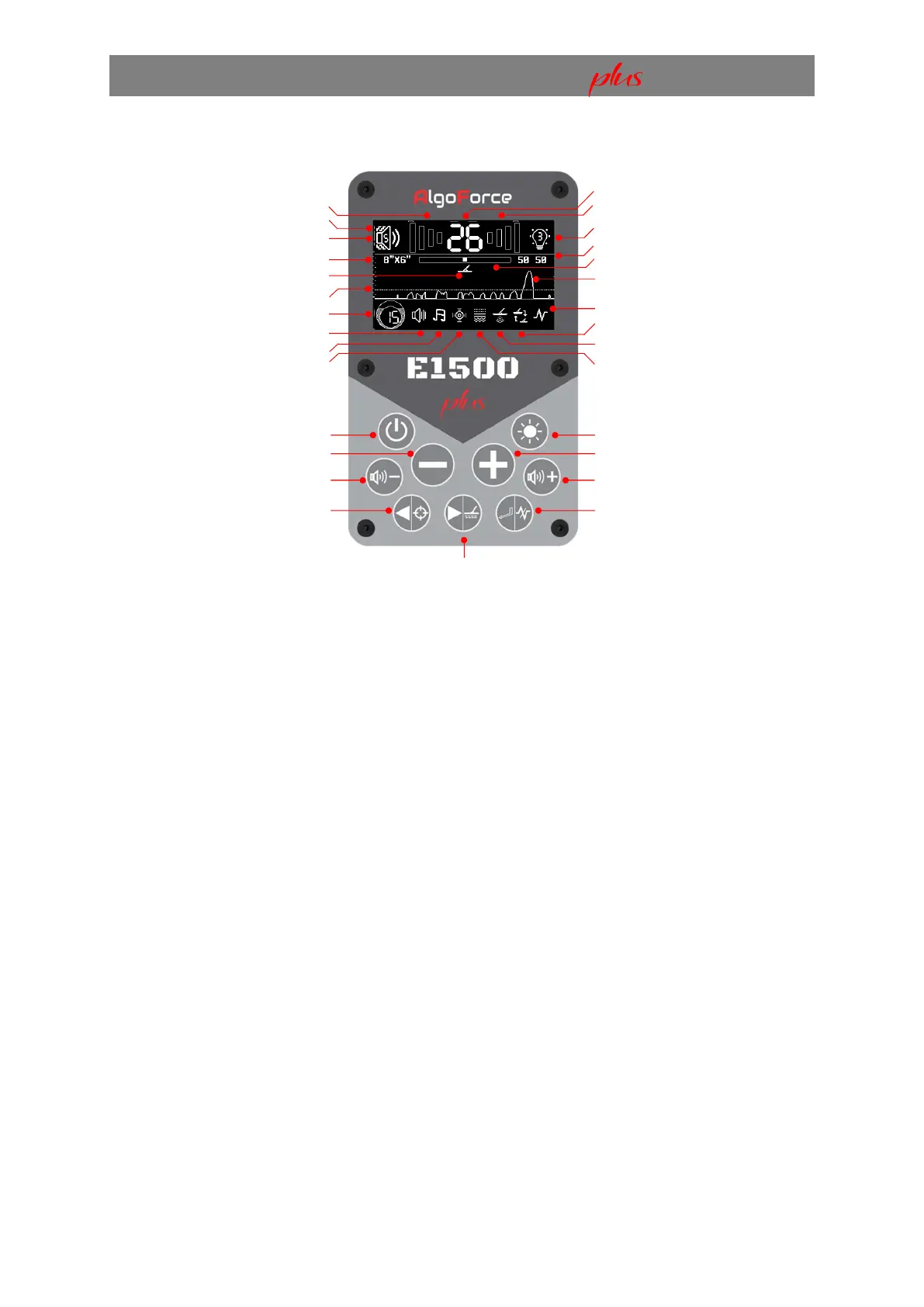
Main Detection User Interface (UI)
Press Volume/Vibration buttons to modify Audio Volume. Hold Volume/Vibration buttons to adjust
Vibration. Press the Backlight/Theme button to adjust the backlight. Hold the Backlight/Theme
button to switch between dark and light display themes. Use the Minus and Plus buttons to modify
Sensitivity.
To adjust other settings:
1) Press Return/Auto FS in the Main Detection UI to access the menu.
2) Navigate with Left/Pinpoint or Right/Auto GB.
3) Modify selected setting with Minus or Plus.
4) Press Return/Auto FS to go back to the Main Detection UI.
I. Power On
Connect the power bank to the control box and turn it on. To power the detector, hold the Power
On/Off button for 3 seconds, then release. Repeat to turn it off.
Note:
1. Some power banks may enter standby mode when no demand is detected, such as when a
connected USB device is turned off. In this case, the power bank must be manually turned on
before turning on the detector. To do this, press the power button if the power bank has one,
or unplug and reconnect the USB cable if it does not.
2. Some power banks may turn on the detector as soon as it’s plugged in.
Low Tone Signal Strength
Vibration Level
Audio Volume Level
Selected Coil Size
Auto GB In Progress Indicator
Detection Threshold
Sensitivity
Audio Threshold
Audio Tone
Audio Treble
Power On/Off
Minus
Volume/Vibration Down
Left/Pinpoint
Right/Auto Ground Balance (GB)
Soil Mineralisation
High Tone Signal Strength
Backlight Level
Dual Ground Balance Values
Ground Drift Indicator (G.D.I)
Real-time Scrolling Signal
Frequency Scan
Coil Selection
Detection Mode
Soil Type
Backlight/Theme
Plus
Volume/Vibration Up
Return/Auto Frequency Scan (FS)


 To Next Page