18
Adjusting the chat balance
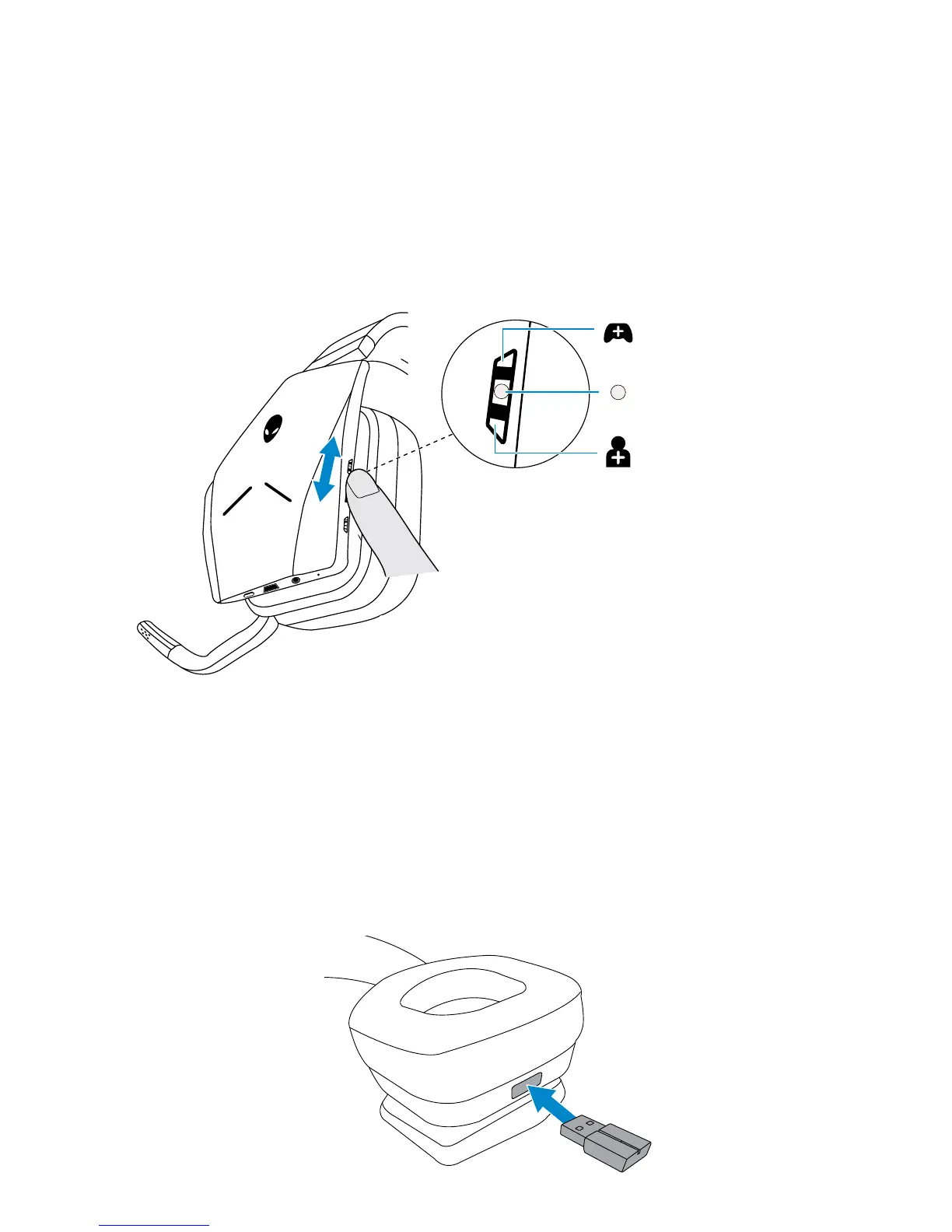
Use the Chat balance control to find a preferred balance between chat audio
and game audio.
Turn the control up to focus on the game volume, reducing the chat volume
from 100% to 0%. Turn the control down to focus on the chat volume, reducing
the game volume from 100% to 0%. Turn the control to the center position, as
indicated by the white marker, to set chat and game audio to their original levels.
Focus game volume
(reduce chat volume)
Balance game/
chat volume
Focus chat
(reduce game volume)
Storing the USB wireless dongle in the headset
The USB wireless dongle can be stored in the USB wireless dongle storage slot.
To secure the wireless dongle, insert it into the slot as shown and push until you
hear an audible click sound.
To remove the wireless dongle, push it inside the headset until you hear an
audible click, then remove your finger. The wireless dongle will pop out of
storage slot and is held in place by a magnet. Pull the USB wireless dongle out
of the slot to use it.



 To Next Page