26
9
1.
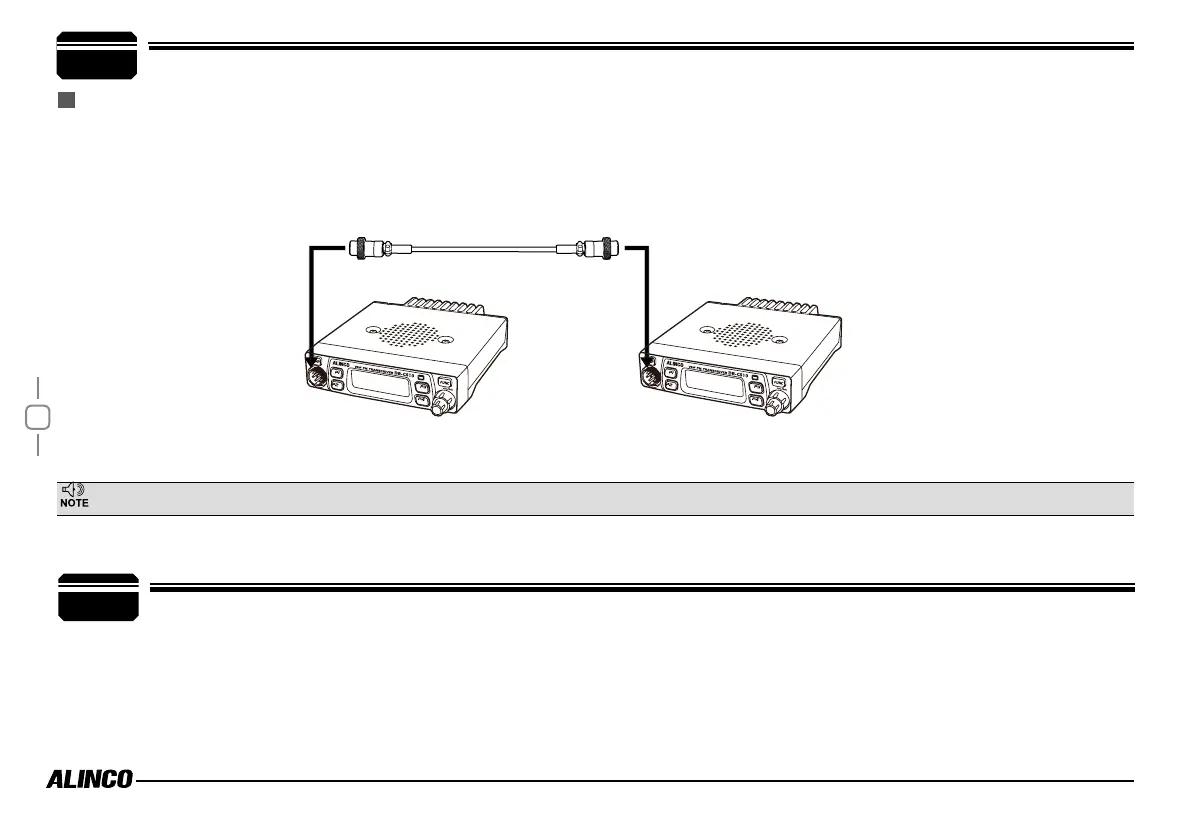
Use optional EDS-29 cloning cable as shown below. Make a master unit by setting and programming it as desired. Turn off both units. Connect the
cable between the DATA jacks on both units.
2.
Master unit: Press programmed CLONE function key (Program the Key by PC) or other way that press and hold Power(On)+ FUNC+ P2 key at the
same time to enter into cloning mode. LCD displays "CLONE".
Cable Clone
OPTIONAL ACCESSORIES
If the data is not successfully transmitted, turn off both units, make sure the cable connection is correct and repeat the entire operation from the beginning.
3.
Press master unit's [FUNC] key, LCD displays "CLONEXX". Slave unit displays "CLONEXXX". When the cloning is successfully finished, the slave
unit will restart. Turn off the power, disconnect the cable and repeat step 3 operations to clone the next slave unit.
This feature clones the programmed data and parameters in the master unit to slave units.
Pre-programming is required using a dealerware.
- EDS-29 Clone cable
- ERW-12 PC cable
- EMS-74 Microphone
10


 To Next Page