ALL-TEST PRO
®
31 User Manual
©2011, ALL-TEST Pro, LLC www.alltestpro.com rev 2011-11F 25
· Test frequencies must be changed if
1) The impedance values are less than 1 Ω or greater than 999 Ω.
2) The Fi and/or I/F values are outside of the recommended tolerances (See the Data
Interpretation Section of this manual)
Select the Motor Test
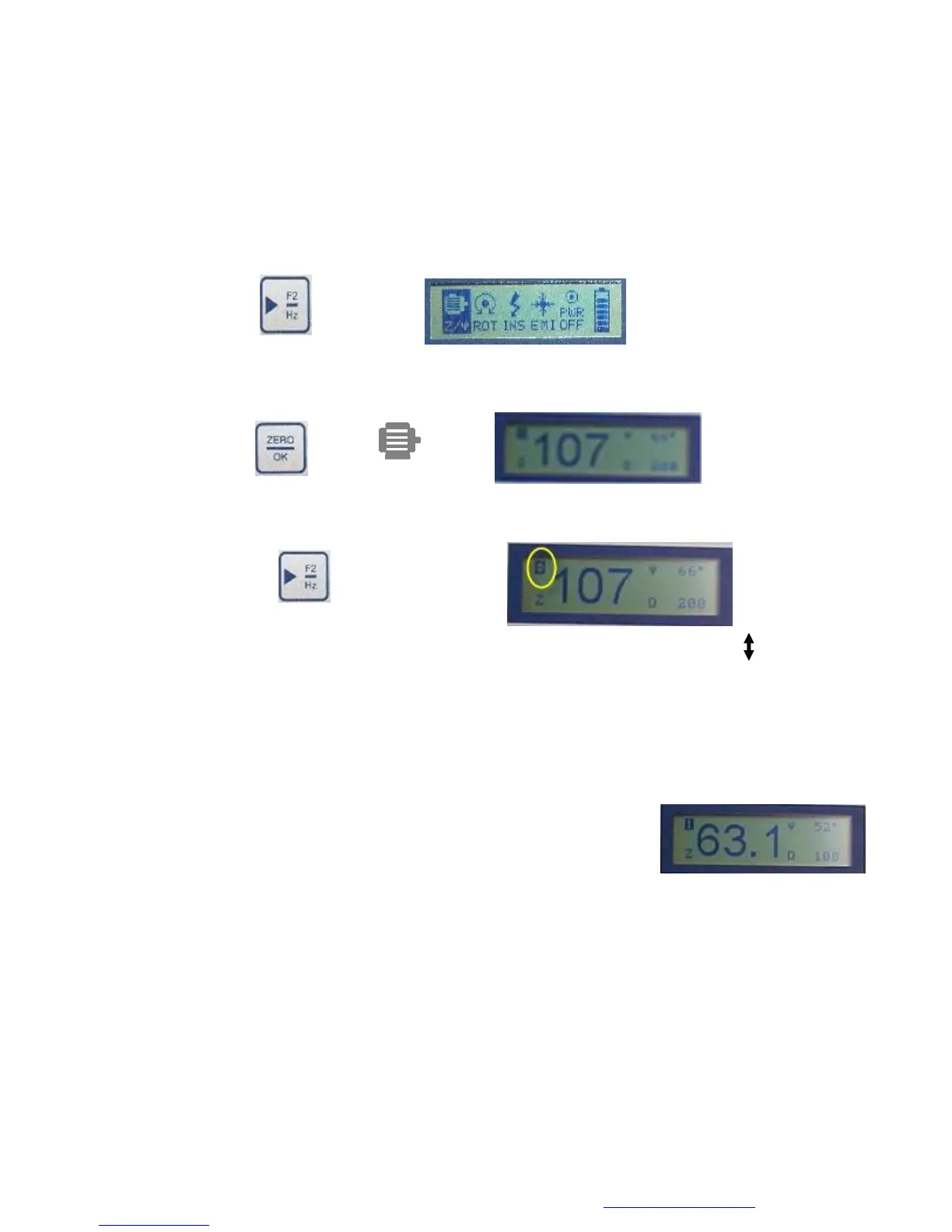
Using the ◄ F1 or ► F2, key highlight the Winding Test (Z/ψ) icon
1. Press the ZERO/OK key to select the Winding test (Z/ψ) from the main menu. This will display
screen 1.
2. While display screen 1 is displayed press the F2 key. The ALL-TEST PRO® 31 will emit an
audible “beep”
and the ‘1’ displayed in the upper left corner of the display screen will change to
Also the value of the frequency in the lower right hand part of the display screen1 will change. In
this case it is 200 Hz.
3. Press the ▲▼buttons:
a. The applied frequency will immediately change to the new value.
b. The new impedance and phase angle (Fi) values will be
displayed.
c. The display screen number returns to 1.
4. The ALL-TEST PRO® 31 frequency change is one step at a time. To change to another
frequency the steps 2 & 3 must be repeated for each frequency. (Note: The test frequency can
only be changed from display screen 1.)
Changing the test frequency will also change the I/F value.


 To Next Page