5.2.3 Using Bluetooth® interface to pair, from Windows
Alternately, you can pair the reader using Windows Control Panel.
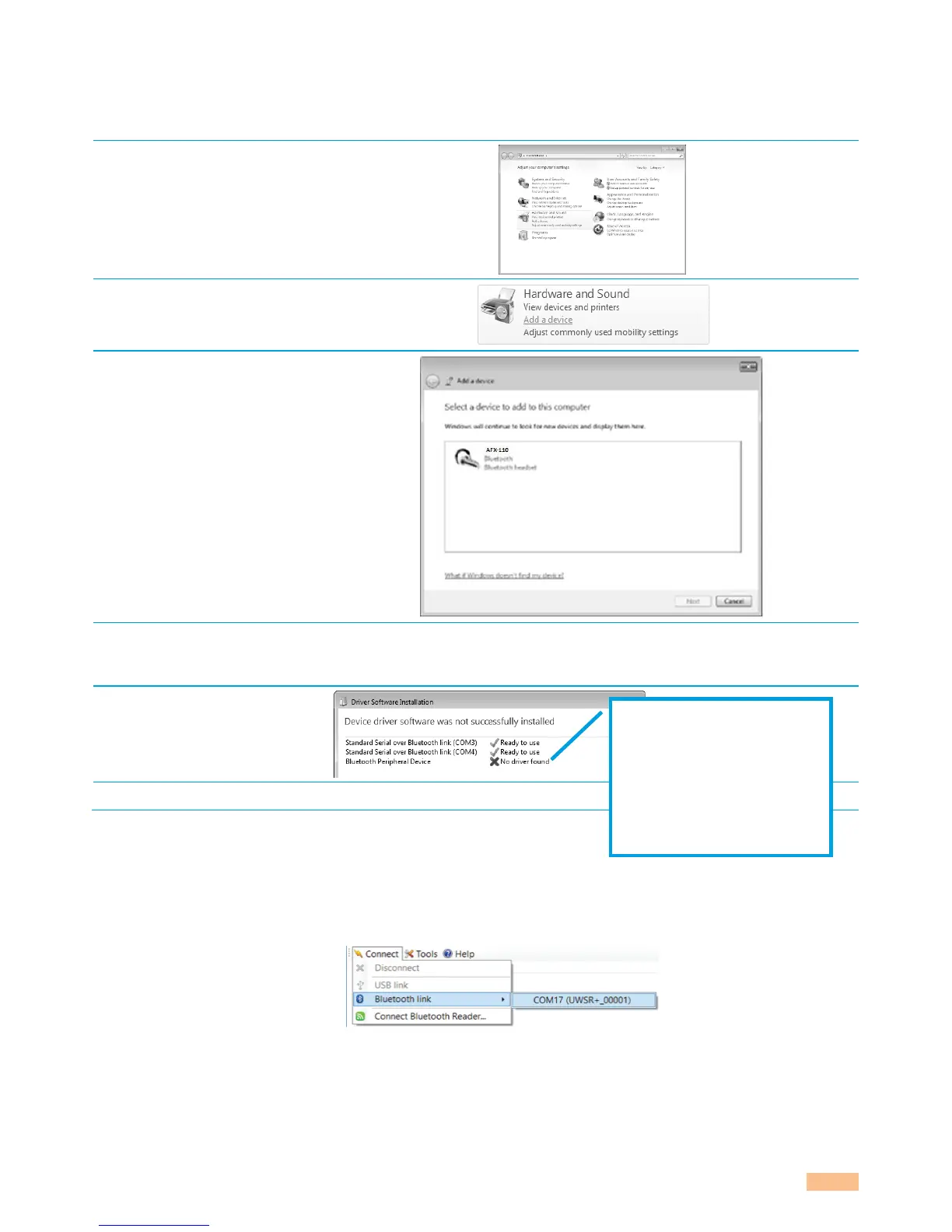
Find below the instructions for pairing with Windows 7:
Open Windows’ Control
Panel
In “Hardware and Sound”
section, select “Add a
device”
Switch-on the reader
and wait until the reader
appears in the device list
as following:
Select the appropriate
reader and click with
right button
NOTE: Your reader may appear as a Bluetooth headset.
Windows will now install
the driver needed as
following:
Your reader is now ready to connect.
5.2.4 Connect by Bluetooth® when the reader is already paired
When your reader has already been paired to your computer, go to “Connect menu”, select
“Bluetooth link” and click on the appropriate COM port:
“Bluetooth Peripheral
Device” is a service
dedicated to Apple’s
devices and is unknown
from Windows’ operating
system that the reason why
the PC mentions “no driver
found”.



 To Next Page