3.3 Power on / off instructions
To turn the AFX-110 on, press and release one button once. During this start up time the reader will
display the screen below and beep once.
Note 1 - Once activated, the reader will stay on for 2 minutes by default.
3.4 Reading an implanted microchip
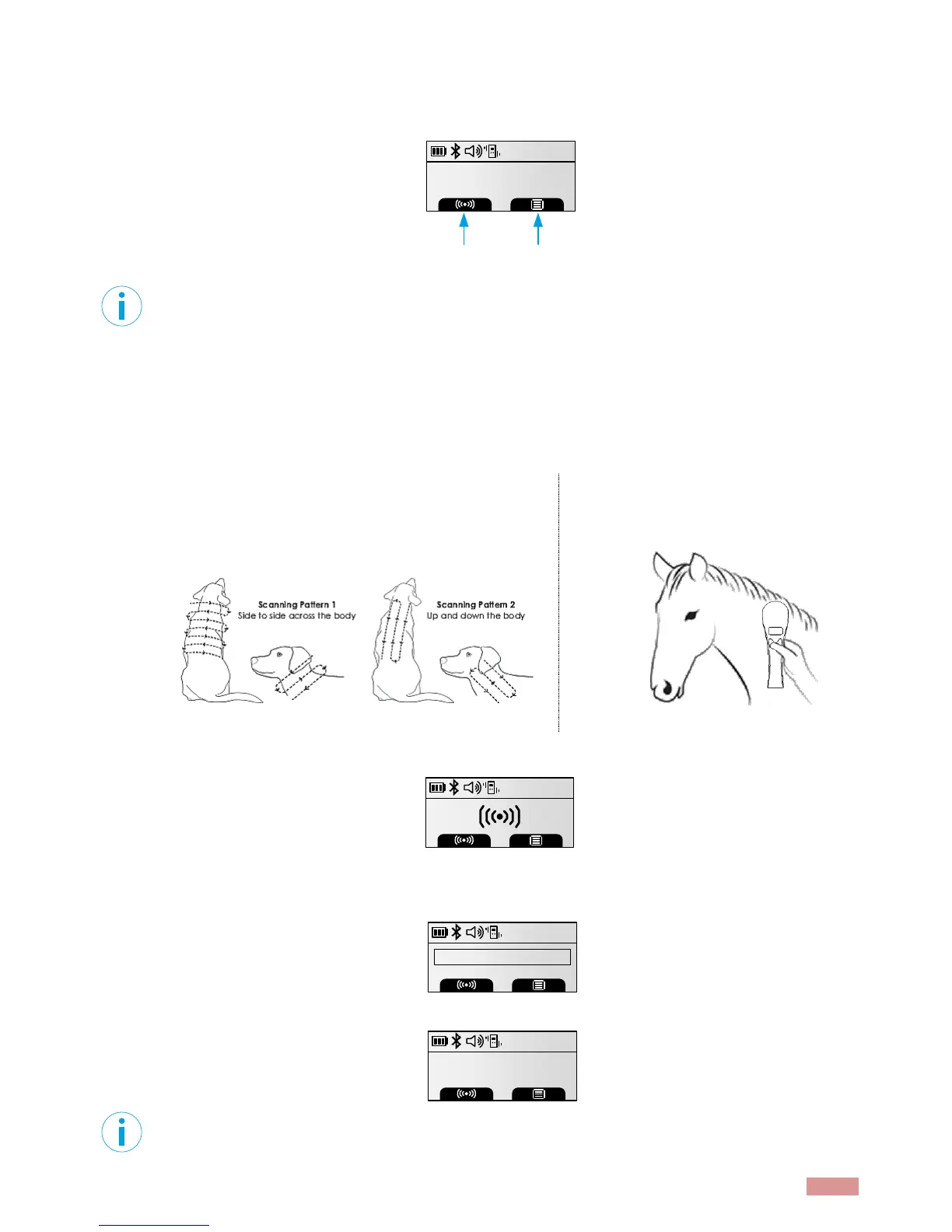
3.4.1 Scanning and locating an implanted microchip
When searching implantable microchips, place the reader so it touches the animal.
Use the following scanning patterns to locate the microchip. Perform pattern 1 and 2 on Left, Top and
Right sides of animal’s neck and shoulders, as microchip placement might vary per animal.
Keep scanner touching animal and scan slowly following
patterns below:
Keep scanner touching animal over
standard location for particular species.
While pressing the SCANNING button, the reader will display the screen below, until a microchip is
found or until a 20-second elapse after the button release.
If a microchip is not detected, the reader will display “ID not found”. In that case, we recommend re-
scanning the test chip to ensure reader is operating properly. The animal, then should be re-scanned,
moving slower and in varying angle according to the patterns described above.
The following pictures show the result of a successful reading session:
Note 2 – If a microchip was found and the reader is connected via its USB interface or its Bluetooth
®
interface to a host computer, it will send the microchip number to the host computer.
Allflex AFX-110
10:49AM
12/19/2017
scanning
menu
982000351249512
10:49AM
FDX-B
ID not found
982000351249512
10:49AM
FDX-B



 To Next Page