© Copyright, Alliance Laundry Systems LLC – DO NOT COPY or TRANSMIT
Testing Machine and Electronic Control Functions
70417701
74
Production Test Cycle
To Enter Production Test Cycle
1. Be certain control is in Ready Mode, and access
panel or coin vault is open.
2. While pressing and holding the HIGH TEMP
keypad with one hand, press the LOW TEMP
keypad with the other hand.
3. When the control enters the Production Test
Cycle, it will first display “S xx” with the “xx”
showing the software version of the control.
4. The control will advance through the sequence of
test steps whenever any keypad is pressed, with
the exception of the Keypad Test. Refer to
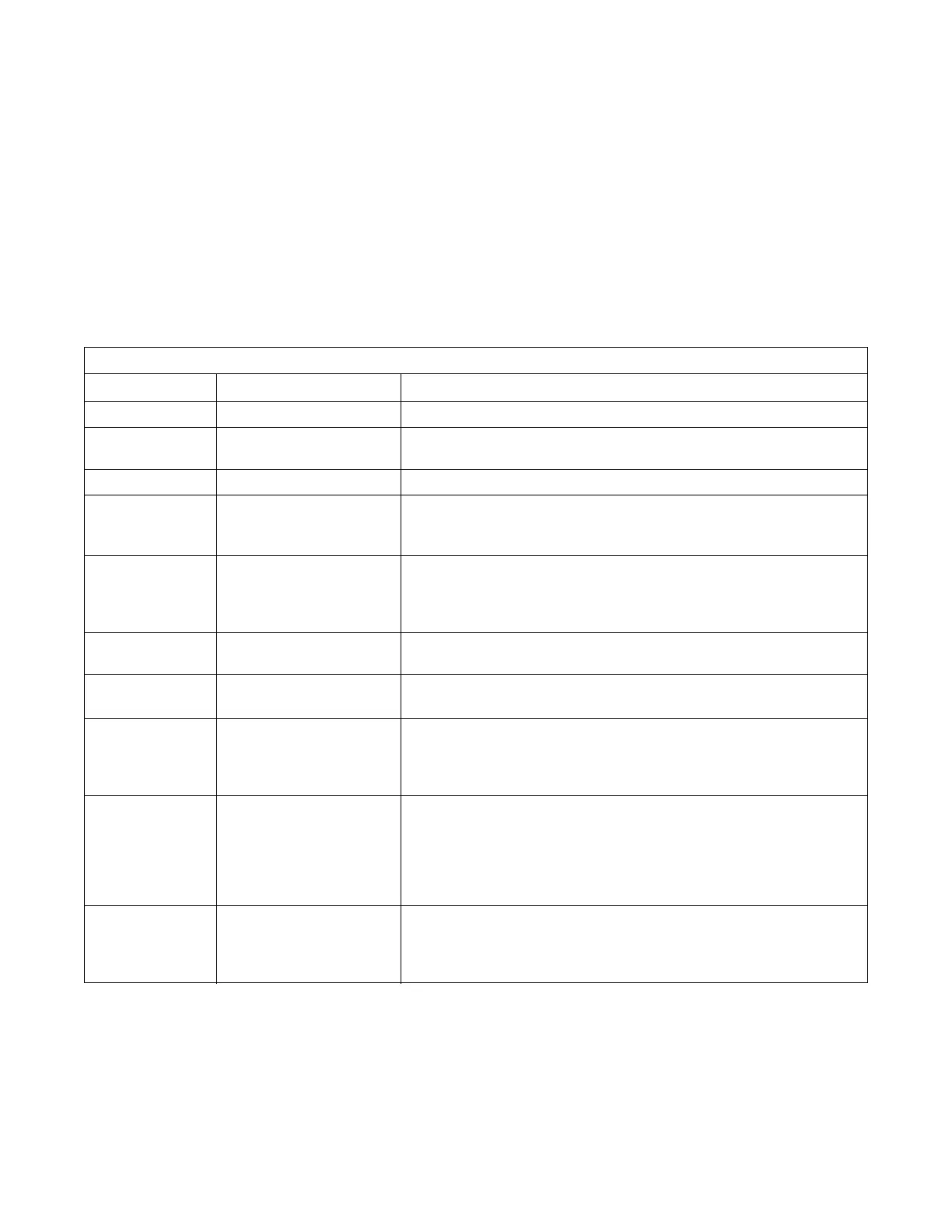
Table 20 for all tests in the Production Test
Cycle.
To Exit Production Test Cycle
The test will be exited when the time reaches “00” on
the control in Step #10. Otherwise, the control must be
powered down to end the test.
NOTE: If power to the control is turned off before 10 Minute Test Cycle has ended, the cycle will be cleared
from control.
Table 20
Production Test Cycle Quick Reference Table
Display Test Mode Comments
Sxx Software Version xx is the software version number.
Cxxx Machine Configuration #2
Display Mode
xxx is machine configuration value.
Ct 4 Control Type 4 is the control type.
All LEDs and
display segments
will light
Show Entire Display Mode The audio signal is turned off.
CxCx Coin Drop Test x is the number of coins entered. If dual coin drops are installed, coin
drop #1 will be shown on the left of the display and coin drop #2 will be
shown on the right of the display. If a single coin drop is used, only one
coin count will increment.
U xx Coin Vault Switch Test xx is either oP to signify coin vault switch is open or CL to signify coin
vault switch is closed.
S xx Service Door Switch Test xx is either oP to signify service door switch is open or CL to signify
service door switch is closed.
Degrees in 5°F
increments,
SH, oP
Thermistor Temperature
Test
The temperature will be displayed in either Fahrenheit or Celsius,
depending on machine’s configuration (refer to Programming Control,
option 16). If control senses a shorted thermistor, SH will be displayed.
If control senses an open thermistor, oP will be displayed.
PAdx Keypad Test When a key is pressed, the control will display the number assigned to
the keypad (1 – HIGH TEMP, 2 – LOW TEMP, 3 – NO HEAT,
4 – MED TEMP, 5 – DELICATES, 6 – START). As each keypad is
pressed, its corresponding LED will be lit and remain on for the duration
of the test. When all keypads have been pressed, the control will advance
to 10 minute test cycle.
10 10 Minute Test Cycle Determines if tumbler can function in a cycle for 10 minutes. START
pad will flash one second on and one second off. The START pad can be
used to decrease time remaining. If START pad is not pressed within
4.25 minutes, the control will return to Ready Mode.



 To Next Page