Owner’s Manual15
Switching Off
• Note – If Backup Loads are connected, Switch off the Backup Main Switch and
any connected RCBOs (UPS - dedicated circuits) within the Switchboard.
• Long press the Power button (6s) on the Primary Unit until the battery LED light
turns off.
• Turn off the Battery Isolator located on the left-hand side of the Primary Unit.
• If a Secondary Unit is/are installed, long press the Power button on all
Secondary Units until the LED indicators turn off.
• Turn off any AC Isolators located on either the Grid or Backup side.
• Turn off the Main Switch Energy Storage (Battery) within the switchboard.
4.4 System Operating Status
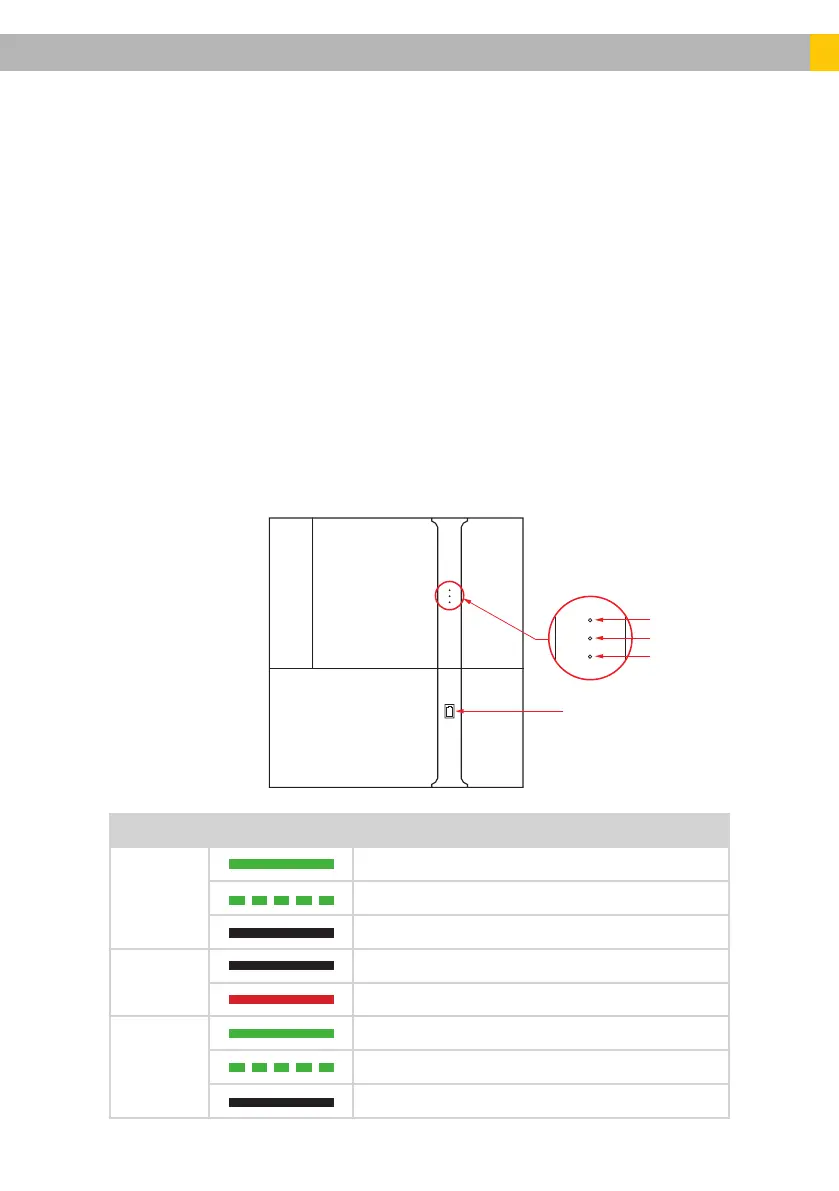
On the Primary Unit (SMILE-B3-PLUS), there are three LEDs indicating the
status of system parameters, i.e., Normal operation, System Fault and COM
(communication). The table below describes different LED states and their
description.
Battery Display
Com
Fault
Normal
LED Status Description
Normal
Solid Green – Normal system operation
Single icker – System standby or self-inspection
Off – Switched off (or Out of order)
Fault
Off – Normal Operation (or Fault-free)
Solid Red – System Fault (or Out of order)
Com
Solid Green – Normal Network Connection
Single icker – Connecting to Alpha Cloud
Off – Switched off (or No network availability)
SMILE B3 PLUS













 To Next Page