20
SMILE B3 PLUS
6.2 System Registration
Contact your system provider for assistance with Product Registration as they may
have a custom process. If your system provider asks you to register the system,
follow the below steps:
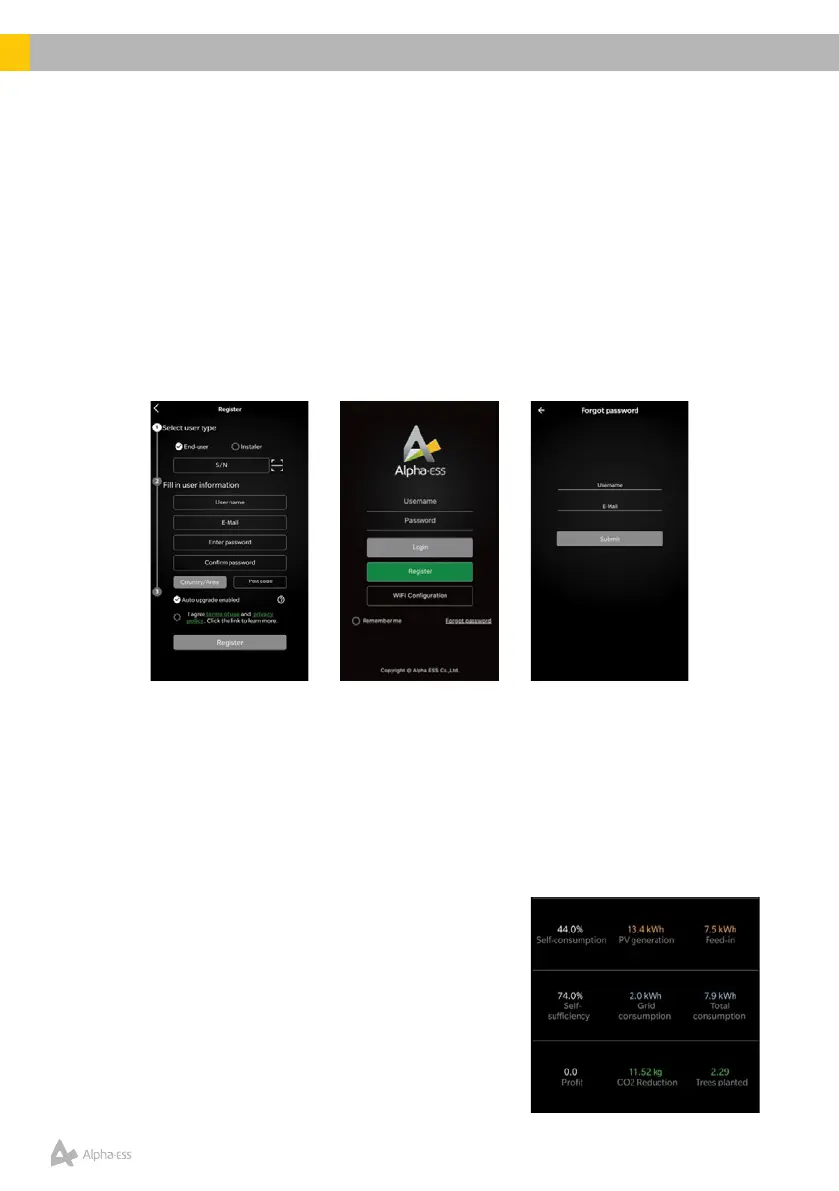
• Open the Alpha ESS APP, click Register and set user type as End-User.
• Enter the Product S/N (AL-xxxxxx), this is located on the side of the Primary
Unit.
• Fill in the User information – Username, E-mail, Password, Country/Area and
Postcode.
• Select Auto upgrade enabled and agree to the terms and conditions.
• Select Register to complete account registration.
Note – If you have forgotten your password, click Forgot Password on the
login page to reset your password. Enter your username and e-mail to receive
instructions on your mailbox. Follow the prompts in the e-mail to create a new
password.
6.3 Alpha ESS App Features
Login to the Alpha ESS app using your credentials to access your SMILE B3 PLUS
system information.
Homepage
The homepage provides an overall breakdown of
the user’s energy usage (in kWh), including Solar PV
generation, Feed-in/Export, Grid consumption and
Total consumption. This helps identify the user’s Self-
consumptionandSelf-sufciencyratios.Userscan
also access details of system energy conservation and
environmental protection (equivalent trees planted).













 To Next Page