Owner’s Manual19
SMILE B3 PLUS
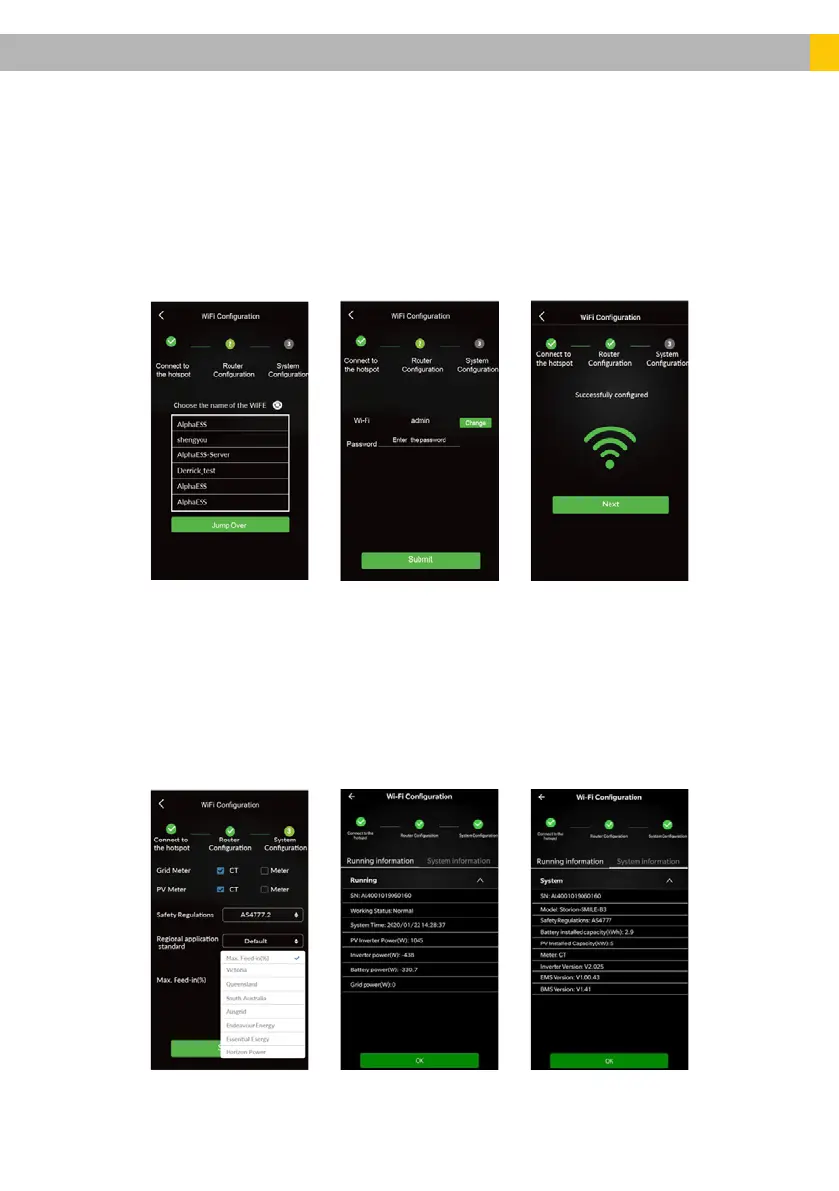
• After establishing a successful connection, return to the Alpha ESS App and
click Next. The app will display a list of Wi-Fi networks available in the region.
Find your Wi-Fi network, enter the Username and Password and hit Submit.
• Once the Wi-Fi connection is established, the app will prompt a Successfully
Conguredmessage&theGreenLED(COM) on the Primary unit comes on
(Flashing, followed by Solid).
• Select the type of Grid & PV Meters used on-site, either CT/Meter based
on site conditions. Select the applicable Safety Regulation (AS 4777.2)
and Regional Application standard (Aus A/ Aus B/ Aus C). Also, select the
applicable Max. Feed in limit (%) and press Submit.
Note – The Basic Parameters are usually completed by the Battery Installer at the
time of installation. If you’re unsure, please retain the default values or contact your
system provider.













 To Next Page