72
5.3 Settings menu
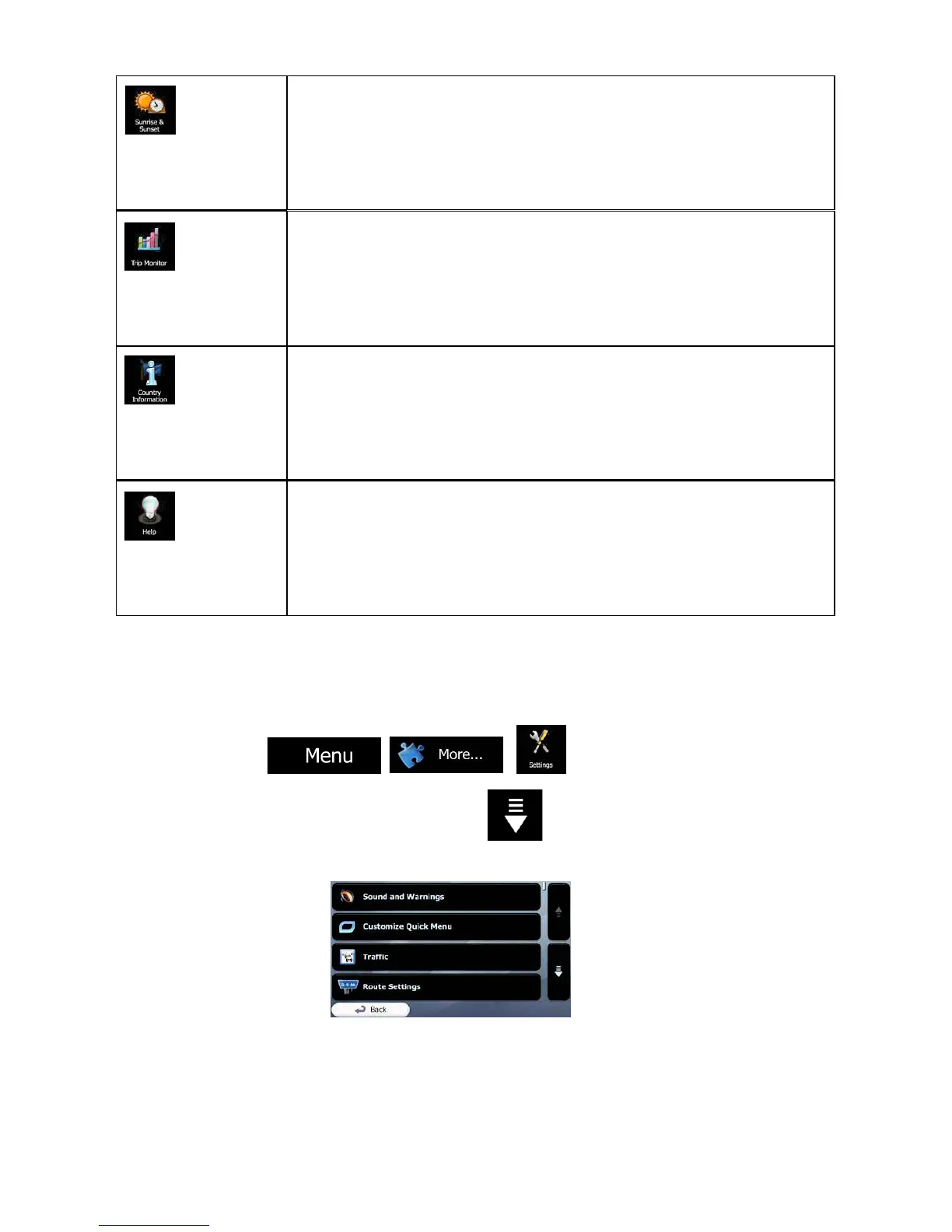
You can configure the program settings, and modify the behaviour of ALPHA-NAV
navigation. Tap the
following buttons:
The Settings menu has several options. Tap or scroll with your finger to see the
full list.
Tap this button to see the sunlit and dark areas of the world.
Your current location and route points are marked on the map.
Tap the Details button to see the exact sunrise and sunset times
for all your route points (your current location, all waypoints and
the final destination).
If you save your trip logs when you arrive at some of your
destinations or let the application automatically save the trip logs
for you, those logs are all listed here. Tap one of the trips to see
the trip statistics, speed and altitude profile. If track log has also
been saved, you can display it on the map with the selected
color. Track logs can be exported to GPX files for later use.
Select a country from the list and see useful driving information
about the selected country. Information may include speed limits
on different road types, the maximum blood alcohol level and
any compulsory equipment you need to show when stopped by
the police.
Run the Demo to watch sample route simulations to see how
navigation works.
The About section provides you with product information. Read
the Software and Database End User License Agreement, or
check the map and other contents of the application. You can
also access program usage statistics.


 To Next Page