EasyManua.ls Logo

Alpine 7294R - Operation

Alpine 7294R
51 pages
Print Icon
To Next Page IconTo Next Page
To Previous Page IconTo Previous Page
Loading...
OPERATION
_
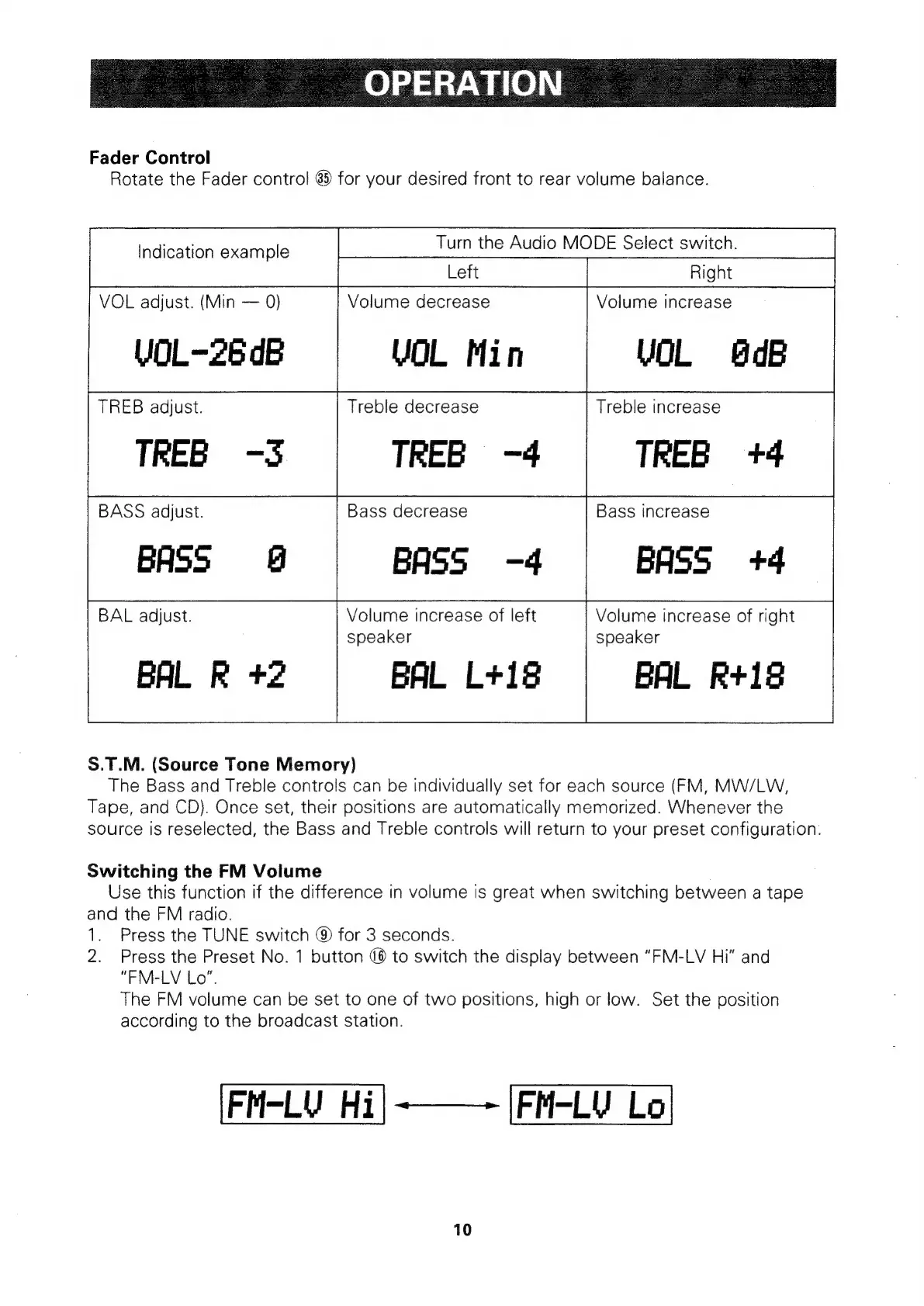
Fader
Control
Rotate
the
Fader
control
63
for
your
desired
front
to
rear
volume
balance.
Indication
example
VOL
adjust.
(Min
0)
VOL-26
dB
TREB
adjust.
TREB
-S
BASS
adjust.
BASS
§@
BAL
adjust.
BAL
R
+2
Turn
the
Audio
MODE
Select
switch.
Volume
decrease
VOL
Min
Treble
decrease
TREB
-4
Bass
decrease
BASS
-4
Volume
increase
of
left
speaker
BAL
L+18
S.T.M.
(Source
Tone
Memory)
The
Bass
and
Treble
controls
can
be
individually
set
for
each
source
(FM,
MW/LW,
Tape,
and
CD).
Once
set,
their
positions
are
automatically
memorized.
Whenever
the
source
is
reselected,
the
Bass
and
Treble
controls
will
return
to
your
preset
configuration.
Switching
the
FM
Volume
Volume
increase
VOL
dB
Treble
increase
TREB
+4
Bass
increase
BASS
+4
Volume
increase
of
right
speaker
BAL
Rt+18
Use
this
function
if
the
difference
in
volume
is
great
when
switching
between
a
tape
and
the
FM
radio.
1.
Press
the
TUNE
switch
®
for
3
seconds.
2.
Press
the
Preset
No.
1
button
(8
to
switch
the
display
between
“FM-LV
Hi"
and
“FM-LV
Lo",
The
FM
volume
can
be
set
to
one
of
two
positions,
high
or
low.
Set
the
position
according
to
the
broadcast
station.
FM-LV
Hi|-———
|FM-LV
Lo
10

Related product manuals