ENTER A DESTINATION
2
34 - Navigation
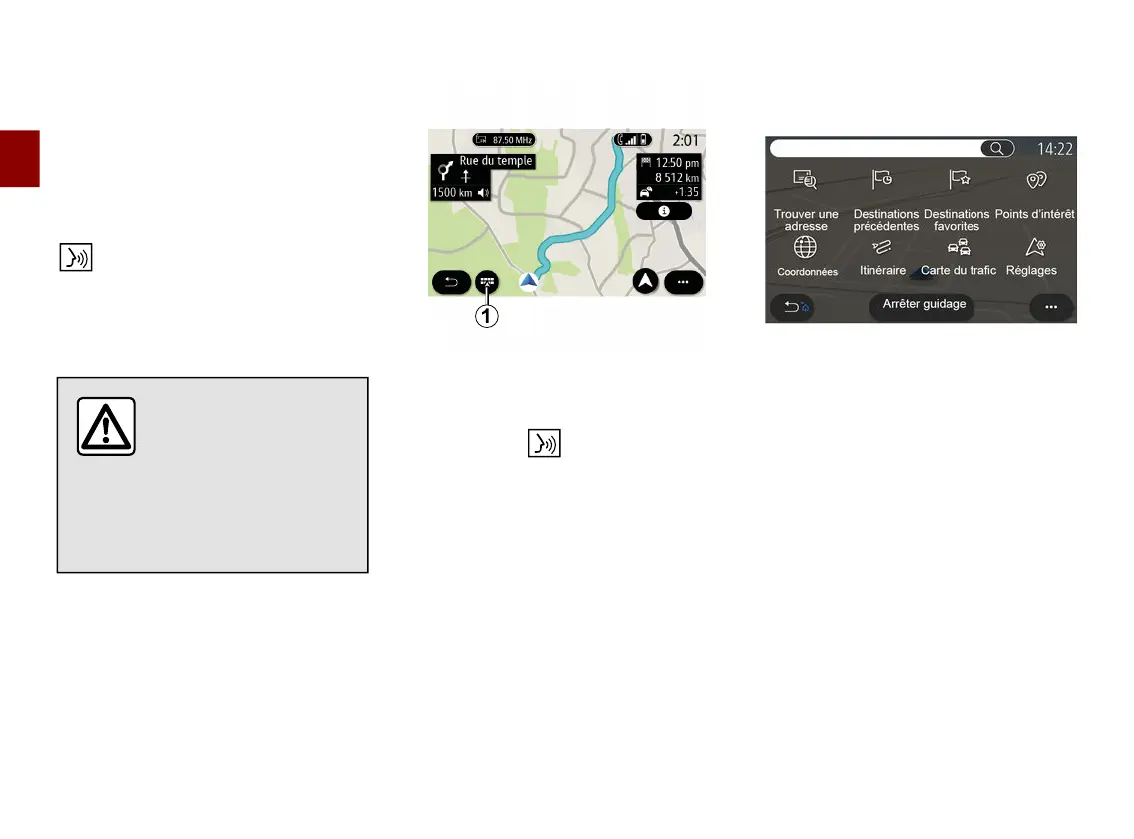
"Navigation" menu
From the home screen, press the card
of press "Menu" then "Navigation".
Using voice recognition to enter an
address
Press the voice recognition button
, then following the sound signal
you will be able to dictate a destination
town, number and/or street name and/
or area. For more information, see the
section on "Using voice recognition".
Precautions regarding
navigation
Use of the navigation
system does not in any
way replace the responsibility or
vigilance of the driver when
driving the vehicle.
Destination in a foreign country
The country must be changed before
you say the address. Press the voice
control button to display the main
voice control menu.
After the sound signal, say "Change
country", then say the country in which
you wish to carry out your search. After
the second beep, say your destination
address.
Note: you can change country as long
as the country is supported by the
system language.
Use the navigation menu
1
to access
the following functions:
– « Find an address » ;
– « Previous destinations » ;
– « Favourite destinations » ;
– « Points of interest » ;
– « Coordinates » ;
– « Route » ;
– « Traffic Map » ;
– « Settings » ;
– ...



 To Next Page