LISTEN TO THE RADIO
3
Audio/Multimedia - 49
"Radio" menu
From the main menu, press "Radio". If
a radio station is already playing, you
can press the shortcut in zone
A
from
some pages in the "Navigation" or "
Phone" menu.
You can select a saved
station, scroll through the
radio stations by frequency
or by list depending on the mode
selected using the button on the
steering column control.
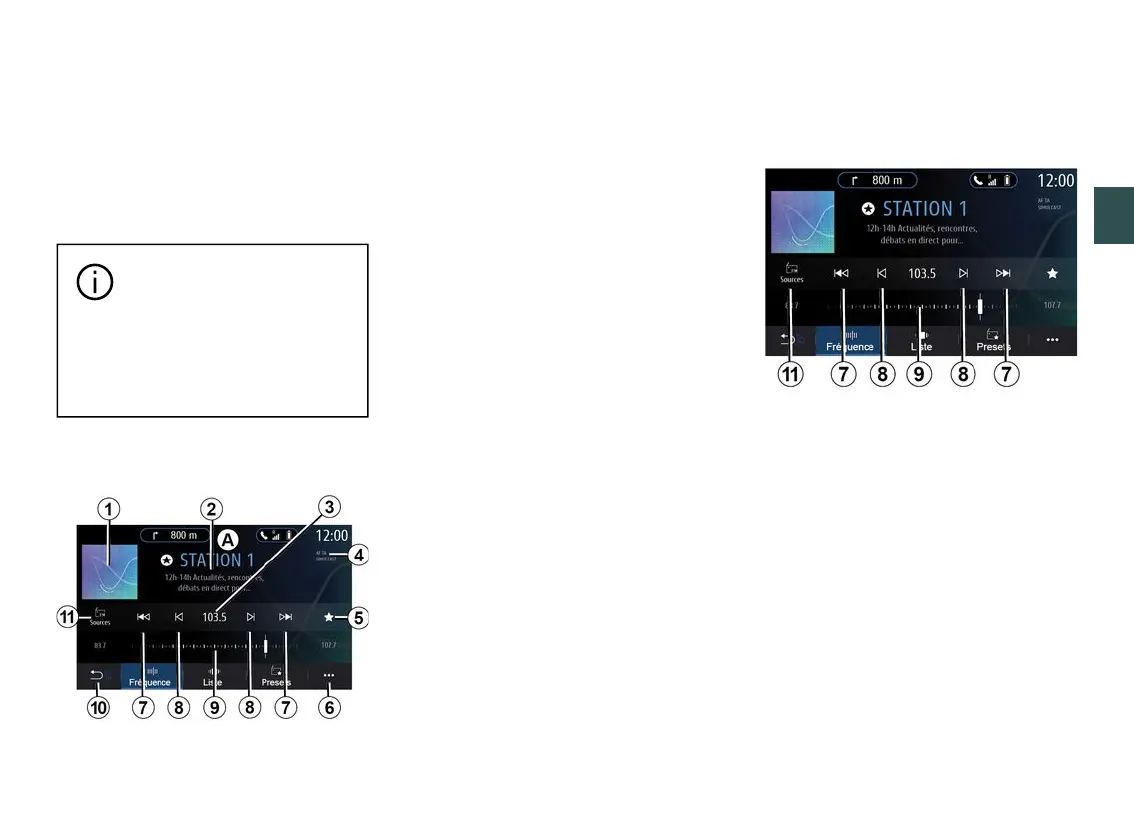
"Radio" screen
1.
Logo of the radio station now
playing.
2.
The name of the current station and
the frequency. Text information (artist,
song etc.).
3.
Access to manual entry of the
desired frequency.
4.
Indication of the activation of the
traffic information and station tracking
functions.
5.
Store the station now playing in
"Presets".
6.
Access the pop-up menu.
7.
Access next or previous station.
8.
Access next or previous frequency.
9.
Frequency selector bar.
10.
Return to the previous screen.
11.
Access the audio sources menu
Note: the information available
depends on the station or radio band
selected.
"Frequency" mode
Use this mode to select radio stations
by frequency in the radio band
selected. To scan the frequency range,
you have two options:
– search by frequency: scan the
frequencies by repeatedly pressing the
buttons
8
or move the cursor on the
selector bar
9
;
– search by station: move forwards or
backwards to the next station by
pressing the buttons
8
.



 To Next Page