CALL MANAGEMENT
4
Phone - 65
To take a call, press the "Answer"
button
16
. To end the call, press the
"End call" button
12
.
"Reject" a call
To reject a call, press and hold the
"Reject" button
12
. The person calling
you will be redirected to your
voicemail.
Put the call "on hold"
Press the "Put call on hold" button
14
.
The multimedia system will hang up
and automatically put incoming calls
on hold. A synthesised message asks
your callers to wait.
Transfer to phone
Press the "Transfer" button
13
to
transfer the call from the vehicle to the
phone.
Note: some telephones may
disconnect from the multimedia system
during a call transfer.
Number keypad
Press the "Keypad" button
15
to
access a number keypad..
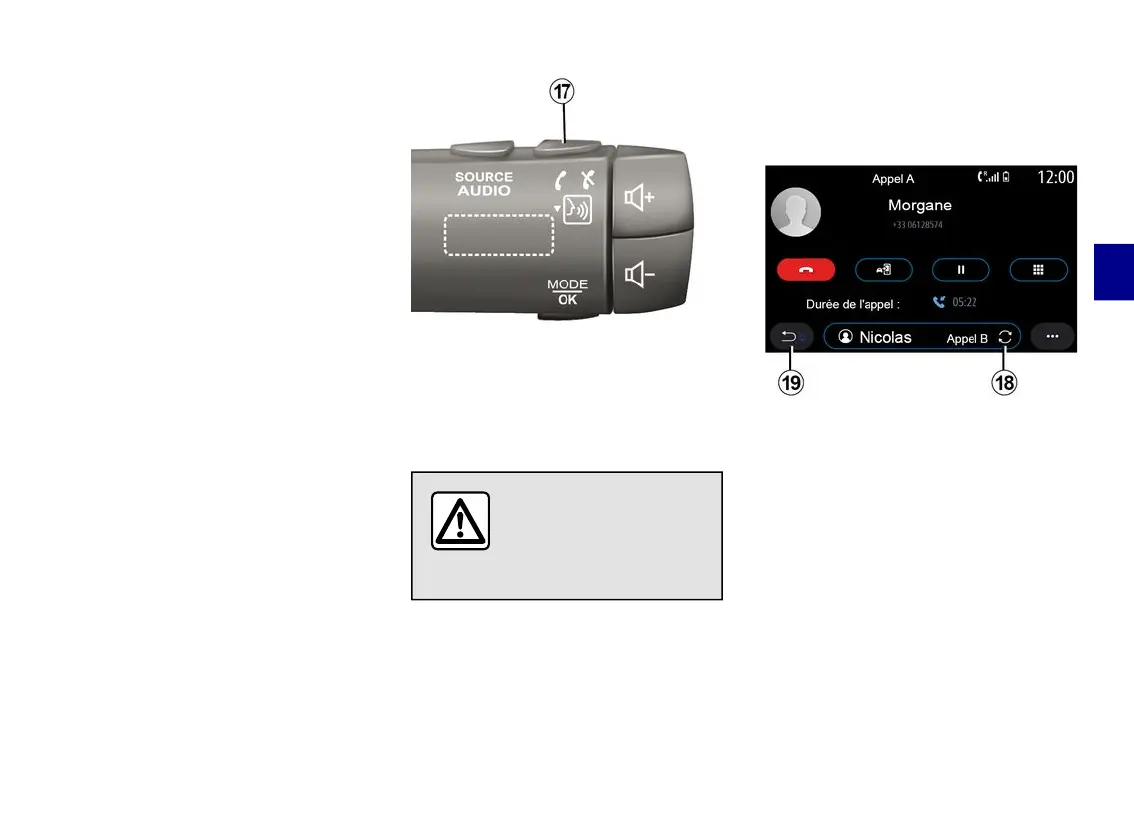
You can answer/end a call by pressing
directly on the steering column control
17
.
For safety reasons, carry
out these operations
when the vehicle is
stationary.
During a call
During a call you can:
– adjust the volume using the control
buttons on the steering column or
using the volume buttons on the
multimedia screen;
– end a call by pressing "End call"
8
or by pressing the button
17
on your
vehicle's steering column control;
– place a call on hold by pressing the
button
14
. To resume a call that is on
hold, press the button
14
again;
– transfer the call to the connected
phone by pressing the "Transfer to
phone" button
13
;
– you can answer a second call and
switch between two calls by pressing
18
.



 To Next Page