106 103448-07- 1/16
X. Operation
1. Entering Adjust Mode
The Control is factory programmed
to include basic modulating boiler
functionality. These settings are password
protected to discourage unauthorized or
accidental changes to settings. User login is
required to view or adjust these settings:
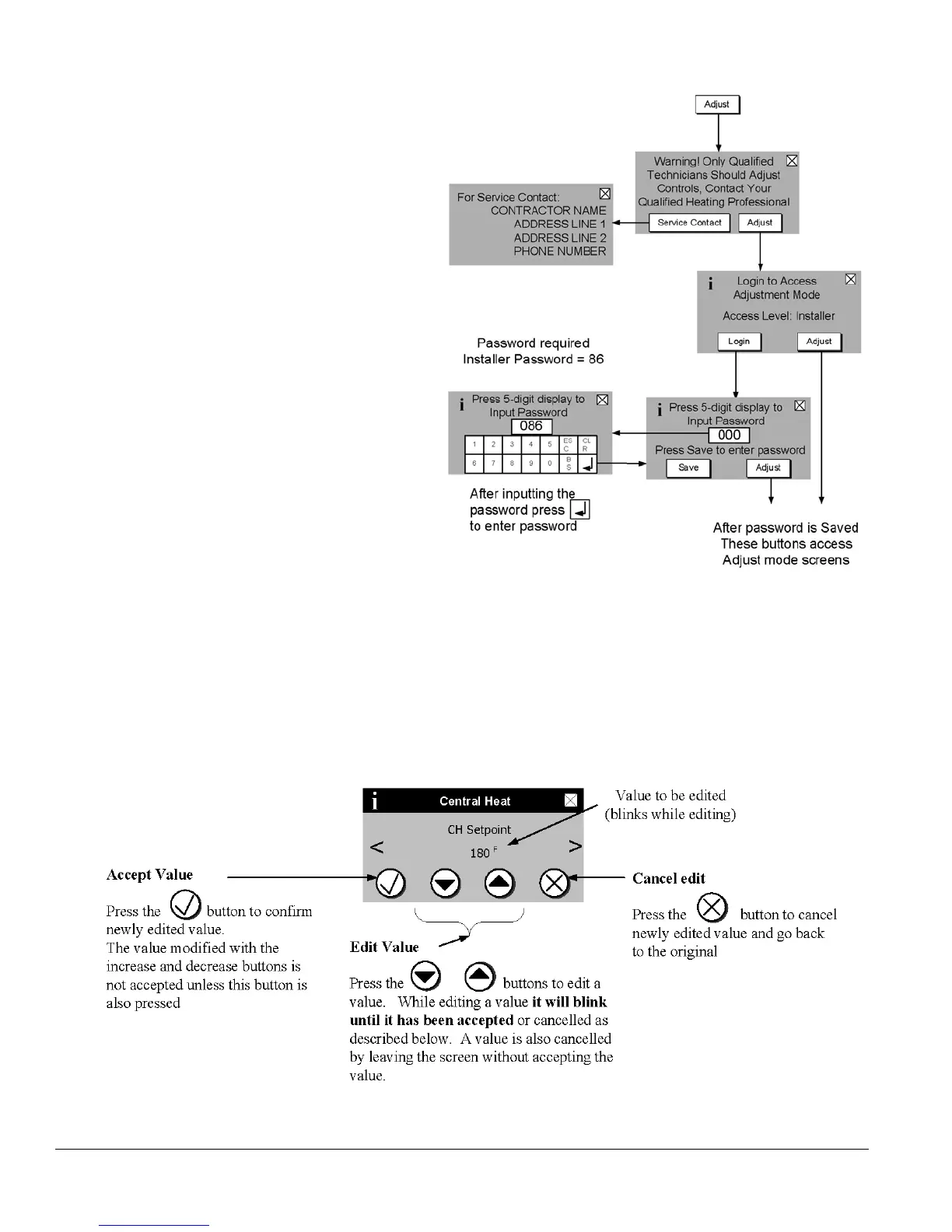
- Press the “Adjust” button on the “Home”
screen.
- Press the “Adjust” button on the Adjust
Mode screen or Press “Service Contact”
for service provider contact information.
- Press “Login” button to access password
screen.
- Press 5-digit display to open a keypad.
Enter the password (Installer Password
is 86) and press the return arrow to close
the keypad. Press the “Save” button.
- Press the “Adjust” button to enter
Adjustment mode.
F. Changing Adjustable Parameters
2. Adjusting Parameters
Editing parameters is accomplished as follows:
Figure 42: Adjust Mode Screens


 To Next Page