122 103448-07- 1/16
“Press”
button to access the following parameters:
Factory
Setting
Range / Choices Parameter and Description
None 1-8
Boiler Address
Each boiler must be given a unique address. When ”Normal” slave selection order is used,
the boiler address is used by the Master Sequencer as the boiler start order. The boiler ad-
dress is also the Modbus Address when a Energy Management System is connected.
Normal
Use Boiler
First, Normal,
Use Boiler Last
Slave Selection Order
“Use Boiler First”; places the Slave in the lead permanently.
”Normal”; ring order follows boiler number (1,2,3,..) order.
”Use Boiler Last”; places the slave last in the ring order.
X. Operation F. Changing Adjustable Parameters (continued)
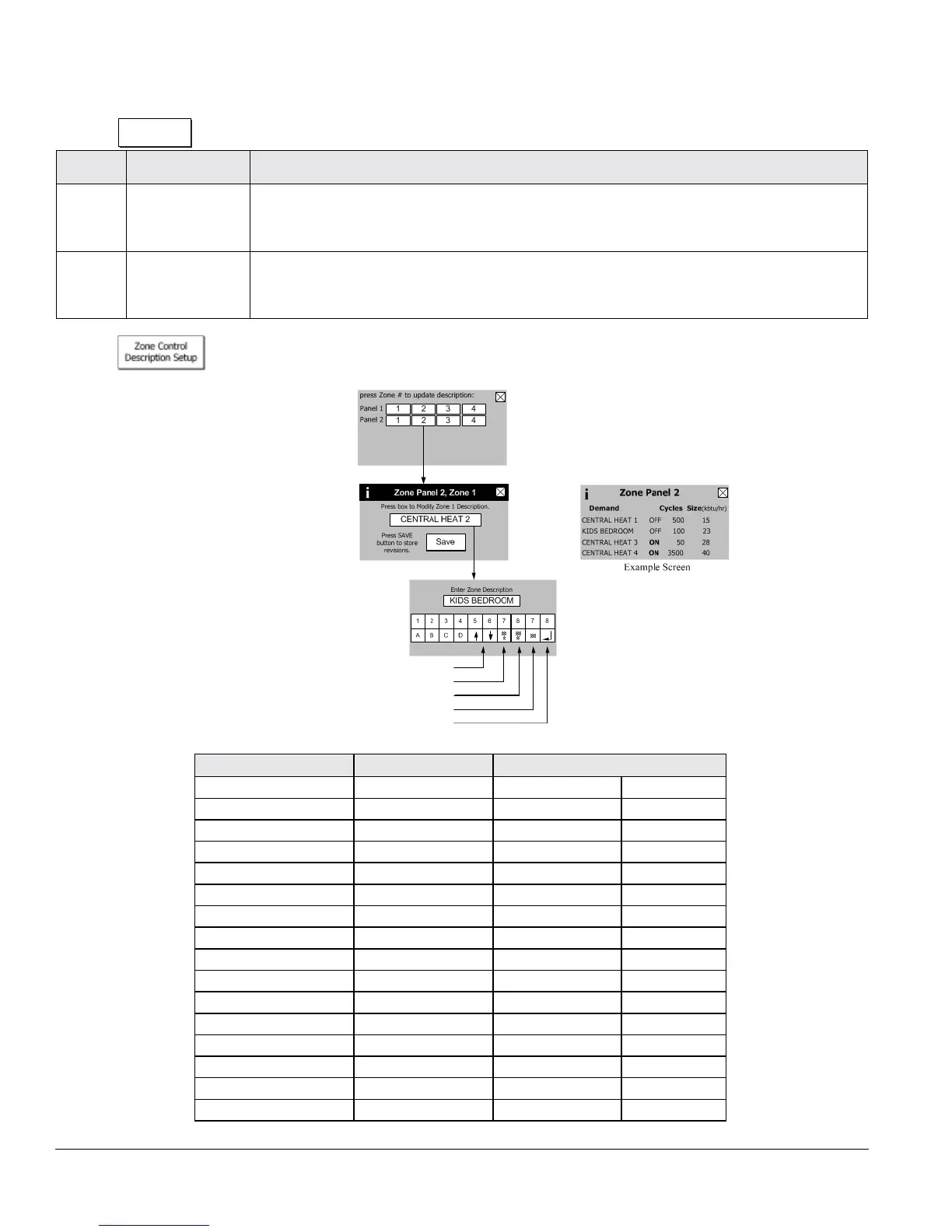
“Press”
button to access the following parameters:
Factory Setting Range / Choices Parameter and Description
Central Heat 1 User dened Zone Control 1 Zone 1
Central Heat 2 User dened Zone Control 1 Zone 2
Central Heat 3 User dened Zone Control 1 Zone 3
Central Heat 4 User dened Zone Control 1 Zone 4
Central Heat 1 User dened Zone Control 2 Zone 1
Central Heat 2 User dened Zone Control 2 Zone 2
Central Heat 3 User dened Zone Control 2 Zone 3
Central Heat 4 User dened Zone Control 2 Zone 4
Central Heat 1 User dened Zone Control 3 Zone 1
Central Heat 2 User dened Zone Control 3 Zone 2
Central Heat 3 User dened Zone Control 3 Zone 3
Central Heat 4 User dened Zone Control 3 Zone 4
Central Heat 1 User dened Zone Control 4 Zone 1
Central Heat 2 User dened Zone Control 4 Zone 2
Central Heat 3 User dened Zone Control 4 Zone 3
Central Heat 4 User dened Zone Control 4 Zone 4
Use Up and DOWN Arrows for More
Exit Screen without Saving
Clear Entire Field
Backspace
Save Field and Exit
NOTE
Zone Control Description
Setup shown for 2 panels,
typical for up to 4.


 To Next Page