129-EN
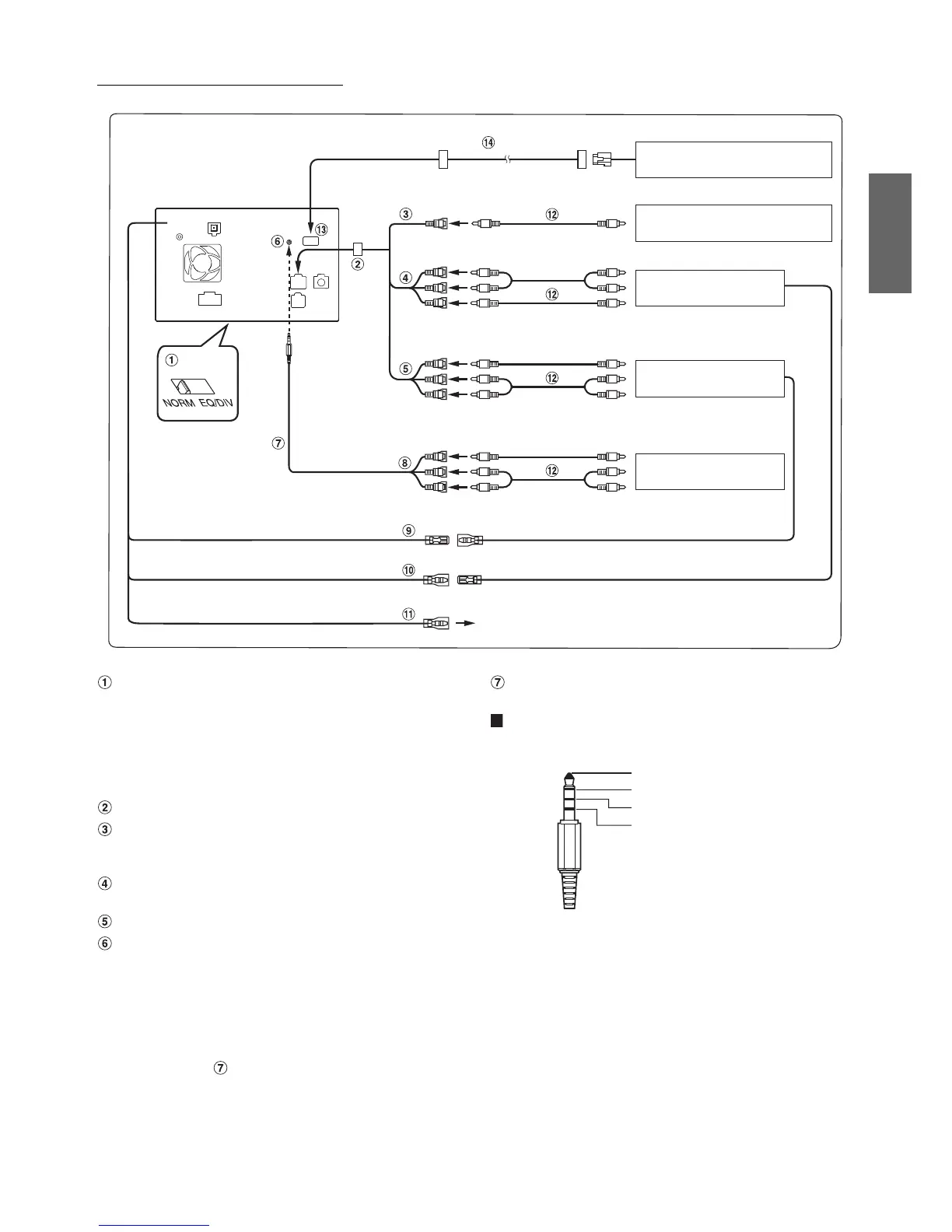
When Connecting External Equipment
To Audio Input terminal
System Switch
When connecting an IMPRINT audio processor or divider
using Ai-NET feature, place the switch in the EQ/DIV
position. When no device is connected, leave the switch in
the NORM position.
• Be sure to turn the power off to the unit before changing the switch
position.
AUX I/O / Camera Input Connector
Camera Input RCA Connector (CAMERA IN)
Use when connecting an optional camera with RCA video
output connector.
Video/Audio Output Connectors (AUX OUTPUT)
Use when connecting an optional monitor etc.
Video/Audio Input Connectors (AUX INPUT)
iPod (V)/AUX Input Connector
Input the iPhone/video compatible iPod audio/video signal
or AUX video/audio signal.
• Set “AUX2 IN” to “AUX” in “Setting the AUX2 Mode” (page 67)
when normal AUX video/audio is input.
• When you use this connector as normal video/audio input connector
(AUX 2 Input), an optional AV/RCA interface cable should be used.
For details, refer to .
AV/RCA interface cable (4-pole mini AV plug to
3-RCA) (sold separately)
Usable 4-pole mini AV plug
Wiring convention of this system is as follows:
• Configuration commercially available 4-pole mini AV plugs is not
unified.
Audio L (White)
Audio R (Red)
Ground
Video (Yellow)
To Video Input terminal
To Video Output terminal
Direct camera HCE-C117D, etc.
(sold separately)
Rear monitor
(sold separately)
(White/Brown) REMOTE OUT REMOTE IN (White/Brown)
(White/Brown) REMOTE IN REMOTE OUT
(Orange/White) REVERSE
Use only when back-up camera is connected.
TV Tuner
(sold separately)
To Video Output terminal
To Video Output terminal
Camera with RCA video output
(sold separately)
To Audio Output terminal
DVE-5207, etc.
(sold separately)
To Audio Output terminal
(White/Brown)




 To Next Page