54-EN
Adjusting Highpass Filter
When Defeat is set to OFF, touch the title bar of H.P.F. to adjust
screen.
Touch [] or [] of Front H.P.F. to adjust the front speaker.
Setting range: OFF, 60 Hz, 80 Hz, 100 Hz
Touch [] or [] of Rear H.P.F. to adjust the rear speaker.
Setting range: OFF, 60 Hz, 80 Hz, 100 Hz
• Select OFF when no adjustment is required.
Turning Defeat ON or OFF
Touch [] or [] of Defeat to set to ON or OFF.
Storing Settings in the Memory
Adjustment or setting contents of Time Correction and P/G-EQ can be
stored.
Contents that can be stored vary depends on the audio processor used.
1
Check whether the Defeat mode is OFF.
2
Touch [MEMORY] on the right side of bottom
screen.
3
Within 5 seconds, touch any one of the preset
buttons [P.SET 1] through [P.SET 6] on the bottom
screen.
The setting contents are stored.
• The stored contents will not be deleted even when the battery power
cord is detached.
Calling up the Preset Memory
1
Check whether the Defeat mode is OFF.
2
Touch any one of the preset buttons [P.SET 1]
through [P.SET 6] on the bottom display to select
the preset memory.
• It takes a few moments to call up the preset memory.
Search Function
Touch [] on the function guide while in the CD or MP3/
WMA/AAC mode.
Search list screen is displayed.
Select a desired track or folder
Touch [] for direct playback.
When a hierarchical list is prepared, [] will be displayed.
Touch [] to display the respective hierarchy list screens.
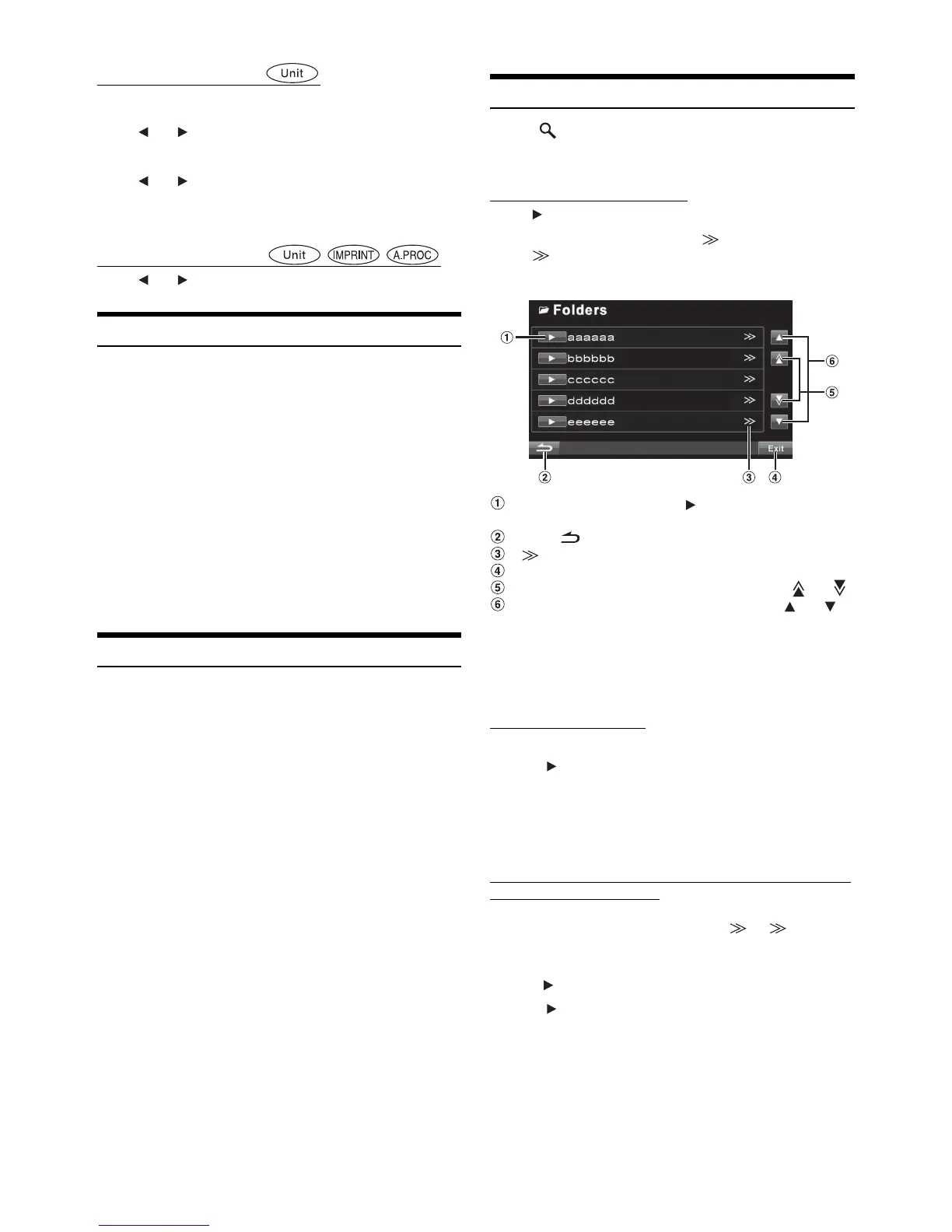
Display example for Search Screen
Select directly by touching [], and its track (or folder/
file) is played back.
Touch [] to return to the previous list screen.
[] is displayed if there is a hierarchical list.
Touching [Exit] will change to the main source screen.
Scroll the list one page at a time by touching [] or [].
Scroll the list one line at a time by touching [] or [].
• The search function does not work on the DVD, Video CD or CD
changer.
• A folder list is displayed only during MP3/WMA/AAC playback when
the DVD player (DVA-5210) or changer compatible with MP3 is
connected.
Internal CD player mode
1 The track list* screen appears.
2 Touch [] of a desired track text*.
The selected track will be played back.
* If the CD is text compatible only.
• “No Text” is displayed in the track text list if there is no text on the
disc.
Internal MP3/WMA/AAC Player/external MP3-compatible
DVD Player/Changer Mode
1 The folder list screen appears.
Select a desired folder and then touch []. ([] appears
only when a file is present in the selected folder.) The file list
screen is displayed.
• Touch [] to play back the folder directly.
2 Touch [] of a desired file name.
The selected file will be played back.



 To Next Page