25-EN
There are several ways to set a destination. You can set a destination
directly from the map (page 23) or select Go to from the main menu.
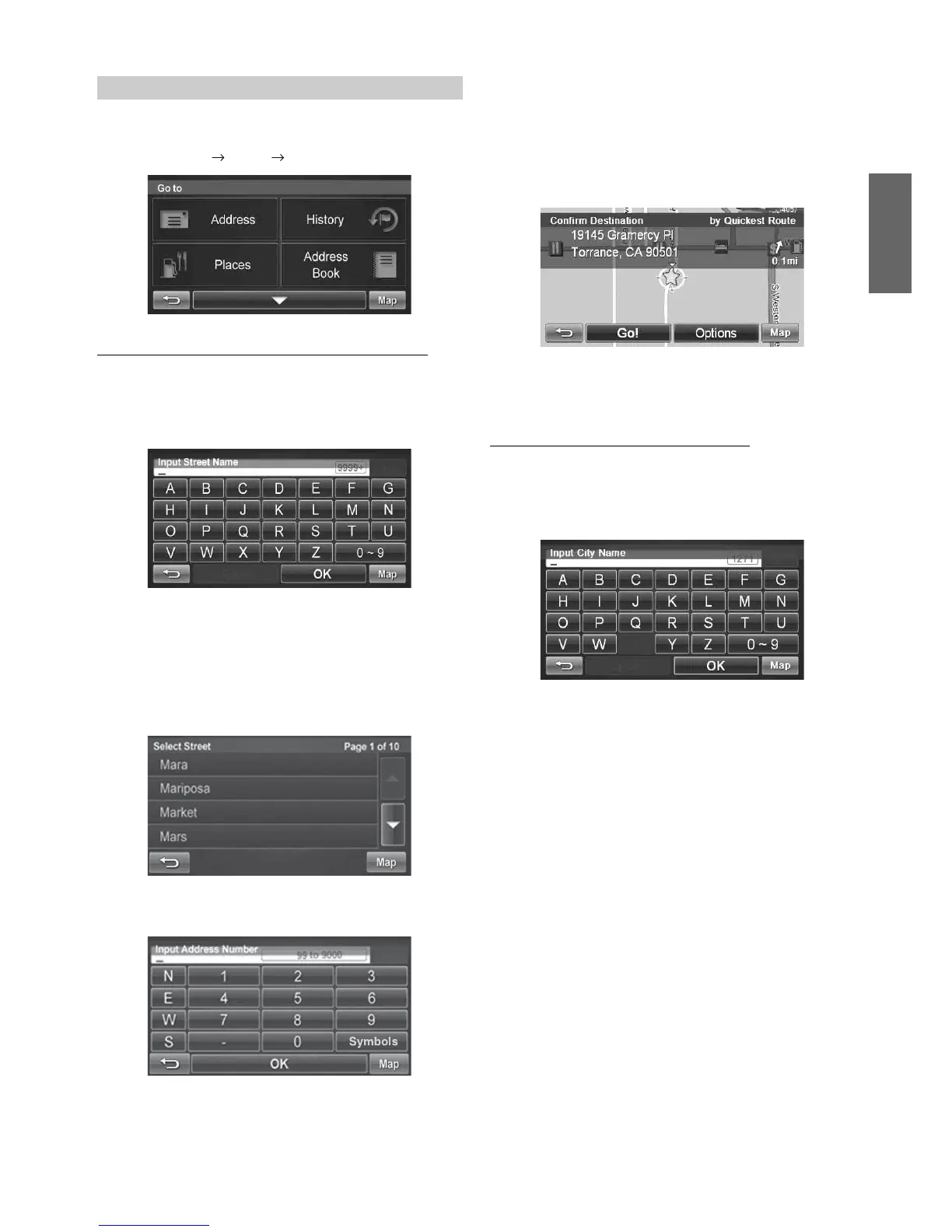
Go to Main Menu Go to Address
Finding a Destination by Entering Street Name First
1
Select by Street.
2
Type the street name and touch [OK].
If there are multiple matches, the system automatically
displays a short list of street names.
Type only the name of the street. Prefix and suffix of the
street are not necessary.
The list of applicable street names appears.
3
Select the desired street name from the list.
4
Type the address number and touch [OK].
5
Type the desired city.
If there are multiple matches, the system lists cities
containing the street name and address number that you
keyed in.
6
The Confirm Destination Screen appears. Touch
[Go!] to calculate the route.
7
See pages 29-31, to see more details about Options
on the confirmation destination screen.
Finding a Destination by City Name First
1
Select by City.
2
Type the city name and touch [OK].
If there are multiple matches, the system automatically
displays a short list of city names. Select the desired city.
3
Type the characters of the street name and touch
[OK].
4
The list of applicable street names appears. Select
the desired street.
5
Type the address number and touch [OK].
6
The Confirm Destination Screen appears. Touch
[Go!] to calculate the route.
Set a Destination by Address




 To Next Page