30-EN
1
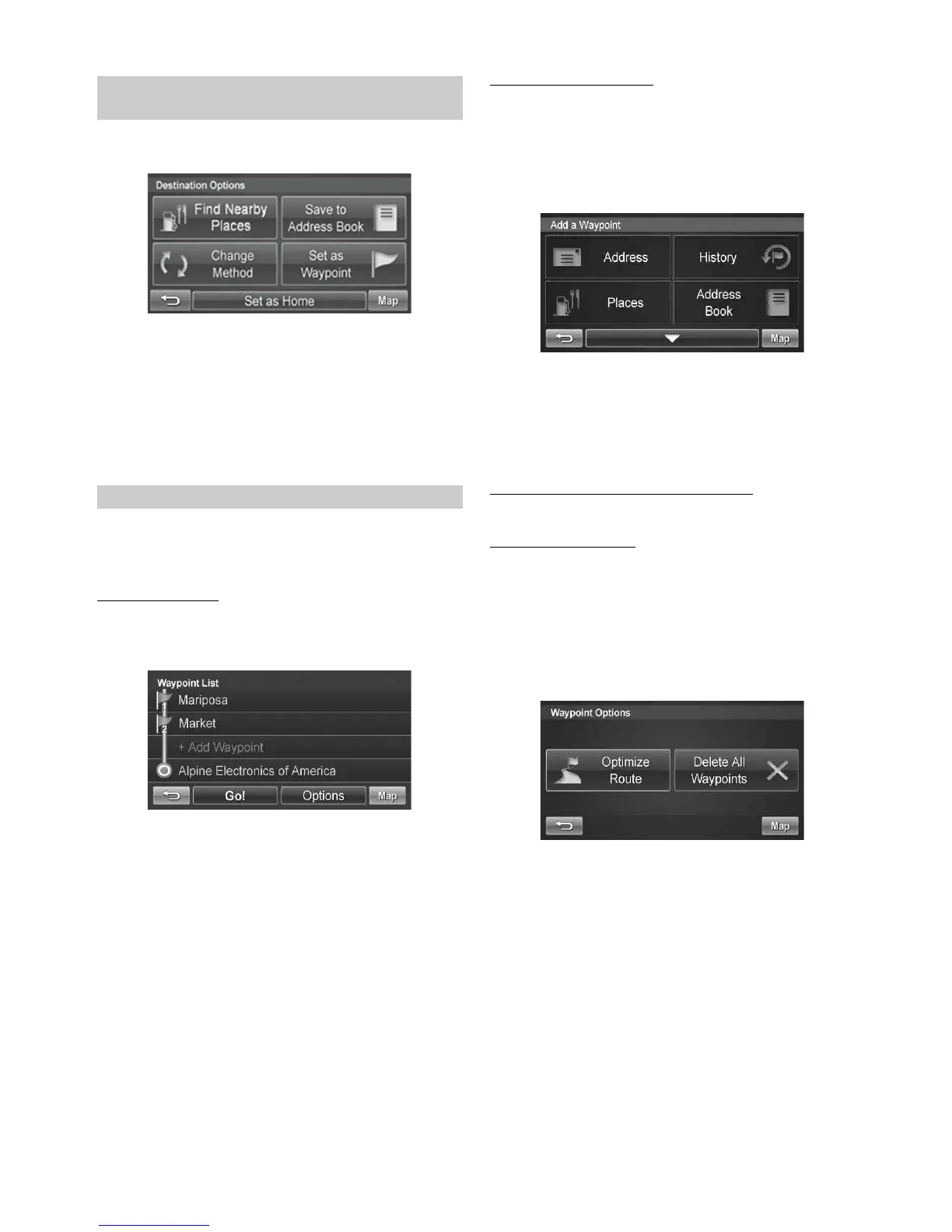
Touch [Save to Address Book].
2
Type in desired name. Touch [OK].
3
Select an icon. If there is no desired icon, touch
[No Icon].
4
Touch [OK].
You can set up to 3 waypoints between you current location and your
destination. The final destination must be set before entering any
waypoints.
Adding a Waypoint
1
Touch [Set as Waypoint] and the destination is
automatically added to the Waypoint List.
2
Touch [Go!] to calculate the route.
Adding another Waypoint
1
Before you touch [Go!] at the Waypoint List screen,
touch [+ Add Waypoint].
2
Enter the waypoint with any method just as finding a
destination. (pages 24-28)
3
Touch [Set as Waypoint] to confirm.
4
The system returns to the Waypoint List screen.
Touch [Go!] to calculate the new route.
Setting a Waypoint Directly from the Map
See page 23.
Optimizing Your Route
1
Touch [Set as Waypoint]. The Waypoint List
appears.
2
Touch [Options]. Waypoint options screen appears.
3
Touch [Optimize Route].
4
The system takes you back to the Waypoint List
screen with optimal route. Touch [Go!] to calculate
the route.
Saving a Destination into the Address
Book
Setting Waypoints



 To Next Page