32-EN
Avoiding a Particular Street
1
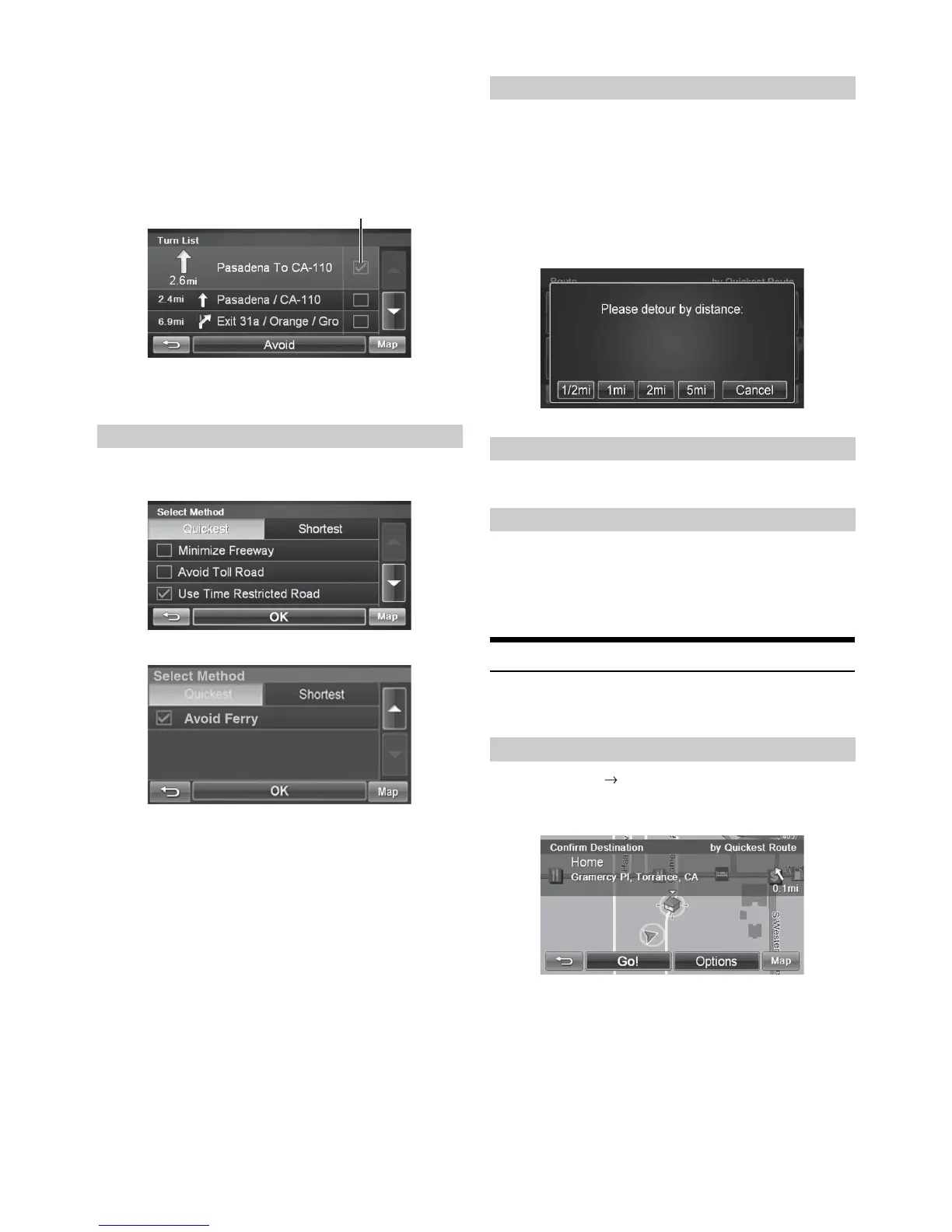
Touch [View Turn List].
2
List of upcoming streets and turns appears on the
screen. Select the street name, and touch its check
box.
3
Touch [Avoid].
1
On Route screen, touch [Change Method].
2
Touch [OK].
• You can select and re-calculate an alternate route based on Quickest
Route or Shortest Route and select Avoid Freeway, Toll Road, Time
Restricted Road or Ferry.
By Distance
1
On Route screen, touch [Detour].
2
Choose detour from 1/2 mile, 1 mile, 2 miles or 5
miles.
The system automatically calculates and displays a
detoured route.
To edit waypoints, see page 31.
From Route screen or Main Menu, touch
[Cancel Route]
.
• After canceling the route, you cannot select Route Menu until the
next destination has been set. To set next the destination, see “Go to
Menu” on page 24.
Home
You can go Home from anywhere once the Home Address is set. See
page 29 to set a destination as Home.
Go to Main Menu Home
Touch
[Go!]
to calculate the route.
Finding an Alternate Route
Check box
Finding a Detour
Editing Waypoints
Canceling Route
Going Home



 To Next Page