5
Altai C2s Dual-Band 2x2 802.11ac WiFi AP/Bridge
Installation Guide
Altai Technologies Ltd. All rights reserved
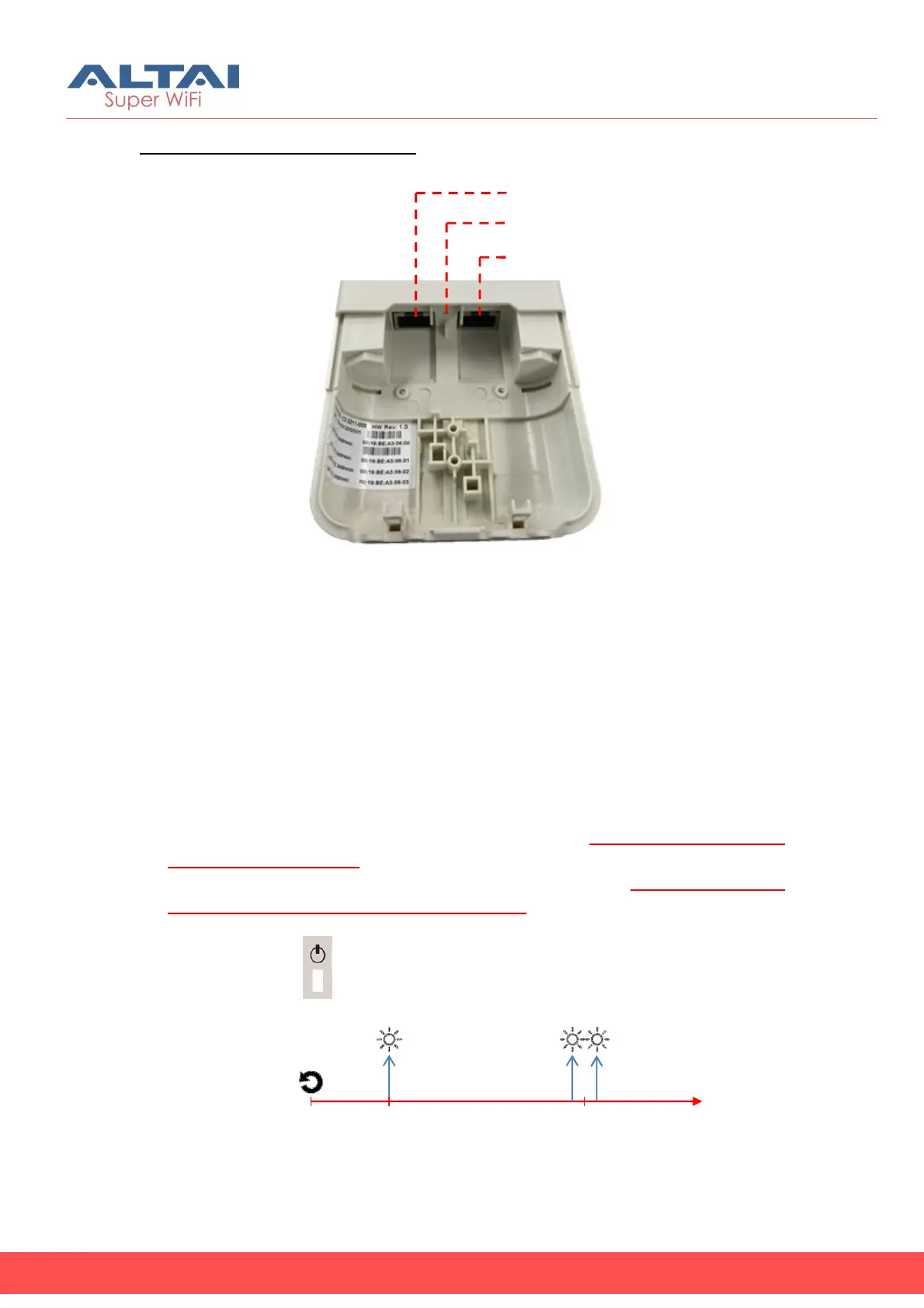
Ethernet Ports and Reset Button
ETH0/PoE IN:
It is used to connect to power source (see the Power Options in the
following section) and provides 10/100/1000 Mbps network interface for
LAN connection.
ETH1:
It provides 10/100/1000 Mbps network interface for LAN connection
with peripherals.
Reset Button:
It serves two functions for C2s operation:
• Reboot: Press and hold the Reset Button for 2-3 seconds until the
Power LED blink once.
• Factory Reset: Press and hold the Reset Button for 5-8 seconds until
the Power LED blink twice consecutively.
Eth Port 1
Reset Button
Eth Port 0
0s
2-3s
5-8s
Power LED
Reboot Factory Reset



 To Next Page