4
Altai C2s Dual-Band 2x2 802.11ac WiFi AP/Bridge
Installation Guide
Altai Technologies Ltd. All rights reserved
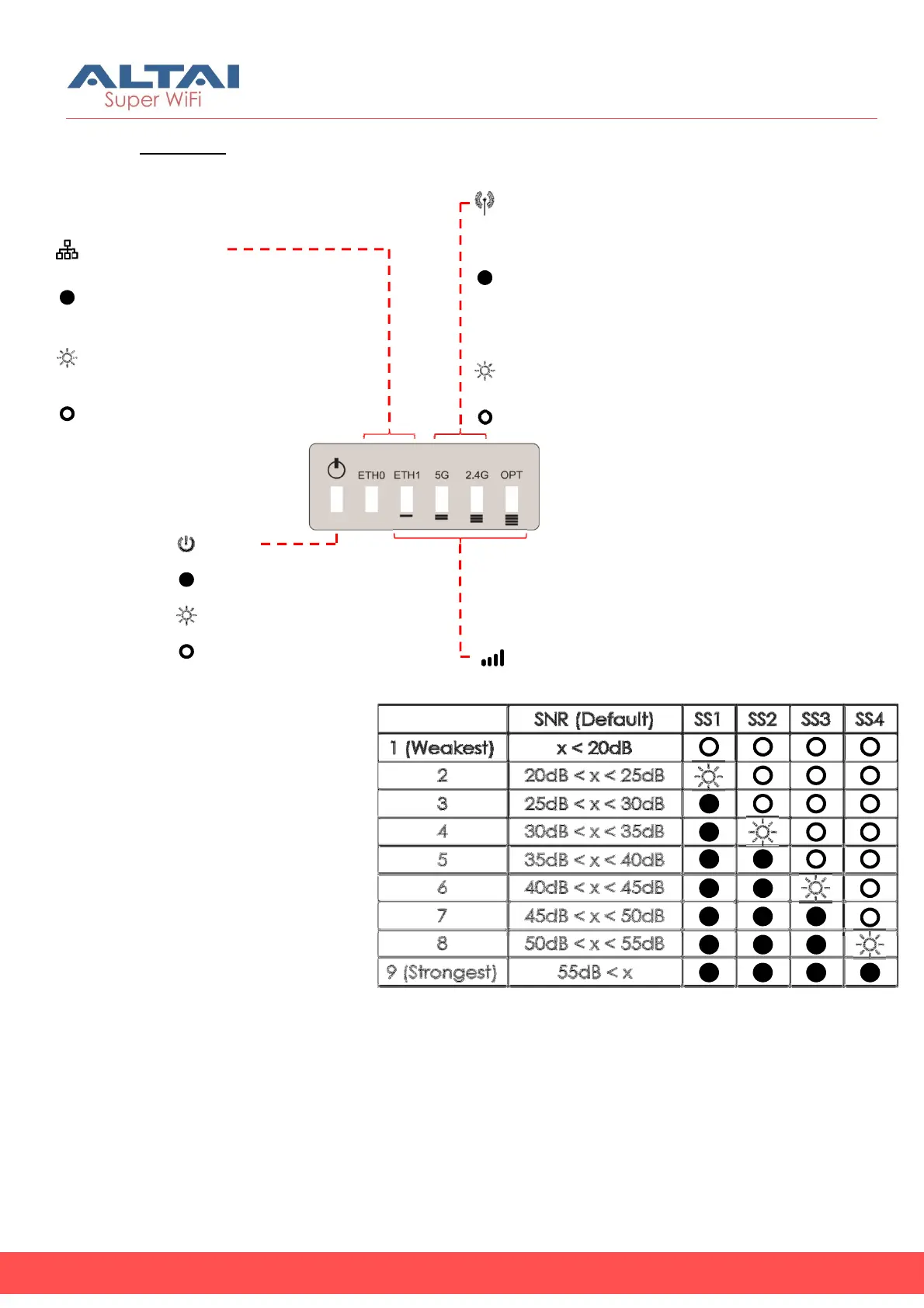
LED Panel
Power
Solid Yellow: Power on
Off: No Power
Received Signal Strength
(Station/Repeater/Bridge
2.4G/5G Radio WiFi
(AP/STA/Repeater/Bridge Mode)
Solid Green:
1. AP Mode on but with no Clients Associated
2. STA/Repeater Mode on but not connected to AP
3. Bridge Mode on but not connected to Remote Peer
Flashing Green: AP Mode with at least one Client
Associated for Data Transmitting/Receiving
Off: Radio Disabled
LAN (Ethernet 0/1)
Solid Blue/Green: LAN Connected
(Blue for 1Gbps; Green for 100/10Mbps)
Flashing Blue/Green: Data
Transmitting/Receiving
Off: LAN Disconnected
Flashing Yellow: AP Booting Up



 To Next Page