13
6.4 The next mode selection can increase or decrease the one-step retard value.
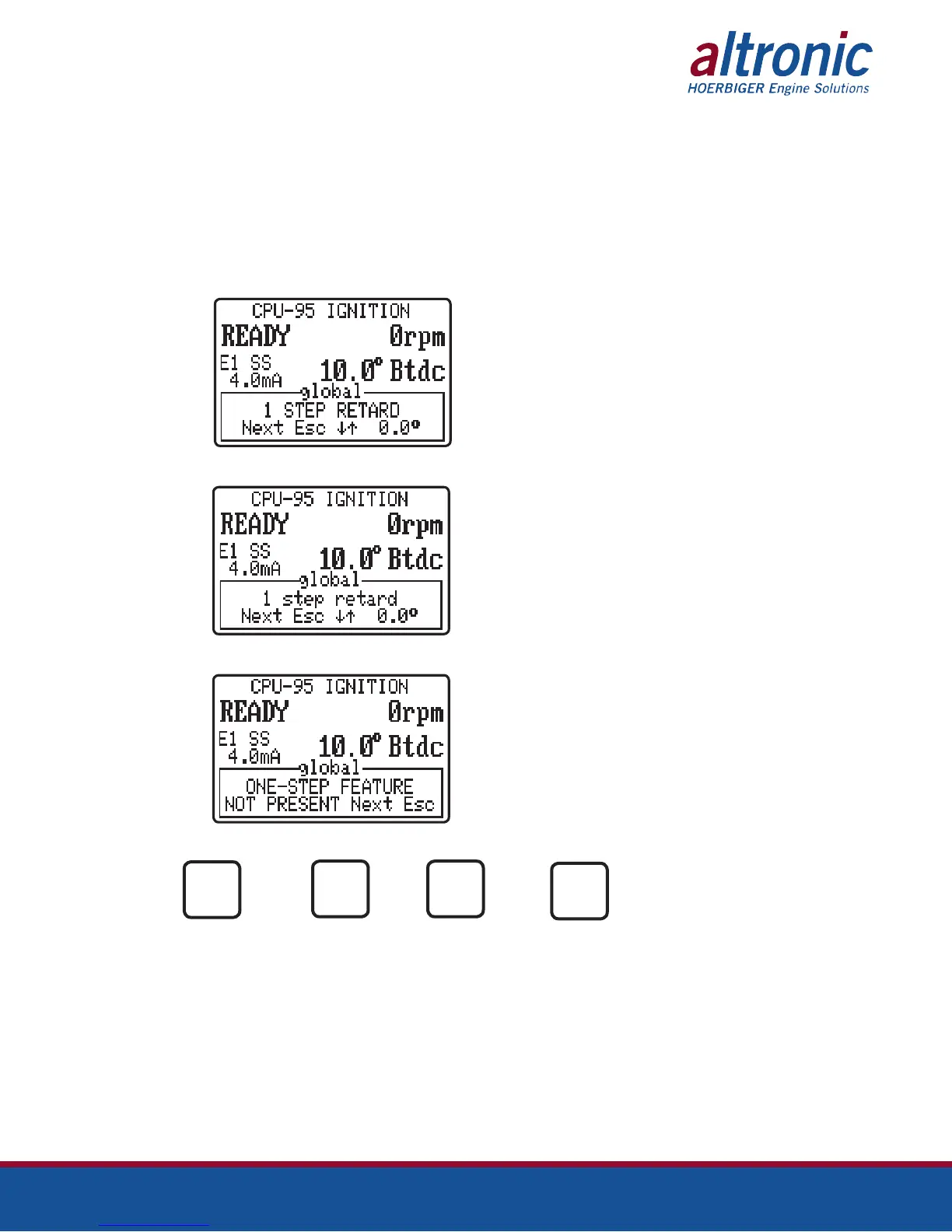
The first screen below is displayed when one-step retard is both configured
and is active. The second screen below is displayed when the one-step retard
is configured but not active. The default configuration selects one-step retard
to be controlled by the Misc. Input terminal. The additional retard would be
implemented when the input is grounded. The third screen below is displayed
when the one-step retard feature is not configured. The actual engine timing
is displayed on this screen so the effect of 1 step retard can be seen during
adjustments (if the Misc Input terminal is grounded).
AT THE NOTE: UPPER CASE
NEXT 1 STEP RET = ON.
OPTION
SCREEN
OR NOTE: LOWER CASE
1 STEP RETARD = OFF.
OR NOTE: 1 STEP RETARD
NOT CONFIGURED.
TO TO TO GO TO
INCREASE DECREASE BACK TO EXIT
FIRST
NEXT
ESC


 To Next Page