19
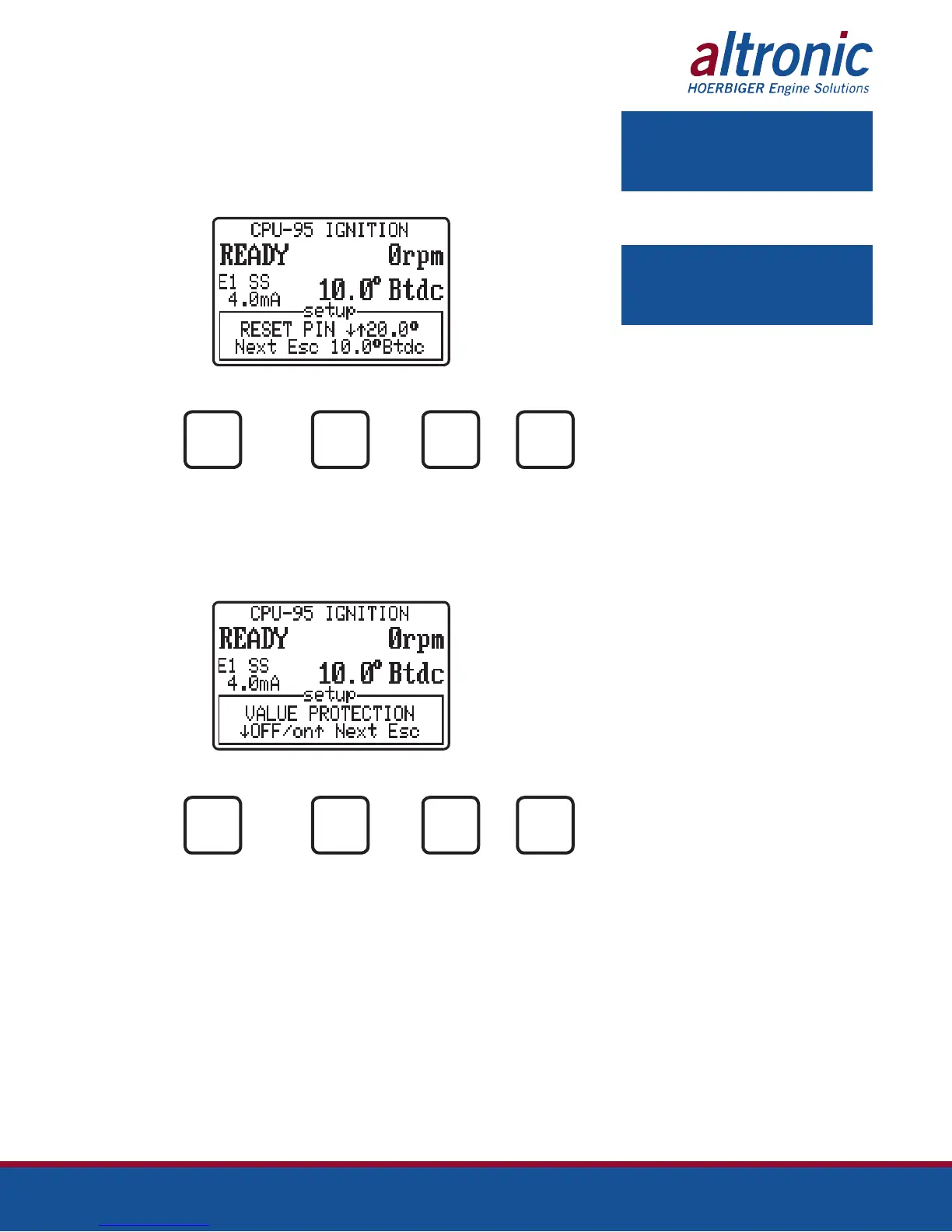
9.5 The next setup screen is used to specify the exact position of the reset pin. Both
the reset position and the engine timing are displayed. Adjustments are made
here to make the displayed timing match the actual spark timing as verified with
a timing light. This adjustment effects the displayed timing but does NOT change
the actual timing of the firings.
AT
TO TO FOR TO
INCREASE DECREASE NEXT EXIT
OPTION
NEXT
ESC
9.6 The next setup screen is used to enable or disable VALUE PROTECTION of
all user values in the EEPROM memory. When protection is on, none of the
EEPROM settings under the Setup or Timing menus can be changed. This feature
can be used to provide limited protection from random changes by inexperienced
operators.
AT
TO TURN TO TURN FOR TO
ON PRO- OFF PRO- NEXT EXIT
TECTION TECTION OPTION
NEXT
ESC
NOTE: Adjustment of this parameter
should be done while individual cylinder
offsets are all at zero.
NOTE: To set up, or adjust the actual
reset position, and engine timing, see
form CPU-95EVS II, section 8.0.



 To Next Page